
Feedspace Home Dashboard

Steps to Import Reviews from AppSumo

Last updated on June 22, 2026

Overview

AppSumo is a well-known platform for discovering software tools, and users often leave detailed reviews about their experiences with apps. Importing these reviews into Feedspace allows you to present authentic user feedback directly on your website. This can improve transparency and provide insights into how your products or services are perceived. Here’s a detailed guide to help you import AppSumo reviews into Feedspace.

Step 1: Log into Feedspace

Sign in to your Feedspace account using your email and OTP to access your workspace.

Step 2: Navigate to the import page

Next, Click on Import in the left sidebar to start the review import process.

Step 3: Paste your AppSumo product link

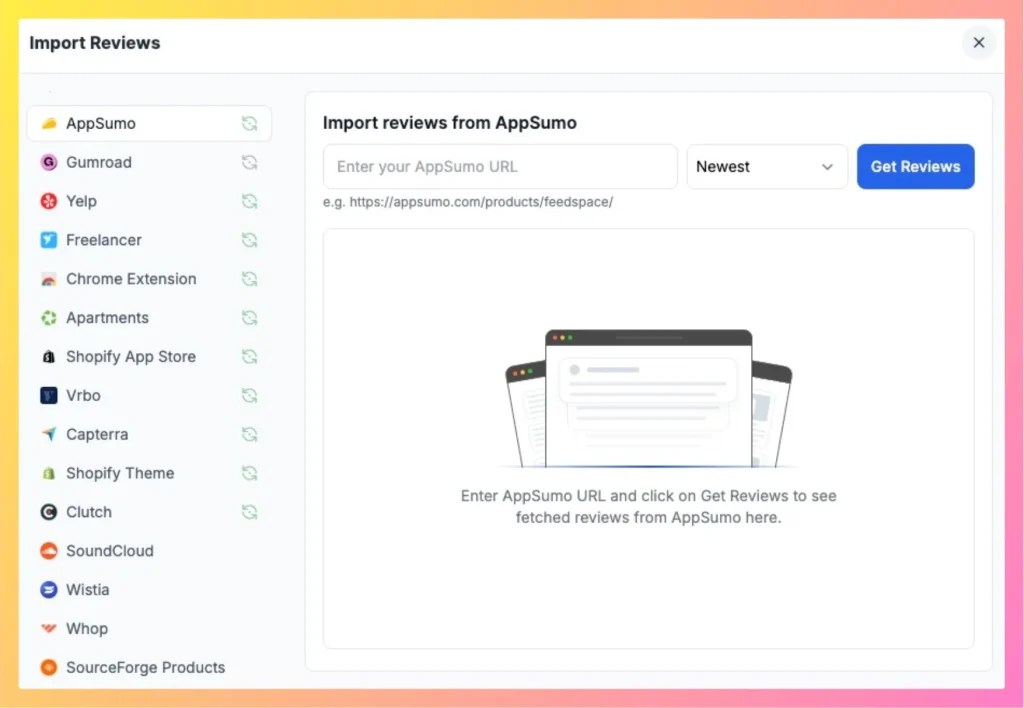
Paste the URL of the AppSumo product whose reviews you want to import into the URL input. Feedspace detects the platform automatically and a Fetch Reviews button appears.

Easily import AppSumo Reviews in Feedspace

Step 4: Fetch and select reviews

Click Fetch Reviews. Feedspace retrieves the AppSumo reviews and shows them in a list. Use the sort dropdown to order the reviews, then tick the reviews you want or use Select All.

Step 5: Import AppSumo reviews

Once your reviews are selected, click Import Review in the footer bar. Feedspace imports the selected reviews into your workspace.

You might also find helpful

How to Import Reviews from Product Hunt into Feedspace

Overview Product Hunt is a popular platform for discovering new products and gathering user feedback. Importing reviews from Product Hunt into Feedspace allows you to display authentic user opinions directly on your website. With Feedspace you paste your Product Hunt page URL, fetch the reviews automatically, then pick the ones...

How to Import Reviews from G2

Overview The Feedspace Chrome Extension allows you to import G2 software reviews directly into your Feedspace workspace. This is a great way for SaaS companies and software vendors to showcase authentic customer reviews from G2 on websites, landing pages, or testimonial walls. Step 1 – Open the G2 Review Go...

How to Import Reviews from Capterra into Feedspace

Overview Capterra reviews provide evaluations of software tools, including aspects like usability, support, and value. Importing these reviews into Feedspace allows you to organize and display them on your website or Wall of Love. Here’s a quick guide on how to import Capterra reviews into Feedspace: Steps to import reviews...