
Feedspace Home Dashboard

How to Import Reviews from EdMuds into Feedspace

Last updated on October 31, 2025

Overview

Feedspace enables you to import and showcase reviews from EdMuds — a platform used by educational institutions and tutors for managing courses and student feedback. By submitting your EdMuds review page link, Feedspace can automatically collect and display those reviews on your website or Wall of Love.

Step 1 – Open Import Reviews in Feedspace

  1. Log in to your Feedspace account.
  2. From the left sidebar, click Import Reviews.
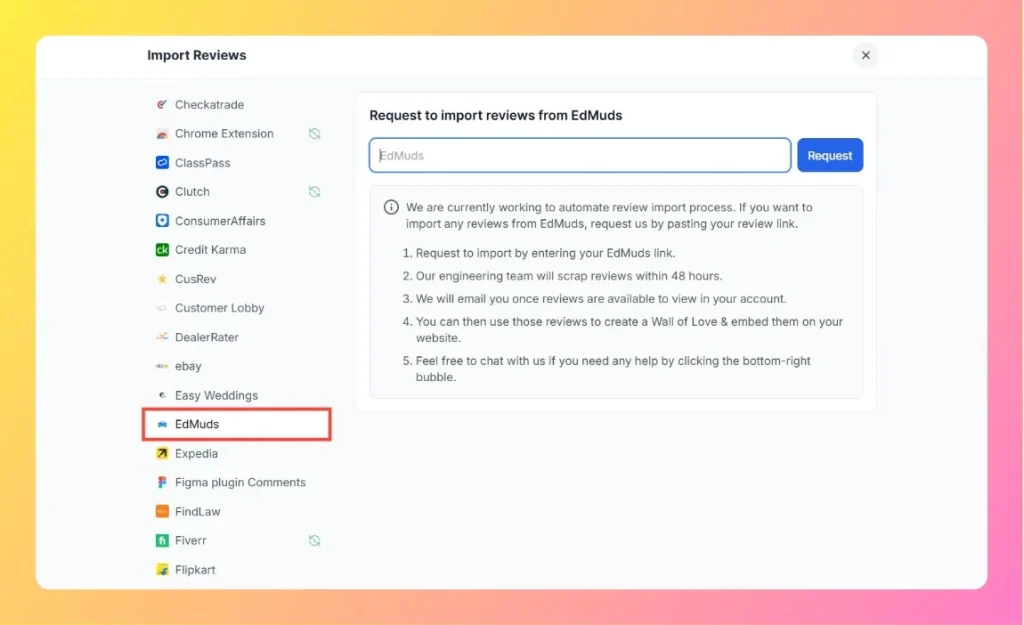
  3. In the Other Platforms section, select EdMuds.

Step 2 – Enter Your EdMuds Review Link

  1. Visit your EdMuds profile or course review page.
    Example: https://www.edmuds.com/reviews/institute-name
  2. Copy the full URL.
  3. Paste it into the input box in Feedspace.
  4. Click the Request button.
Enter EdMuds Review Link

Step 3 – Review Scraping Process

  1. The Feedspace engineering team will scrape reviews from your EdMuds page within 48 hours.
  2. You’ll receive an email notification when the reviews are ready and available in your account.

Step 4 – Display Imported Reviews

Once reviews are successfully imported, you can:

  • Manage them directly in your Feedbox.
  • Add them to your Wall of Love for public display.
  • Embed them on your website using Feedspace’s customizable widgets.

Step 5 – Support Assistance

If you need help during the import process, click the chat bubble at the bottom-right corner of your Feedspace dashboard to contact the support team.

You might also find helpful

How to Import Reviews from Udemy into Feedspace

Overview Udemy is a widely used platform for online learning, where students can leave feedback on courses. Importing Udemy reviews into Feedspace allows you to display real student opinions directly on your website. This helps you highlight student experiences, share testimonials, and provide credible insights to potential learners. Follow this...

How to Import Reviews from Coursera into Feedspace

Overview Coursera is a popular platform for online learning, offering courses from top universities and organizations. Importing reviews from Coursera into Feedspace allows you to showcase authentic feedback from learners on your website. By displaying these reviews, you can highlight course experiences, student testimonials, or instructor feedback. Feedspace makes it...

How to Import Reviews from Italki into Feedspace

Overview Italki is a leading platform for language learning, where students can leave reviews about teachers and courses. Importing reviews from Italki into Feedspace allows you to present authentic feedback directly on your website. Displaying these reviews can help visitors understand the quality of lessons and teachers. This guide will...