
Feedspace Home Dashboard

How to Import Reviews from Fiverr into Feedspace

Last updated on October 31, 2025

Overview

Feedspace enables freelancers and agencies to import reviews directly from Fiverr, allowing you to showcase client feedback on your portfolio, personal website, or Wall of Love. Highlighting your Fiverr reviews helps build credibility and attract more clients through authentic social proof.

Step 1 – Open Import Reviews in Feedspace

  1. Log in to your Feedspace account.
  2. From the sidebar, click Import Reviews.
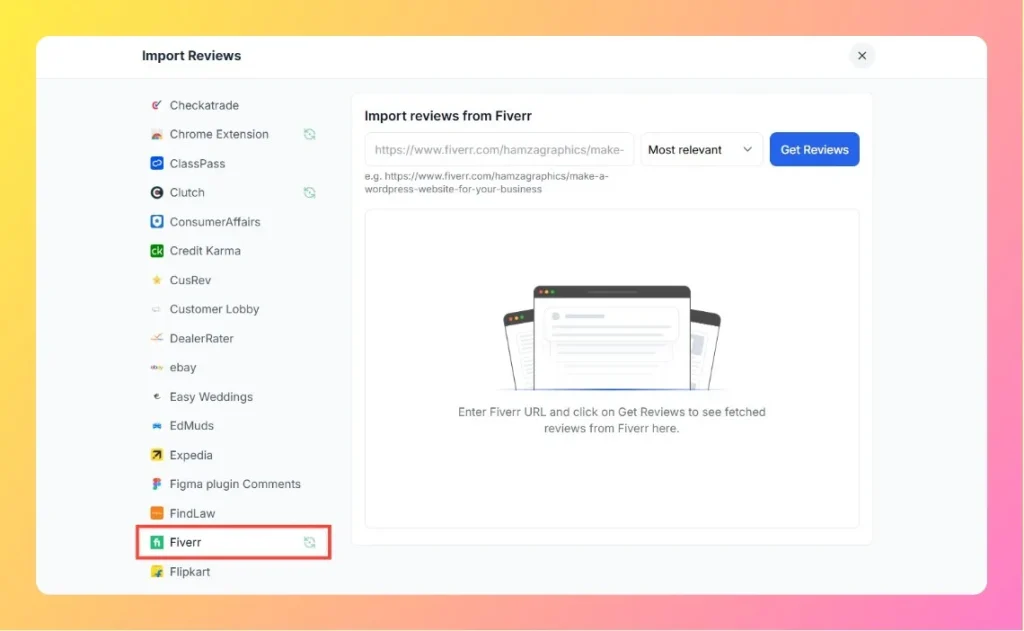
  3. In the Other Platforms list, select Fiverr.

Step 2 – Enter Your Fiverr Gig Link

  1. Visit your Fiverr gig page.
    Example: https://www.fiverr.com/hamzagraphics/make-a-wordpress-website-for-your-business
  2. Copy the full gig URL.
  3. Paste it into the input box in Feedspace.
  4. Select your preferred filter (e.g., Most Relevant, Most Recent).
  5. Click Get Reviews.
Enter Fiverr Review Link

Step 3 – Fetch Reviews from Fiverr

Feedspace will automatically fetch and display reviews from your Fiverr gig page. You’ll be able to view all the imported reviews directly on your dashboard.

Step 4 – Use Your Imported Reviews

Once reviews are fetched, you can:

  • Manage them inside your Feedspace dashboard.
  • Add them to a Wall of Love to display client success stories.
  • Embed the reviews on your portfolio website to increase trust and conversion.

Step 5 – Need Assistance?

If you experience any issues while importing Fiverr reviews, click the chat bubble at the bottom-right corner of your Feedspace dashboard to get help from our support team.

You might also find helpful

How to Import Reviews from Fiverr

Overview The Feedspace Chrome Extension makes it easy to capture your Fiverr client reviews and import them directly into your Feedspace workspace. This helps you showcase your Fiverr feedback as professional testimonials on your website or portfolio. Step 1 – Open the Fiverr Review Log in to your Fiverr account...

How to Import Reviews from Upwork

Overview The Feedspace Chrome Extension allows you to easily capture your Upwork client reviews and add them to your Feedspace workspace. This way, you can showcase your Upwork feedback as testimonials on your website or social media. Step 1 – Open the Upwork Review Log in to your Upwork account...

How to Import Reviews from People Per Hour into Feedspace

Overview PeoplePerHour is a popular platform for freelancers and businesses to connect, with many clients sharing reviews about their experiences. By importing PeoplePerHour reviews into Feedspace, you can showcase real customer feedback directly on your website. Whether you’re a freelancer, agency, or service provider, displaying reviews from PeoplePerHour can help...