
Feedspace Home Dashboard

How to Import Reviews from MoveAdvisor into Feedspace

Last updated on October 31, 2025

Overview

Feedspace allows you to import reviews from MoveAdvisor, a platform that provides moving company listings and verified customer feedback. By importing MoveAdvisor reviews, you can display real customer experiences and build credibility directly on your website using a Wall of Love.

Step 1 – Open Import Reviews in Feedspace

  1. Log in to your Feedspace account.
  2. Go to Import Reviews from the left sidebar.
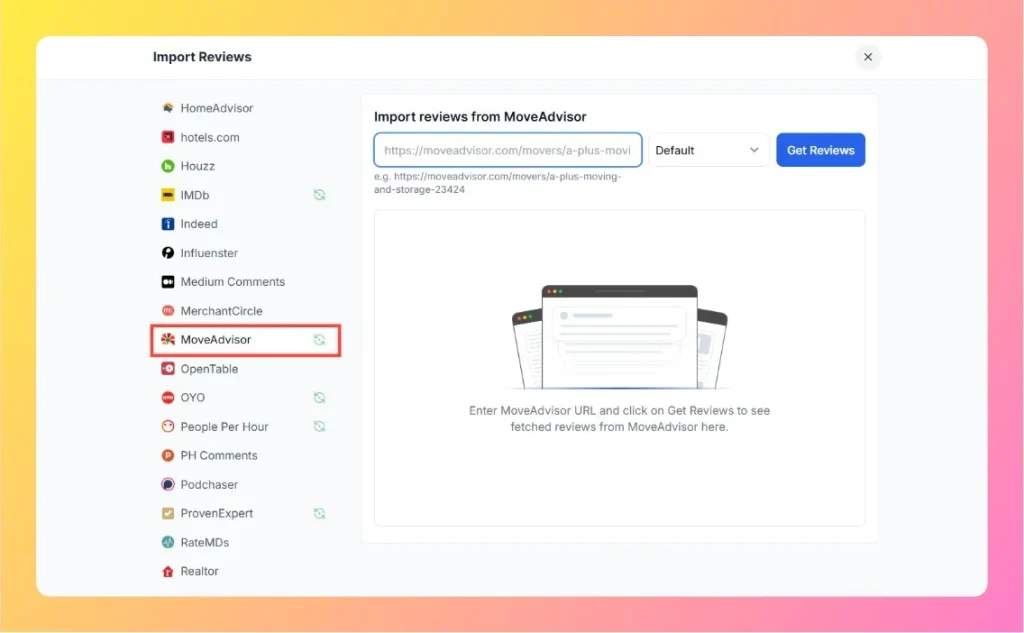
  3. Select MoveAdvisor from the list of available platforms.

Step 2 – Enter Your MoveAdvisor Review Link

  1. Go to your company’s review page on MoveAdvisor.
    Example: https://moveadvisor.com/movers/a-plus-moving-and-storage-23424
  2. Copy the full URL of the page.
  3. Paste it into the input field on the Feedspace import page.
  4. Choose the preferred sort option (Default, Most Recent, or Highest Rated).
  5. Click on Get Reviews to fetch your customer reviews.
Enter MoveAdvisor Review Link

Step 3 – Review Import Process

  1. Feedspace will retrieve the visible reviews from MoveAdvisor automatically.
  2. The imported reviews will appear in your Feedspace dashboard.

Step 4 – Manage and Publish Reviews

Once the reviews are fetched:

  • Review and filter the imported customer feedback.
  • Select the ones you want to display publicly.
  • Use them to create a Wall of Love or embed the reviews on your company website.

Step 5 – Need Help?

If you face any issue during import, click the chat bubble at the bottom-right corner of your Feedspace dashboard to reach support.

You might also find helpful

How to Import Reviews from IMDB into Feedspace

Overview IMDB is a leading platform for movie and TV show reviews, offering a variety of audience opinions and ratings. Importing reviews from IMDB into Feedspace allows you to showcase these insights directly on your website. This can help your visitors see genuine feedback, ratings, and detailed reviews from verified...

How to Import Reviews from Yelp into Feedspace

Overview Yelp reviews offer insights from customers about local businesses, such as restaurants or services. Importing these reviews into Feedspace allows you to present them on your website or Wall of Love. Here’s a quick guide on how to import Yelp reviews into Feedspace: Steps to Import Reviews from Yelp...

How to Import Reviews from Rotten Tomatoes into Feedspace

Overview Rotten Tomatoes is a trusted platform for movie ratings and reviews, featuring both audience and critic opinions. Importing reviews from Rotten Tomatoes into Feedspace allows you to display feedback directly on your website, helping visitors see diverse perspectives about movies or shows. Feedspace makes it simple to manage and...