
Feedspace Home Dashboard

How to Import Reviews from Realtor.com into Feedspace

Last updated on November 7, 2025

Overview

Feedspace enables real estate professionals to import client testimonials and property feedback directly from Realtor.com. By integrating your Realtor.com reviews into Feedspace, you can showcase authentic client experiences on your website and build credibility with potential buyers and sellers.

Step 1 – Open Import Reviews in Feedspace

  1. Log in to your Feedspace account.
  2. From the left sidebar, click on Import Reviews.
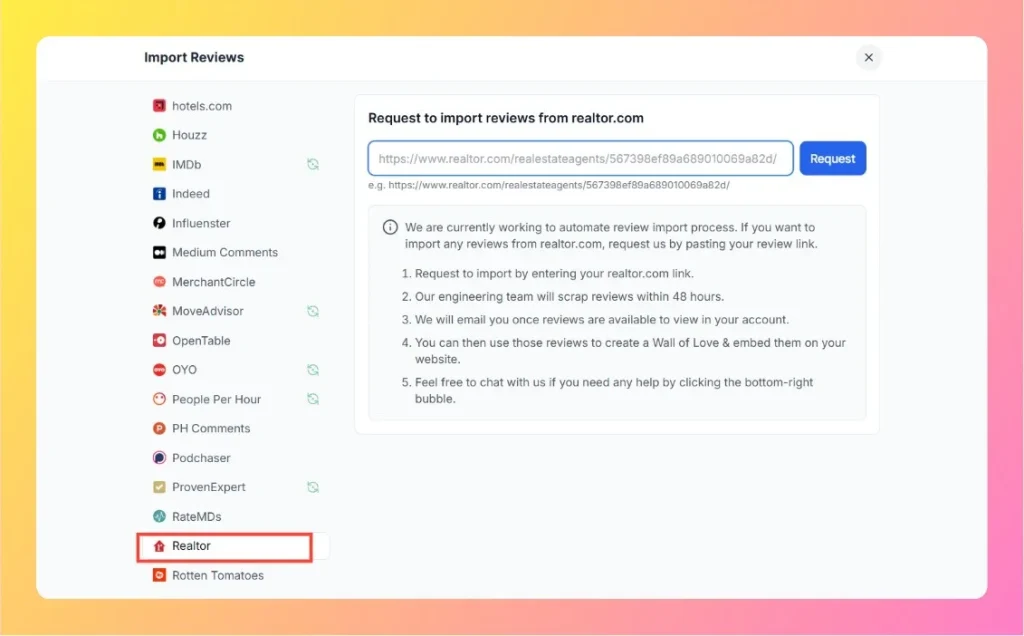
  3. Select Realtor from the list of available review platforms.

Step 2 – Enter Your Realtor.com Review Link

  1. Visit your Realtor.com agent profile page.
    Example: https://www.realtor.com/realestateagents/567398ef89a689010069a82d/
  2. Copy the full profile URL.
  3. Paste it into the Realtor.com input field in Feedspace.
  4. Click the Request button to initiate your review import request.
Enter Realtor Review Link

Step 3 – Review Import Process

  1. Feedspace’s engineering team will collect your Realtor.com reviews within 48 hours.
  2. Once completed, you will receive an email notification confirming that your reviews are available in your Feedspace account.

Step 4 – Manage and Display Reviews

After your reviews have been imported:

  • Access them through your Feedspace dashboard.
  • Select which reviews to feature publicly.
  • Create a Wall of Love or embed them directly on your real estate website to highlight client trust and satisfaction.

Step 5 – Support Assistance

If you experience any issues or delays, click the chat bubble at the bottom-right corner of your Feedspace dashboard to get assistance from the support team.

You might also find helpful

How to Import Reviews from Zillow

Overview The Feedspace Chrome Extension allows you to import Zillow client reviews directly into your Feedspace workspace. This makes it easy for real estate professionals to showcase verified customer feedback on websites, landing pages, and testimonial walls. Step 1 – Open the Zillow Review Log in to your Zillow profile...

How to Import Reviews from HomeStar into Feedspace

Overview HomeStar is a platform where users leave reviews for home improvement services, contractors, and related businesses. By importing HomeStar reviews into Feedspace, you can display authentic customer feedback directly on your website. Showcasing these reviews can help build trust, improve customer confidence, and encourage more users to engage with...

How to Import Reviews from Airbnb into Feedspace

Overview Airbnb is a widely used platform where travelers share feedback about accommodations, experiences, and hosts. Importing these reviews into Feedspace allows you to display authentic customer feedback directly on your website. Whether you manage a property, offer services, or want to show customer experiences, this process helps you integrate...