

Feedspace Home Dashboard

How to Embed Wall Of Love in Instapage

Last updated on October 3, 2025

Overview

Instapage allows you to embed Feedspace code snippet directly into your landing pages. This is useful for Feedspace’s Wall of Love. This step-by-step guide will help you easily add your custom code to any Instapage page.

Step 1 – Log in to Your Instapage Account

Go to Instapage and log in with your account credentials.

Step 2 – Open Your Landing Page

From your Instapage dashboard, choose the landing page where you want to embed the code, or create a new page.

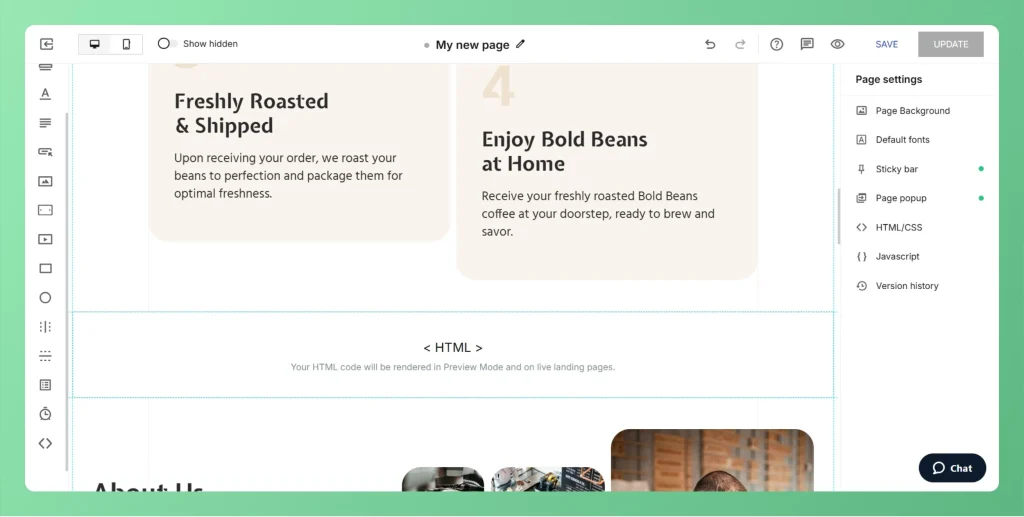
Step 3 – Add a Code Widget

  • In the page editor, click the Widgets panel on the left sidebar.
  • Drag and drop the HTML widget to your desired section on the page.
Choose Embed HTML Option

Step 4 – Paste Your Embed Code

  • Click on the HTML widget you just added.
  • A popup will appear – paste your Wall of Love embed code from Feedspace.
  • Click Done to save.
Save and See Embed Wall of Love

Step 5 – Resize and Position the Widget

  • Adjust the widget size to properly fit the embedded content.
  • Move it around the page to place it exactly where you want it.

Step 6 – Publish Your Page

  • Click the Publish button at the top-right corner.
  • Your page with the embedded code will now be live.

You might also find helpful

How to Embed Widget in Instapage

Overview Instapage allows you to embed Feedspace code snippet directly into your landing pages. This is useful for Feedspace’s widgets. This step-by-step guide will help you easily add your custom code to any Instapage page. Step 1 – Log in to Your Instapage Account Go to Instapage and log in...

How to Embed Widget in Unbounce

Overview Unbounce allows you to embed Feedspace code snippet into your landing pages using its built-in Custom HTML element. Step 1 – Log in to Your Unbounce Account Visit Unbounce and sign in to your dashboard. Step 2 – Open the Page Builder From the dashboard, choose the landing page...

How to Embed Wall Of Love in Carrd

Overview Feedspace Wall of Love embed code can be easily added to any Carrd site. This simple process helps you showcase customer trust directly on your Carrd page. By following the steps below, you can embed the code in minutes. Step 1 – Log in to Your Carrd Account Go...