Embed Code
<div class="feedspace-embed"
     data-id="0b1aeb49-6680-4b55-a187-549c45d7ed2c">
</div><script src="https://js.feedspace.io/v1/embed/embed.min.js"
        type="text/javascript" async>
</script>STEP 1
To showcase your Wall of Love on Framer, start by creating a custom component. Click the Framer logo in the top-left corner, navigate to Component → Create From Code, and click the + button to add a new component.
STEP 2
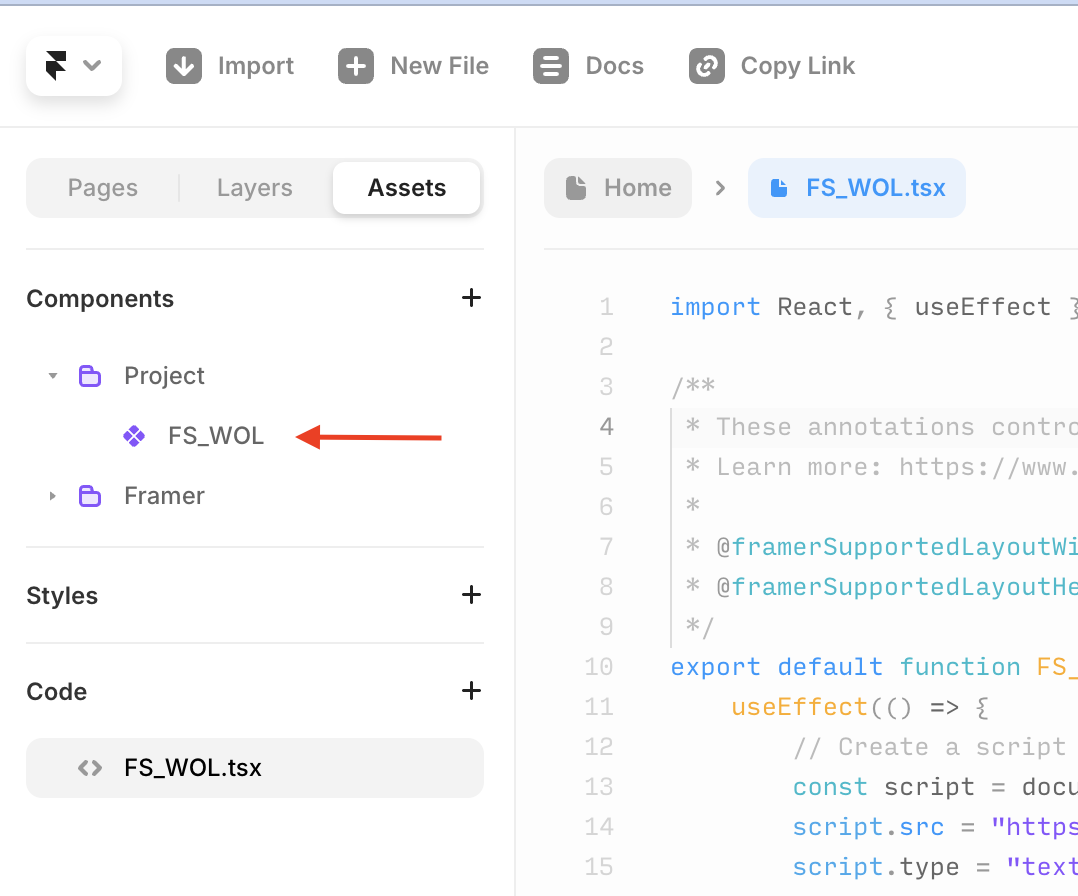
Click Assets to locate the FS_WOL component in the Components section. Drag and drop it to the desired location on your page to display the Wall of Love.
STEP 3
Replace the default code with the code provided below.
import React, { useEffect } from "react"

/**
 * These annotations control how your component sizes
 * Learn more: https://www.framer.com/developers/components/auto-sizing
 *
 * @framerSupportedLayoutWidth any
 * @framerSupportedLayoutHeight auto
 */
export default function FS_WOL(props) {
    useEffect(() => {
        // Function to safely add the script
        const loadScript = () => {
            return new Promise((resolve, reject) => {
                // Create a script element
                const script = document.createElement("script")
                script.src =
                    "https://js.feedspace.io/v1/embed/embed.min.js?v=1.0.56"
                script.type = "text/javascript"
                script.async = true

                // Handle script load and error
                script.onload = resolve
                script.onerror = reject

                // Append the script to the document body
                document.body.prepend(script)
            })
        }

        // Load the script and handle potential errors
        loadScript().catch((error) => {
            console.error("Failed to load Feedspace script:", error)
        })

        // Cleanup the script when the component unmounts
        return () => {
            const script = document.querySelector(
                'script[src="https://js.feedspace.io/v1/embed/embed.min.js?v=1.0.56"]'
            )
            if (script) {
                document.body.removeChild(script)
            }
        }
    }, [])

    return (
        <div
            style={{ ...containerStyle }}
            className="feedspace-embed"
            data-id="0b1aeb49-6680-4b55-a187-549c45d7ed2c"
        ></div>
    )
}

// Styles are written in object syntax
const containerStyle = {
    height: "100%",
    display: "flex",
    justifyContent: "center",
    alignItems: "center",
    overflow: "hidden",
}
STEP 4
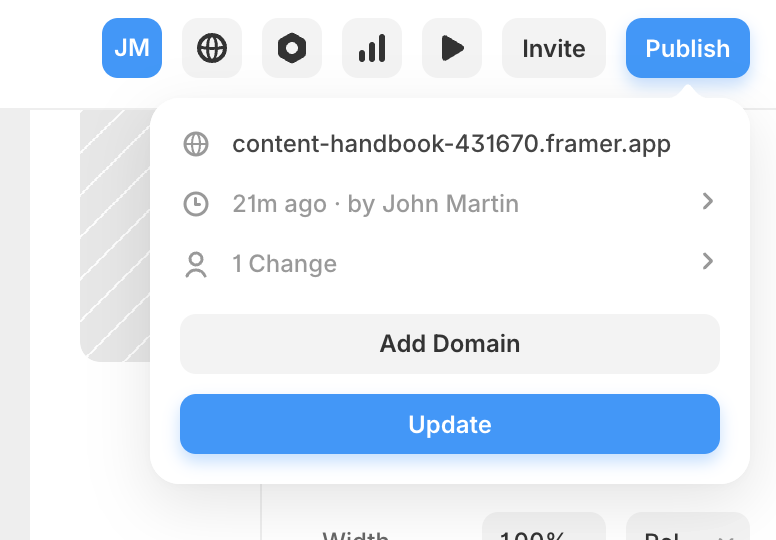
On Framer, click on 'Publish', then 'Update' to your change.
STEP 1
Just copy this component to your project and use it anywhere:
// components/FeedspaceWOL.tsx

"use client";

import Script from "next/script";

interface FeedspaceWOLProps {
  pageId: string;
  className?: string;
}

export default function FeedspaceWOL({
  pageId,
  className = "",
}: FeedspaceWOLProps) {
  return (
    <>
      <div className={`feedspace-embed ${className}`} data-id={pageId} />

      <Script
        src={"https://js.feedspace.io/v1/embed/embed.min.js"}
        strategy="lazyOnload"
      />
    </>
  );
}
STEP 2
Import and use the component anywhere in your app:
import FeedspaceWOL from '@/components/FeedspaceWOL'

<FeedspaceWOL pageId="0b1aeb49-6680-4b55-a187-549c45d7ed2c" />
STEP 3
Styling Examples (With Tailwind CSS)
<FeedspaceWOL
  pageId="0b1aeb49-6680-4b55-a187-549c45d7ed2c"
  className="mx-auto my-8 px-4 max-w-4xl"
/>
Copy the embed link, go to the section of your site or app where you want to display the page, open the embed block, and paste the copied link there.
https://www.feedspace.io/widget/0b1aeb49-6680-4b55-a187-549c45d7ed2c