TripAdvisor has always been a place where people share their travel experiences, reviews, and recommendations. It’s a go-to platform for travelers looking for advice and insights. Recently, it has also become a space where brands can engage with their customers in real-time.
Even simple reviews or casual feedback can grab attention and help people remember your business. Adding real reviews from your Tripadvisor feed gives your audience something familiar to engage with. It makes your website feel more dynamic, less robotic. Your target audiences can see actual customer interactions, not just polished marketing, giving your brand a more authentic feel. That kind of authenticity builds trust faster than any tagline ever could.
With a testimonial collection tool like Feedspace, you can easily display your TripAdvisor reviews on your website or in emails to keep the conversation going. Let’s take a look.
Use Feedspace to Add TripAdvisor Reviews on Your Website
Feedspace helps you collect and manage reviews without turning it into a hassle. You can capture reviews from top platforms or send out a quick review request form to ask for new ones. Whether the feedback is written, video, or even audio, Feedspace can easily handle it all without errors.
And once you’ve got your reviews, you don’t have to let them sit in a folder. With the Wall of Love, you can showcase them on your website or drop them into email campaigns in just a few clicks.
Let’s take a look at how you can import reviews from Tripadvisor on Feedspace.
How to Import TripAdvisor Reviews?
Getting started with importing your TripAdvisor reviews is easy. Simply follow these steps:
Step 1: Create A Feedspace Account

Use your Google credentials or other available options to create a new account with Feedspace or log in to an existing one.
Step 2: Import TripAdvisor Review
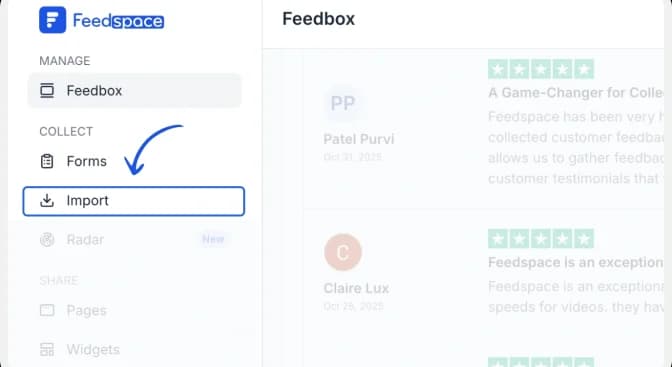
From the Feedspace dashboard, click Import in the left sidebar. Keep Automated Import selected.
Step 3: Paste the Tripadvisor url and fetch the reviews
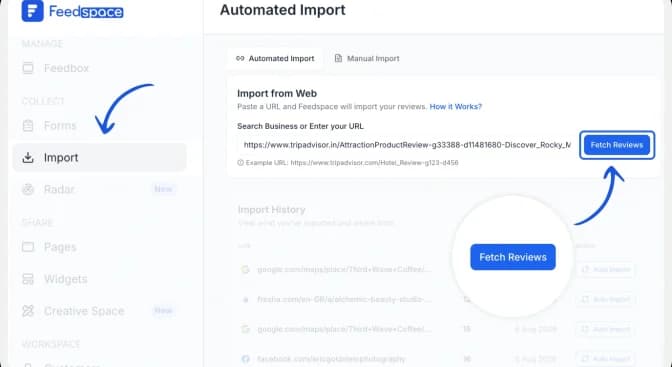
Paste the Tripadvisor listing URL into the Search Business or Enter your URL field. Click Fetch Reviews and wait for Feedspace to retrieve the public reviews from the listing.
Step 4: Import the Tripadvisor Reviews

After Feedspace fetches the reviews, click Import Review to add them to your Feedspace account.
Step 5: Create a Wall of Love

Once the import is complete, click Create Wall of Love Page. You can also open Pages from the sidebar and click Create Page.

Step 6: Select the Tripadvisor Reviews

Choose the imported Tripadvisor reviews you want to show. Use Select All to include every review or select individual reviews manually. You can change their order or use automated selection, then click Save & Next.
Step 7: Customize the wall of love
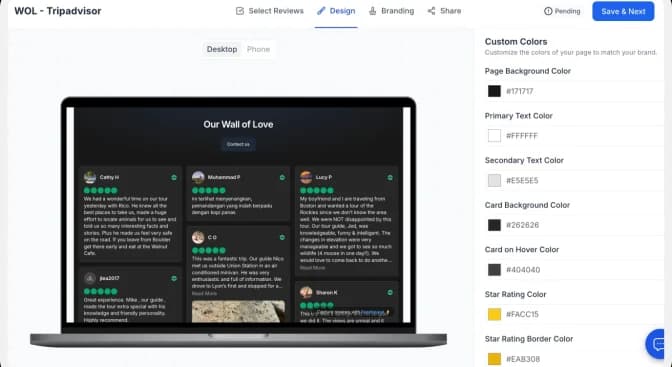
Use the Design tab to adjust the page background, text, review cards and link colours. Check the desktop and mobile previews as you work. Use the Branding tab to update the page title, description, logo and other brand details.
There you have it! You have now built your first Wall of Love. Don’t forget to share it with the world!
How to Embed the Tripadvisor Review on Your Website?
To add Tripadvisor reviews to your website, you will need an embed code for the Wall of Love. Let’s understand how and where to find this code.
Step 1: Copy the embed code

Open the Share tab and choose the framework used by your website: HTML/WordPress, Framer, Next.js, Angular or iFrames. Click Copy code.
Step 2: Paste the code into your website
Open the page where you want the reviews to appear and add an HTML, embed or custom-code block. Paste the complete Feedspace code into the block, preview the page, and publish it when the layout looks correct on desktop and mobile.
| Important: Paste the complete snippet exactly as copied. If your website builder strips scripts, use the iFrame option or follow that platform’s custom-code instructions. |
Step 3: Preview the finished Wall of Love

Confirm that the review cards, profile details, links and CTA display correctly. Check both desktop and mobile layouts before making the page live.
Note: Feedspace’s Wall of Love is fully customizable, so you can change the description, branding colours, light/dark themes, and more.
Try Now!
Benefits of Adding Tripadvisor Reviews to Your Website
1. Build Trust
Tripadvisor reviews aren’t just for show. When people see others mentioning your business or writing positive reviews and their experiences, it gives the sense that things are happening. It tells them you’re active, responsive, and engaged. That kind of presence feels trustworthy, even if no one says it out loud.
2. Use Cases
Sometimes the best use cases come from your customers. They come from someone posting a review about their stay or experience with your service. And then someone else sees it and decides to book with you. It’s low effort for you, but the impact can be surprisingly significant.
3. Social Proof
People trust what others post, especially when it feels unfiltered. Showing Tripadvisor reviews on your website or in an email campaign gives visitors that little extra push. If others are using your services and seem happy with them, that’s often enough to get someone curious.
Conclusion
All in all, Feedspace makes it a lot easier to actually use the reviews your business gets on Tripadvisor. Instead of letting those reviews just sit out there, you can bring them into your site or emails and give them real visibility. Whether it’s a quick compliment or a detailed review, it’s all usable. You can also collect regular reviews in video, audio, or text, whatever works best. Try Feedspace and see how simple it is to turn real posts into real impact.