
Feedspace Home Dashboard

How to Import Reviews from Instagram Posts

Last updated on June 22, 2026

Overview

With the Feedspace Chrome Extension, you can easily import Instagram posts as testimonials or reviews into your Feedspace workspace.

Step 1 – Select the Instagram Post

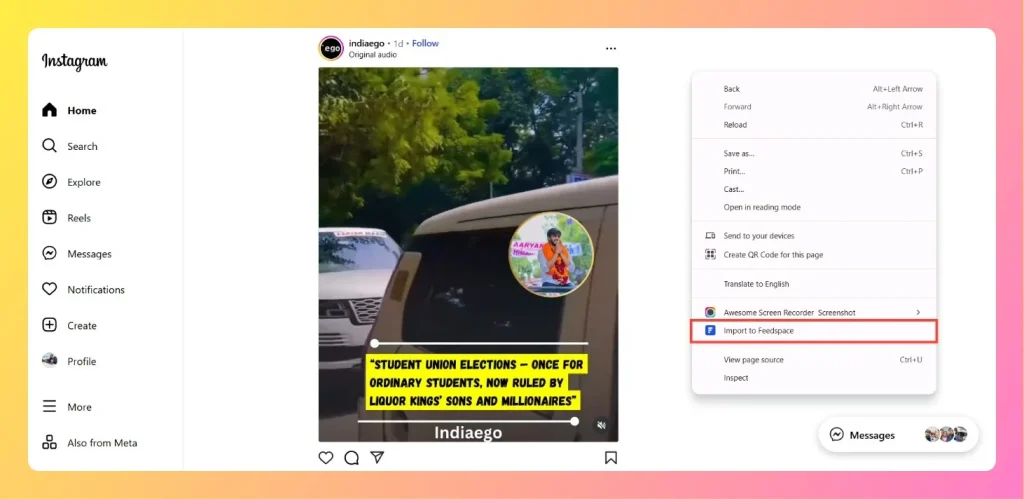
Open the Instagram post you want to import as a review.

Step 2 – Right-click and Import

Right-click on the post. From the context menu, choose “Import to Feedspace.”

Right Click on Post and  Import to Feedspace

Step 3 – Confirm and Save

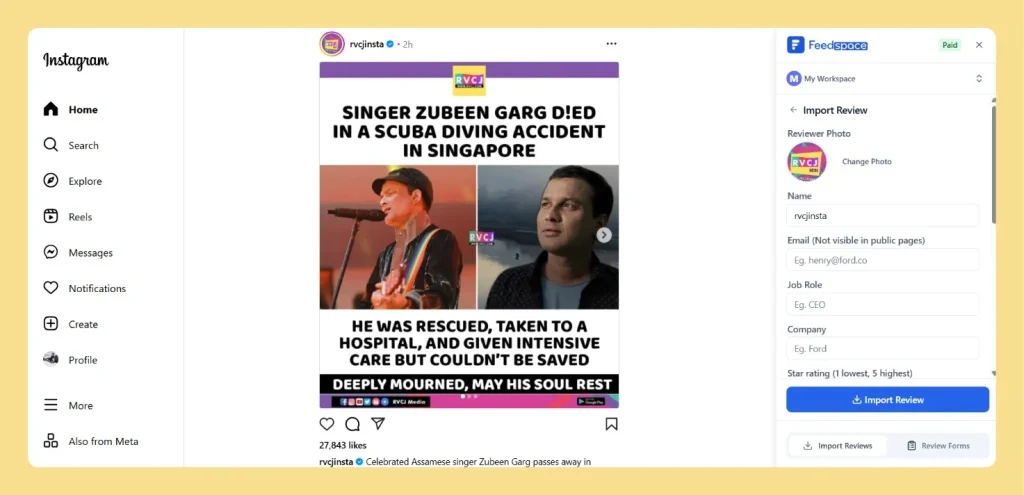
  • A Feedspace import panel will appear on the right side. Review the details such as Name, Email, Job Role, Company, and Rating, Review Text, Image, Date, etc. Make edits if necessary.
  • Click Import Review to save the Instagram post into your Feedspace workspace.
Check Review Details and Click on Import Review

Your Instagram post is now successfully imported into Feedspace.

You might also find helpful

How Do I Import Instagram Posts into Feedspace?

Overview Feedspace lets you import posts and reels from Instagram and display them as testimonials on your website. You can use this to showcase real customer mentions, product posts, and brand stories without asking customers to submit anything manually. For example, if a customer posts a reel showing your product...

Share Testimonial Form Easily on Instagram

Overview Reach your audience where they spend their time – Instagram! With Feedspace, sharing Review Forms (text, video, or audio) is simple and just a few taps away. Step 1 – Log in to Feedspace Head to your Feedspace account and open the workspace where you want to collect responses....

Sharing Audio Recordings on Social Media

Overview Feedspace’s Audio Testimonial feature, sharing your audio recordings is a breeze. You can easily post audio clips on all the major social media platforms like Facebook, Twitter, LinkedIn, Instagram, and more. Why It’s So Convenient: