It is completely natural to wonder whether a reviewer can go back and update something they submitted. This article answers that question clearly and walks you through the simple steps to get an updated review into your Feedspace account whenever you need one.
A submitted review is final
Once a reviewer submits their response, the review is recorded in your Feedspace account and the submission is complete. Reviewers do not have a self-service option to return and edit what they already sent. This is by design: it ensures the review data in your account stays accurate, trustworthy, and fully under your control as the form owner.
How to get an updated review
If a reviewer contacts you and asks to change their submission, the process is straightforward. You delete the original review from your Feedspace account and then send the reviewer your form link again so they can submit a fresh, updated response.
Step 1: Delete the original review
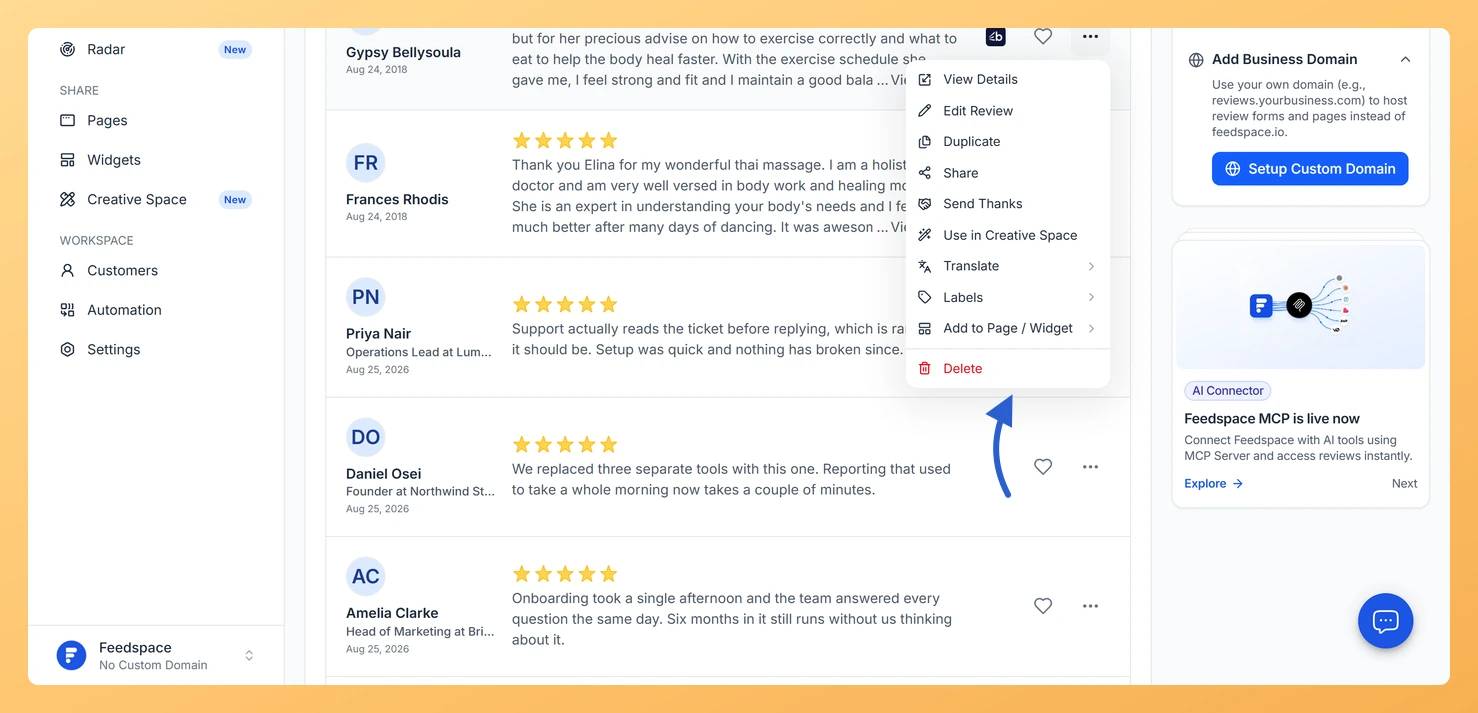
Open your Feedspace account and go to the form where the review was collected. Locate the review you want to remove, open the options for that entry, and delete it. The review is removed from your account immediately.
Step 2: Send the form link again
Once the original review has been deleted, share your Feedspace form link with the reviewer again. They can open it and fill in their updated thoughts as a completely new submission. The new response will appear in your account just like any other review.
What’s next
Delete the original review from your Feedspace account so the reviewer can resubmit without a duplicate appearing.
Copy your form link from the Feedspace dashboard and send it directly to the reviewer so they can submit a fresh response.
Visit the how to view reviews article to learn how to find and manage all submissions in your account.
Check the what are review forms article to explore all the options available for customising and sharing your form.
Common questions
Can I edit the review for them instead?
Yes, from the review’s three-dot menu in Feedbox. That changes what you display, so use it for tidying wording rather than changing what somebody said.
You might also find helpful
How Do I View Reviews Collected by My Feedspace Form?
Every review submitted through your Feedspace form is stored in your workspace and can be accessed in seconds. You can open the reviews list directly from the form card on the Forms page using the View Reviews option in the form menu. What You Can Do Option 1: From the...
What Are Review Forms?
Overview Review Forms are an easy way to collect honest opinions, reviews, and experiences from your customers or team members. They allow you to: Why Use Review Forms? How Review Forms Work
How Do I Get Started with My First Feedspace Review Form?
Overview Getting your first review form live on Feedspace takes a few minutes. You end up with a branded page where a customer can record a video, leave a voice note, capture their screen, or simply type, with nothing to download and no account to create on their end. You...