
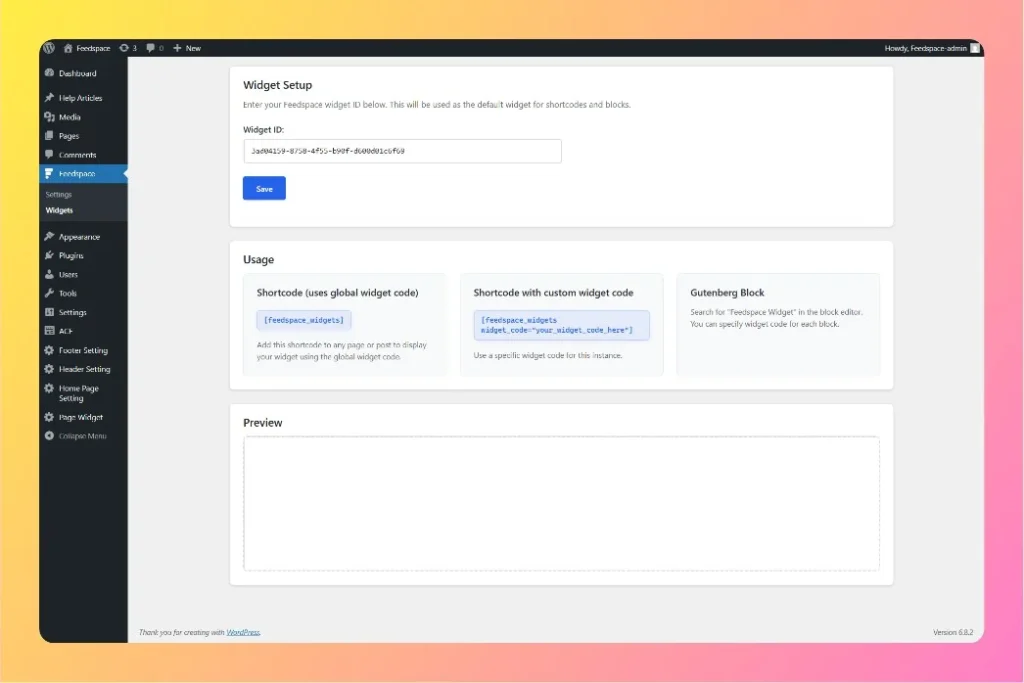
Feedspace Home Dashboard

How to Use WordPress Feedspace Plugin

Last updated on June 18, 2026

Overview

Feedspace is a simple and powerful WordPress plugin that helps you showcase customer testimonials and reviews directly on your WordPress website. With an easy-to-use interface, you can embed any Feedspace widget using just your Widget ID, making it quick and easy to display social proof.

Key features

  • Easy Widget Embedding: Simply enter your widget ID from Feedspace.
  • Gutenberg Block Support: Add widgets directly using the modern block editor.
  • Shortcode Support: Use [feedspace_widgets] in any post or page to display reviews.
  • Instant Display: Your testimonials and reviews will appear instantly on your website.
Click on Feedspace on Left Sidebar

How it works

1. Get your widget ID

  • Log in to your Feedspace dashboard and click Widgets in the left sidebar.
  • On the widget card, click the Embed icon. The editor opens on the Share tab. Under the HTML/WordPress tab, copy the Widget ID from the input field in the WordPress plugin install box.

2. Add to WordPress

You have two options to add Feedspace widgets:

  • Use Gutenberg Block:
    • In the WordPress editor, add the “Feedspace Widget” block.
    • Paste your Widget ID into the block.
  • Or Use Shortcode:
    • Use [feedspace_widgets] in any post or page.
    • Set your Widget ID in the plugin settings to reuse the same widget across all pages.

3. Display your widget

Once added, your customer testimonials and reviews will automatically display on your website: no extra coding needed.

You might also find helpful

How to Import Reviews from WordPress Plugins into Feedspace

Overview WordPress is one of the most popular platforms for building websites, and many plugins have their own customer review systems. Importing reviews from WordPress plugins into Feedspace allows you to display authentic customer feedback directly on your website. Whether you are showcasing plugin reviews for your own WordPress products...

How to Embed Wall Of Love in WordPress

Overview Adding Feedspace code snippet to your WordPress website is a great way to extend functionality. WordPress gives you simple ways to embed code directly into your site. Step 1: Log in to WordPress Admin Go to your WordPress Admin portal and sign in with your credentials. Step 2: Go...

How to Embed Widget in Elementor

Overview Elementor page builders for WordPress gives you simple ways to embed Feedspace code snippet directly into your site. Step 1: Log in to WordPress Admin Go to WordPress admin portal and sign in with your credentials. Step 2: Open Elementor Editor From the dashboard, navigate to Pages (or Posts)...