
Feedspace Home Dashboard

How to Import Reviews from Google Shopping into Feedspace

Last updated on October 31, 2025

Overview

Feedspace allows you to import product reviews directly from Google Shopping so you can display verified customer feedback on your website or Wall of Love. This helps you build buyer trust, improve social proof, and enhance conversion rates.

Step 1 – Open Import Reviews in Feedspace

  1. Log in to your Feedspace account.
  2. From the sidebar, select Import Reviews.
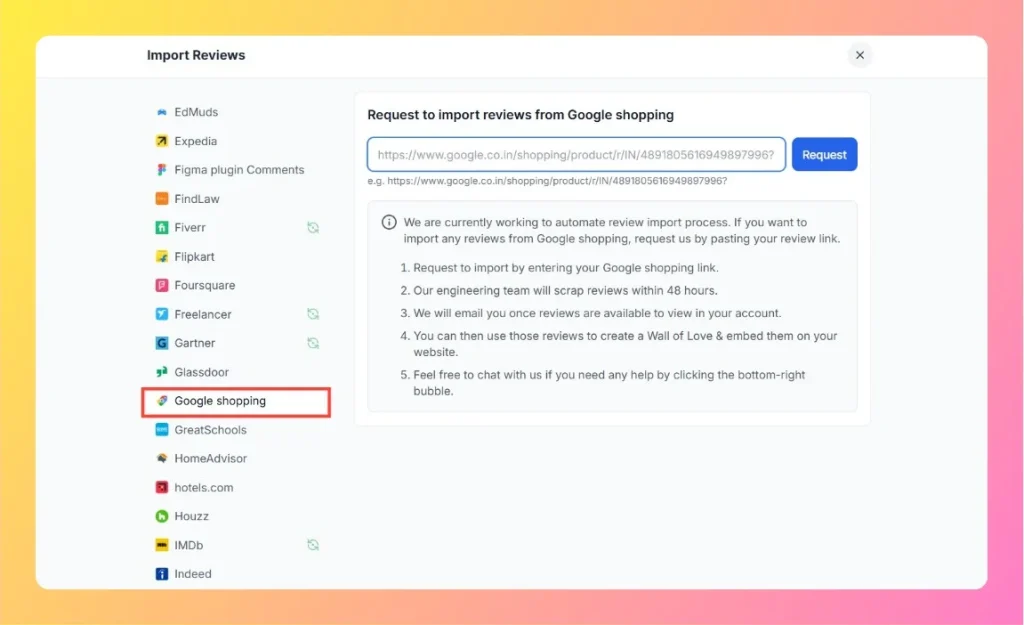
  3. In the list under Other Platforms, click Google Shopping.

Step 2 – Enter Your Google Shopping Product Link

  1. Open your product page on Google Shopping.
    Example: https://www.google.co.in/shopping/product/r/IN/4891805616949897996
  2. Copy the product URL from your browser’s address bar.
  3. Paste it into the input field in Feedspace.
  4. Click the Request button.
Enter Google Shopping Review Link

Step 3 – Review Scraping Process

  1. Feedspace’s engineering team will scrape your Google Shopping reviews within 48 hours.
  2. Once your reviews are imported successfully, you’ll receive an email notification.

Step 4 – Manage and Display Your Reviews

After import:

  • Access your reviews in the Feedspace dashboard.
  • Use them to create a Wall of Love or embed them on your product page.
  • Showcase positive customer feedback to boost confidence and engagement.

Step 5 – Need Help?

If you need assistance or face any issues, click on the chat bubble at the bottom-right corner of your Feedspace dashboard to reach the support team.

You might also find helpful

How to Import Reviews from Amazon Product into Feedspace

Overview Feedspace makes it easy to import your Amazon product reviews directly into your account using the Feedspace Chrome Extension.You can import genuine customer reviews from your Amazon product pages and display them beautifully on your Wall of Love, widgets, or website pages. Step 1 – Install Feedspace Chrome Extension...

How to Import Reviews from Flipkart into Feedspace

Overview Feedspace allows you to import customer reviews directly from Flipkart, one of India’s leading e-commerce platforms. This feature helps online sellers and product manufacturers display verified customer feedback on their website or Wall of Love to enhance credibility and sales conversions. Step 1 – Open Import Reviews in Feedspace...

How to Import Reviews from eBay into Feedspace

Overview Feedspace lets you easily import reviews from your eBay store using the Feedspace Google Chrome Extension. This feature allows you to collect authentic product feedback and display it beautifully on your website or Wall of Love. Step 1 – Install Chrome Extension Step 2 – Navigate to eBay Website...