
Feedspace Home Dashboard

How to Import Reviews from Medium Comments into Feedspace

Last updated on October 31, 2025

Overview

Feedspace allows you to import reader feedback and comments from Medium posts. This feature is especially useful for bloggers, writers, and publications who want to highlight authentic audience engagement and appreciation on their website using a Wall of Love.

Step 1 – Access Import Reviews in Feedspace

  1. Log in to your Feedspace account.
  2. Go to Import Reviews from the sidebar.
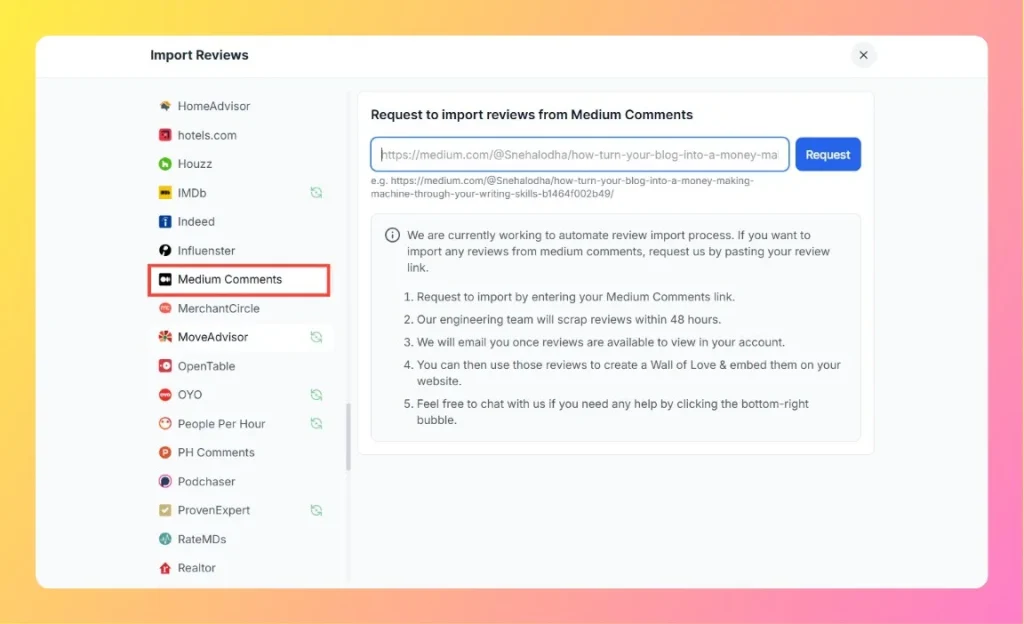
  3. Select Medium Comments from the list of platforms.

Step 2 – Enter Your Medium Post Link

  1. Open your Medium article where readers have left comments or feedback.
    Example: https://medium.com/@Snehalodha/how-turn-your-blog-into-a-money-making-machine-through-your-writing-skills-b1464f002b49/
  2. Copy the full article URL from the browser.
  3. Paste it into the input box on the Feedspace import page.
  4. Click the Request button to send your import request.
Enter Medium Comments Review Link

Step 3 – Review Import Process

  1. Feedspace’s engineering team will scrape the comments within 48 hours.
  2. You’ll receive an email once the imported comments are available to view in your account.

Step 4 – Use Reviews in Feedspace

Once imported:

  • Review and manage comments in your Feedspace dashboard.
  • Select positive comments and turn them into testimonials or highlights.
  • Create a Wall of Love and embed it on your personal website, portfolio, or publication page.

Step 5 – Support

If you need any help or encounter issues during the process, use the chat bubble located at the bottom-right corner of your Feedspace dashboard to contact support.

You might also find helpful

How to Embed a Feedspace Widget on a WordPress Site Using Breakdance Builder

Overview Integrating your Feedspace review widget with a Breakdance-powered WordPress website is simple and takes just a few minutes. This guide walks you through generating your embed code and placing it inside your Breakdance layout. Note: Make sure you have installed and activated the Feedspace WordPress plugin before proceeding. How...

How to Import Reviews from Influenster into Feedspace

Overview Feedspace allows you to import product and brand reviews from Influenster, a popular community where users share authentic opinions about beauty, wellness, and household products. By importing reviews, you can showcase verified customer experiences on your Wall of Love and enhance brand trust. Step 1 – Access Import Reviews...

How to Import Reviews from OYO into Feedspace

Overview OYO is a widely used platform for hotels, with many customers sharing their experiences and feedback through reviews. Importing reviews from OYO into Feedspace allows you to display these reviews on your website, enhancing trust and engagement. Here’s a straightforward guide to help you bring in reviews from OYO....