
Feedspace Home Dashboard

How to Import Reviews from Podchaser into Feedspace

Last updated on November 7, 2025

Overview

Feedspace allows podcasters and media creators to import their listener reviews directly from Podchaser — a popular platform for podcast ratings and discussions. This feature helps you showcase authentic listener feedback on your website or Wall of Love to boost credibility and engagement.

Step 1 – Open Import Reviews in Feedspace

  1. Log in to your Feedspace account.
  2. From the left sidebar, click on Import Reviews.
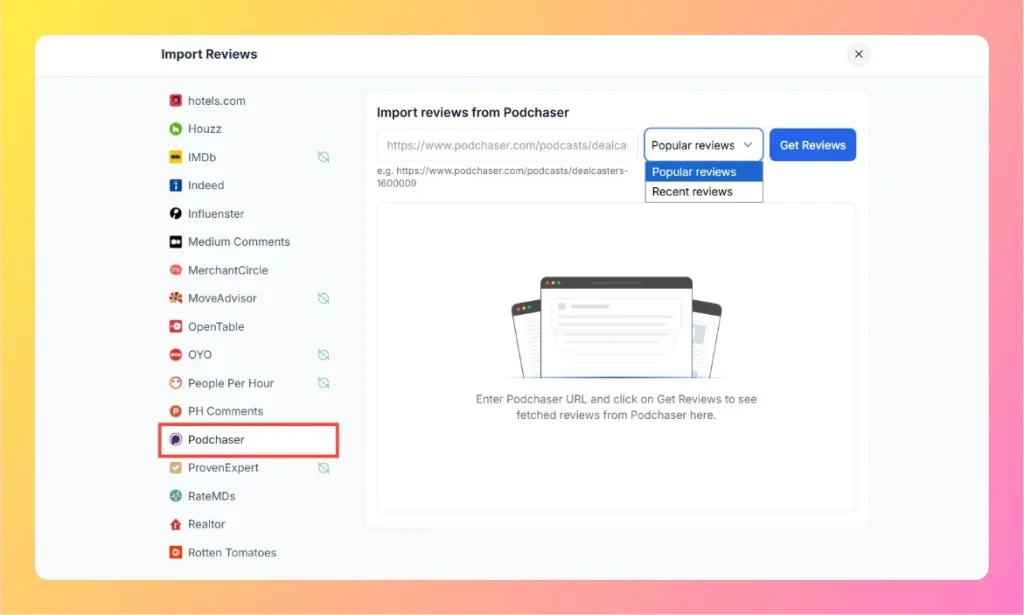
  3. Select Podchaser from the list of available sources.

Step 2 – Enter Your Podchaser Review Link

  1. Visit your podcast’s page on Podchaser.
    Example: https://www.podchaser.com/podcasts/dealcasters-1600009
  2. Copy the full URL of your podcast page.
  3. Paste the URL into the Podchaser input field in Feedspace.
Enter Podchaser Review Link

Step 3 – Choose Review Type

  1. Use the dropdown menu to select which type of reviews to import:
    • Popular Reviews – Fetches the most liked or upvoted listener reviews.
    • Recent Reviews – Imports the latest feedback from listeners.
  2. After choosing your preferred type, click on Get Reviews to fetch them.

Step 4 – Manage and Display Reviews

Once the reviews are imported:

  • Review and edit any fetched feedback if needed.
  • Select which reviews you’d like to feature publicly.
  • Use them to create a Wall of Love or display them directly on your podcast website or landing page.

Step 5 – Support Assistance

If you experience any issues while importing, click the chat bubble at the bottom-right corner of your Feedspace dashboard for instant help.

You might also find helpful

How to Import Reviews from Apple Podcasts into Feedspace

Overview Apple Podcasts is one of the most popular platforms for sharing podcasts. Importing reviews from Apple Podcasts into Feedspace lets you highlight listener feedback directly on your website. This can help showcase audience opinions, build trust with new listeners, and make your podcast more engaging. Feedspace provides a simple...

What Are Audio Testimonials?

Overview Audio testimonials are voice recordings from real customers talking about their experiences with your product or service. They bring in: Why Use Them?

How to Create an Audio Review Form in Feedspace

Overview Creating an audio form in Feedspace is a simple and easiest way to collect audio feedback from your audience. This feature is ideal for gathering detailed feedback, conducting interviews, and collecting voice notes. In this guide, we’ll walk you through the steps to create an audio form, configure its...