
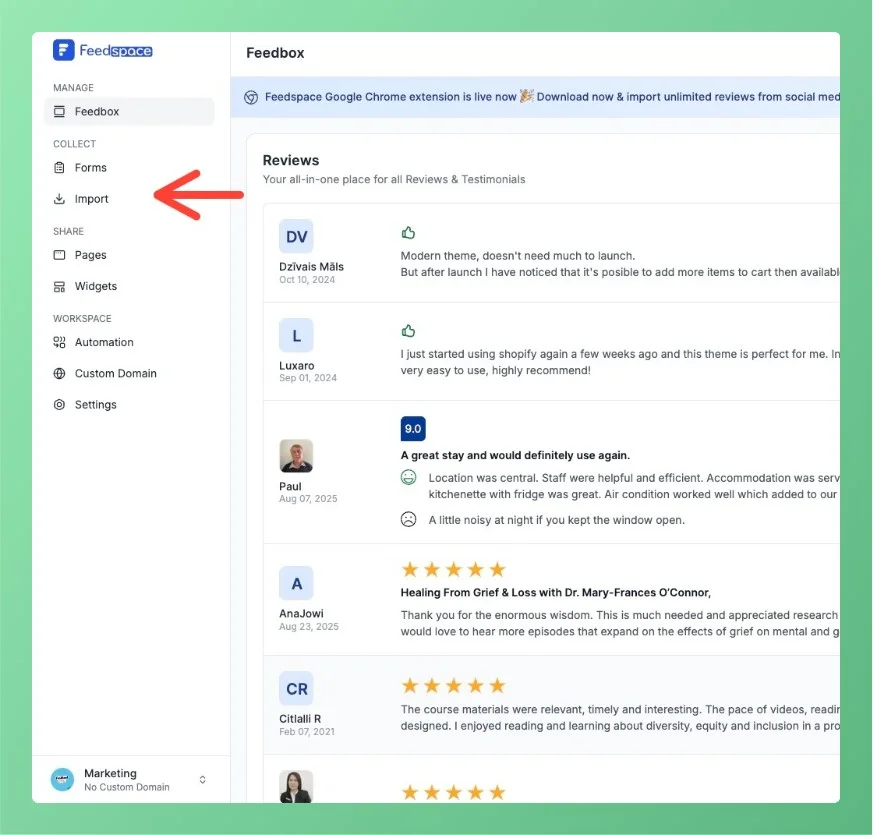
Feedspace Home Dashboard

How to Import Social Platform Reviews in Feedspace

Last updated on October 1, 2025

Overview

Bringing your reviews into Feedspace is quick and simple.

Step 1 – Log in

Open your Feedspace account and go to your workspace.

Step 2 – Select Platform

Click on Import from the sidebar and choose the platform you want to bring reviews from (Google, YouTube, X Twitter, LinkedIn, Trustpilot, Tripadvisor, Product Hunt, Play Store, etc.).

Navigate to import page

Step 3 – Add URL or Link

Paste your business page or app link into the provided field.

Step 4 – Import Reviews

Click Get Reviews and your selected reviews will appear in your Feedbox.

You might also find helpful

What are Social Feedbacks?

Social feedbacks on Feedspace.io refer to the aggregation of testimonials, testimonials, and social interactions collected from multiple platforms such as Google Business, Facebook, Trustpilot, Product Hunt, Amazon, and more all centralized for easy management and display. Why Social Feedbacks Matter:

What Can I Gather from the Social Media Feedback?

Overview With Feedspace Social Media Feedback, e-commerce brands and businesses can collect, manage, and showcase user-generated content from all social channels, turning audience interactions into valuable insights and marketing assets. Types of Content You Can Gather 1. Text Posts 2. Video Content 3. Audio Replies Using Feedspace’s Social Media Feed...

How to Import Reviews from Google Business into Feedspace

Overview Feedspace allows you to import reviews directly from your Google Business Profile (GMB) so you can manage them in one place and showcase them on your website via widgets or a Wall of Love. You can import reviews by simply entering your business name or pasting your Google Maps...