
Feedspace Home Dashboard

How to Embed Widget in Notion

Last updated on June 22, 2026

Overview

Feedspace widgets can be easily embedded in any Notion page. This quick process helps you showcase testimonials, feedback, or trust signals directly inside your Notion workspace.

Step 1: Copy Your Widget Embed Link from Feedspace

  • Go to your Feedspace dashboard
  • Select Widgets from the left sidebar
  • Click on the Widget you want to embed
  • Go to the Share tab
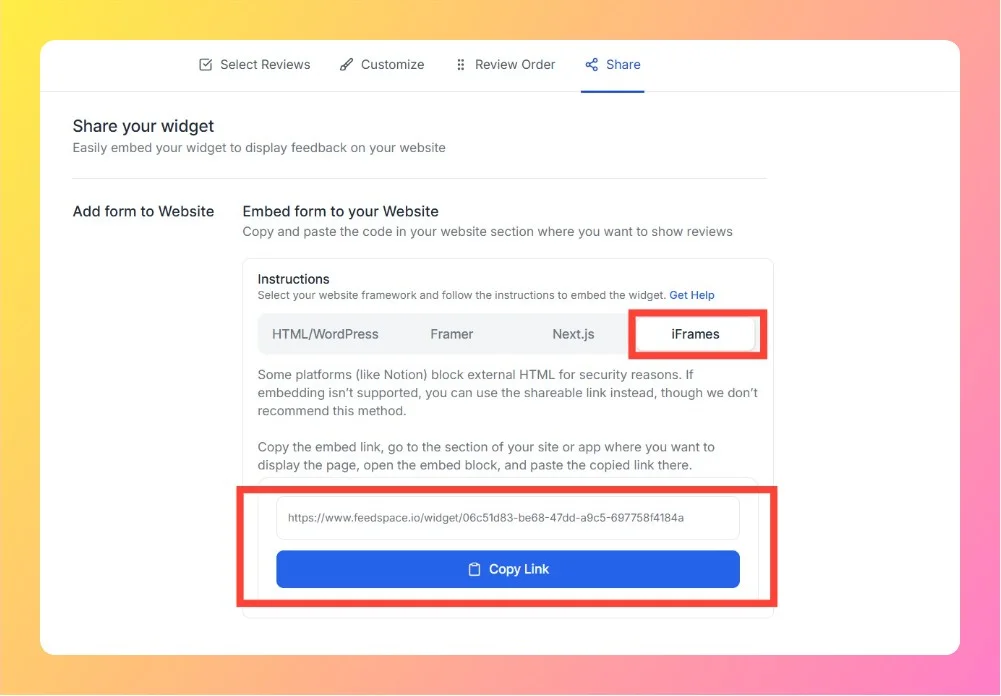
  • Copy the Embed Link from iFrames tab, which looks like this:
Copy Embed Link from iFrames Tab

Step 2: Log in to Your Notion Account

Go to Notion and log in with your account credentials.

Step 3: Open the Page

Choose the page where you want to embed the widget, or create a new page in your workspace.

Step 4: Add an Embed Block

  • Click on the area where you want to add the widget.
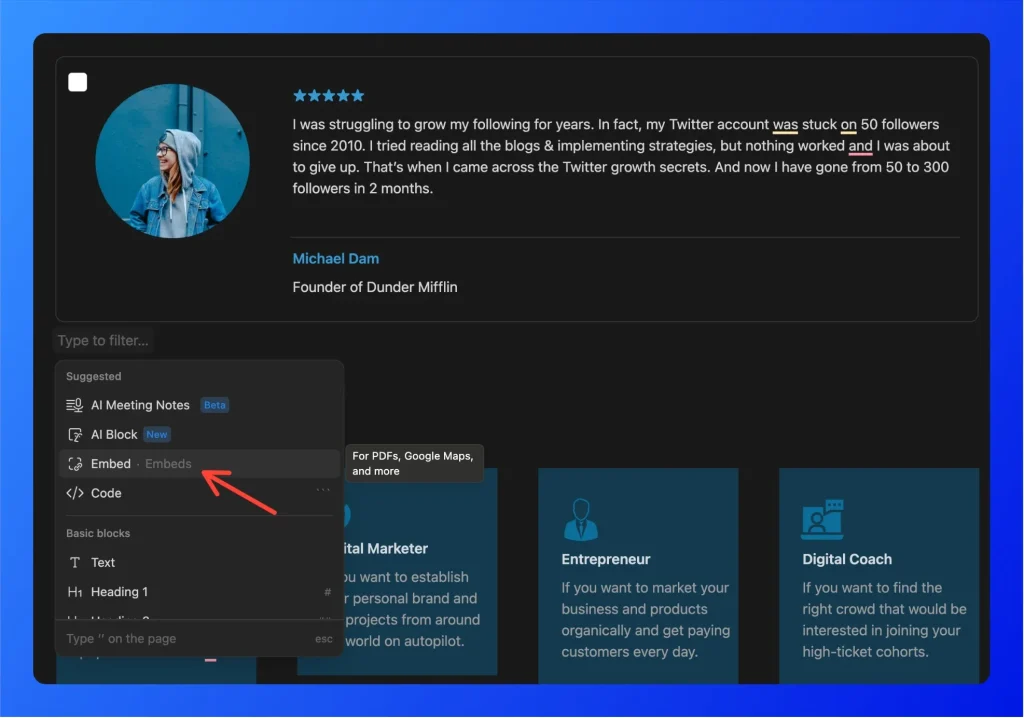
  • Type “/embed" and select the “Embed” block from the menu.
Choose Embed Option
  • Paste your Feedspace widget embed link into the field.
  • Click “Embed Link”.
  • The widget will instantly appear on the page.

Step 5: Resize and Adjust Placement

  • Drag the block edges to adjust the widget size.
  • Move the block to position it correctly on the page.

Step 6: Share or Publish

  • If you want the widget visible to others, enable “Share to web” in the top-right.
  • Otherwise, it stays visible only within your workspace.

Your Notion page will now display the Feedspace widget.

You might also find helpful

How to Embed Wall Of Love in Notion

Overview Feedspace Wall of Love embed code can be easily added to any Notion page. This simple process helps you showcase customer trust directly on your Notion page. By following the steps below, you can embed the code in minutes. Step 1: Copy your embed link from Feedspace Step 2:...

How Do I Automate Notion Notifications with Zapier?

Overview Feedspace connects to Notion through Zapier, letting you automatically submit testimonials to Feedspace whenever a new item is added to a Notion database. This removes manual data entry and keeps your testimonial collection in sync with your Notion workspace. Automation through Zapier is available on Professional and Business plans...

How to Embed Wall Of Love in Framer

Overview You can embed the Feedspace Wall of Love directly on any Framer site. This simple process allows you to showcase customer trust and testimonials inside your Framer project. Step 1: Sign In to Framer Go to Framer and log in with your account credentials. Step 2: Open the Project...