

Feedspace Home Dashboard

How to Import Reviews from eBay

Last updated on May 20, 2026

Overview

The Feedspace Chrome Extension makes it easy to capture your eBay product reviews and import them directly into your Feedspace workspace. This helps you showcase your eBay seller feedback as professional testimonials on your website or online store.

Step 1 – Open the eBay Review

Go to eBay and open the product listing or seller profile page where feedback and reviews are listed. Scroll to the review you want to import.

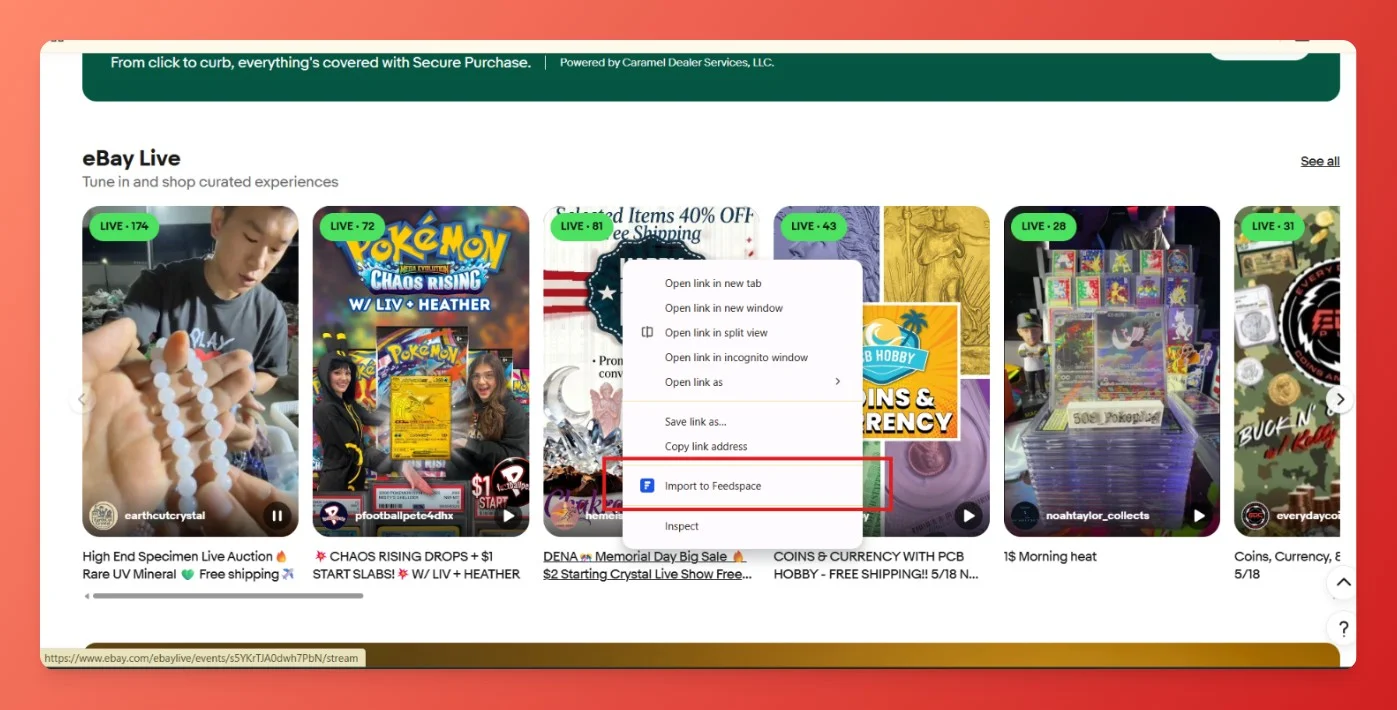
Step 2 – Right-Click on the Review

Hover over the review section. Right-click on the post. From the context menu, choose “Import to Feedspace.

Step 3 – Confirm and Save

  • A Feedspace import panel will appear on the right side. Review the details such as Name, Email, Job Role, Company, and Rating, Review Text, Image, Date, etc. Make edits if necessary.
  • Click Import Review to save the eBay review into your Feedspace workspace.

Your eBay review is now successfully imported into Feedspace.

You might also find helpful

How to Import Reviews from Amazon

Overview The Feedspace Chrome Extension lets you easily capture Amazon product reviews and import them directly into your Feedspace workspace. This is especially useful for showcasing authentic customer feedback on your website, landing pages, or marketing materials. Step 1 – Open the Amazon Review Go to Amazon and open the...

How to Import Reviews from X (Twitter) Posts

Overview With the Feedspace Chrome Extension, you can easily import tweets (posts) from X and save them directly into your Feedspace workspace as testimonials. Step 1 – Select the X Post Go to the X (Twitter) post you want to import as a review or testimonial. Step 2 – Right-click...

How to Install the Feedspace Chrome Extension

Overview The Feedspace Chrome Extension makes it easier to collect and manage reviews or testimonials directly from your browser. With just a click, you can capture customer feedback while browsing or working in different platforms – without switching tabs or logging into the Feedspace dashboard. You can install the extension...