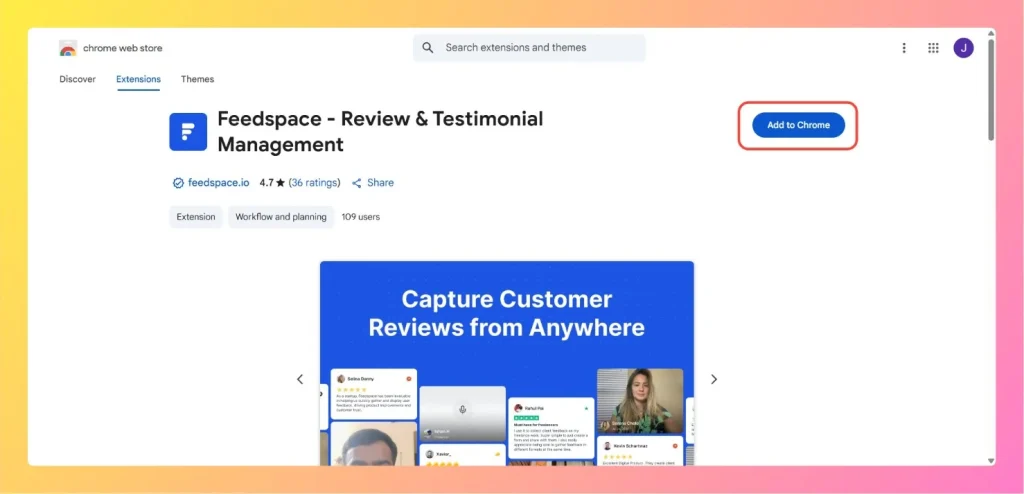
The Feedspace Chrome Extension makes it easier to collect and manage reviews or testimonials directly from your browser. With just a click, you can capture customer feedback while browsing or working in different platforms, without switching tabs or logging into the Feedspace dashboard.
You can install the extension from the Chrome Web Store and start using it instantly in your Google Chrome browser.
Ensure you’re logged into the Google account connected to your Chrome browser.
Step 2: Install the Extension
On the extension page, click Add to Chrome.
In the confirmation pop-up, click Add extension to install it.
Chrome downloads and adds the Feedspace extension to your browser.
Step 3: Log In & Start Collecting Reviews
Click on the Feedspace icon in your toolbar.
Log in with your Feedspace credentials.
You can now start collecting and saving testimonials directly while browsing.
That’s it! The extension is ready to use. You can manage testimonials, capture feedback, and sync everything back to your Feedspace workspace.
The Feedspace Chrome Extension is free to install from the Chrome Web Store and works with your Feedspace account. You sign in with the same credentials you use for your dashboard, so any reviews you capture flow into your workspace.
Common questions
Is the Chrome extension included in my plan?
Yes. The Feedspace Chrome Extension is free to install from the Chrome Web Store and works with your existing Feedspace account, whatever plan you are on. You sign in with your Feedspace credentials, and the reviews you capture save to your workspace.
You might also find helpful
How to Import Reviews from Amazon
Overview The Feedspace Chrome Extension lets you easily capture Amazon product reviews and import them directly into your Feedspace workspace. This is especially useful for showcasing authentic customer feedback on your website, landing pages, or marketing materials. Step 1: Open the Amazon review Go to Amazon and open the product...
How to Import Chrome Extension Reviews into Feedspace
Overview Chrome Extension reviews include user opinions on browser tools, add-ons, and features from the Chrome Web Store. Importing these reviews into Feedspace allows you to show them on your website or Wall of Love. Here’s a quick guide on how to import Chrome Extension reviews into Feedspace: Steps to...
How to Import Reviews from LinkedIn Posts
Overview The Feedspace Chrome Extension makes it easy to capture testimonials from LinkedIn posts directly into your Feedspace workspace. Perfect for preserving praise, posts, or comments from LinkedIn without copying manually. Step 1 – Open the LinkedIn Post Go to the LinkedIn post you want to import as a testimonial or...