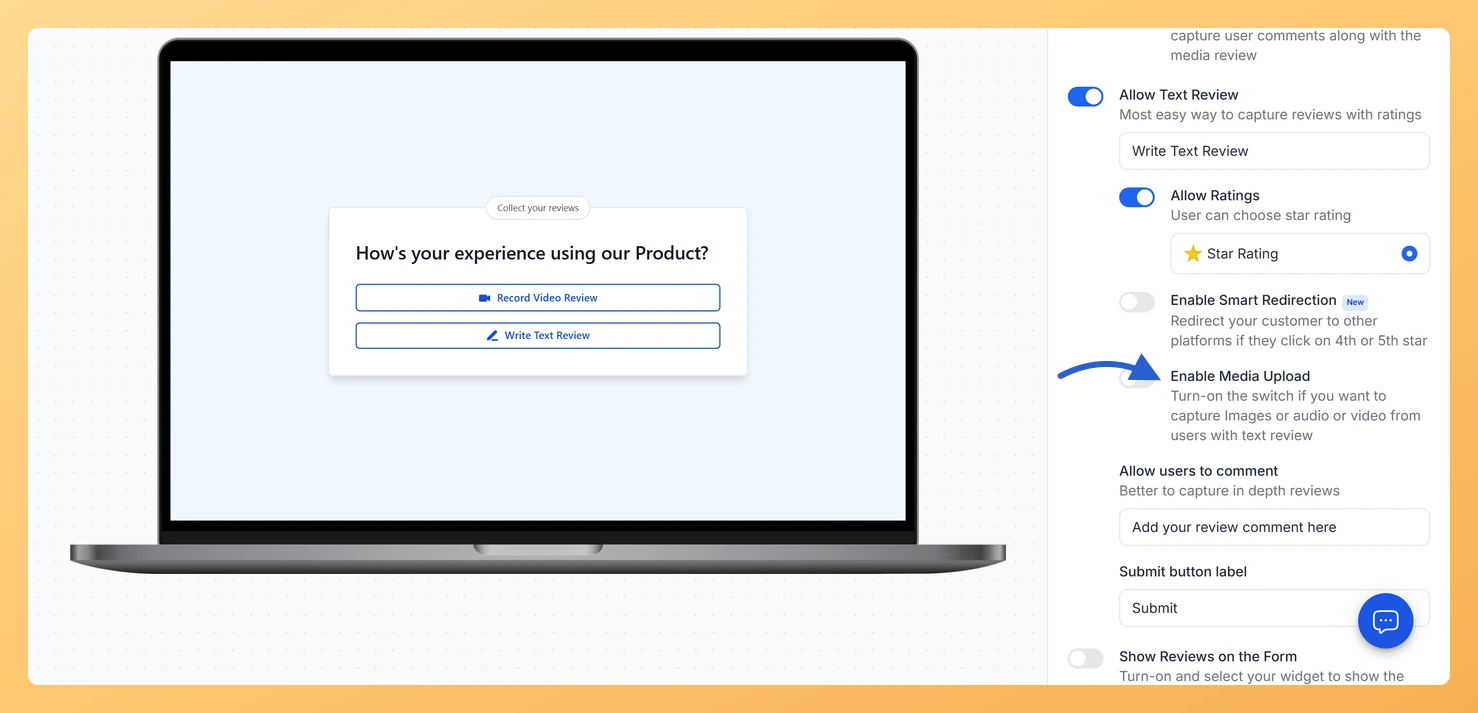
Yes, Feedspace can collect image testimonials. There are two ways to add image-based reviews to your workspace: reviewers can upload images directly when submitting a review on your form, and you can import image screenshots of existing reviews using the AI-powered Image Reviews feature.
This is useful when you have existing review screenshots from social media or chat apps that you want to add to your Wall of Love or widget alongside the reviews you collect through your form.
Option 1: Reviewers upload images on your form
When you enable the media upload field on your form, reviewers can attach image files alongside their text or video review. Each file can be up to 50MB and reviewers can attach up to five files per submission.
Click the Edit (pencil) icon on your form card to open the form editor.
Click the Capture Review tab and enable the media upload option so reviewers can attach images.
Click Save and Next to save your changes.
Option 2: Import image screenshots with AI
If you have screenshots of reviews from other platforms (for example, a DM on social media or a review on a site Feedspace cannot auto-import from), you can upload the screenshot and Feedspace will use AI to extract the review text and details automatically.
In the left sidebar, click Import under the Collect section.
The Manual Import tab is active by default. Click the Image Reviews subtab.
Drag your screenshot into the upload area, or click browse to choose a file. Accepted formats are JPEG, PNG, and WEBP. The maximum file size is 15MB.
Click Import Review. Feedspace analyses the image and extracts the review content automatically.
On success, a confirmation screen shows how many reviews were imported. Click Import More Reviews to add another screenshot, or Create Wall of Love to go directly to your Pages section.
What’s next
Once image testimonials are in your workspace, you can add them to a Wall of Love page or a widget just like any other review. Select them by checking their cards in the page or widget editor, then publish your page or copy the embed code to share them on your website.
Common questions
What image formats does the Image Reviews feature accept?
The Image Reviews feature accepts JPEG, PNG, and WEBP files up to 15MB each. One file can be uploaded per import session, but you can run the importer multiple times to add more screenshots.
What if the AI does not detect any reviews in my screenshot?
If no reviews are detected, Feedspace shows an error. Try uploading a clearer screenshot where the review text is fully visible and not cut off. Screenshots with too much background content or very small text may not extract correctly.
Can I add a reviewer photo to an imported image review?
When you manually import a single review using the Review Import subtab, you can upload a reviewer photo as part of the form. For image-extracted reviews, you may be able to edit the imported review afterwards to add a photo.
You might also find helpful
How Do I Import Reviews From a Screenshot in Feedspace?
Overview Feedspace can read reviews directly from a screenshot. The Image Reviews option in Manual Import uses AI to scan an image you upload and pull out the reviews it finds, so you can add them to Feedspace without retyping anything. A common case: a customer praised you somewhere Feedspace...
Can Reviewers Upload Media Files with a Text Review in Feedspace?
Yes. The Enable Media Upload option inside the text review section lets reviewers attach a supplementary video, audio file, or image alongside their written testimonial. This is separate from the main Upload Video button on the form, it specifically adds an upload option to the text review step. What You...
How Do I Allow Reviewers to Upload a Video on My Feedspace Form?
Some reviewers already have a great video they want to share, whether it is a clip recorded on their phone, a screen recording from their desktop, or a short testimonial filmed earlier. Feedspace lets you add an Upload Video button to your review form so reviewers can submit a pre-recorded...