
Overview
It is completely natural to want to refine your Wall of Love page name after you have seen it live or after your brand messaging has evolved. The good news is that Feedspace gives you full control over your page name and heading at any point. This article walks you through exactly what you can update and how.
Yes, You Can Rename Your Wall of Love Page at Any Time
Feedspace lets you update both the visible heading displayed on your Wall of Love page and the internal name that appears in your Feedspace dashboard whenever you like. There is no need to delete and recreate the page. Simply open the editor and make your changes in seconds.
How to Update the Page Title and Heading
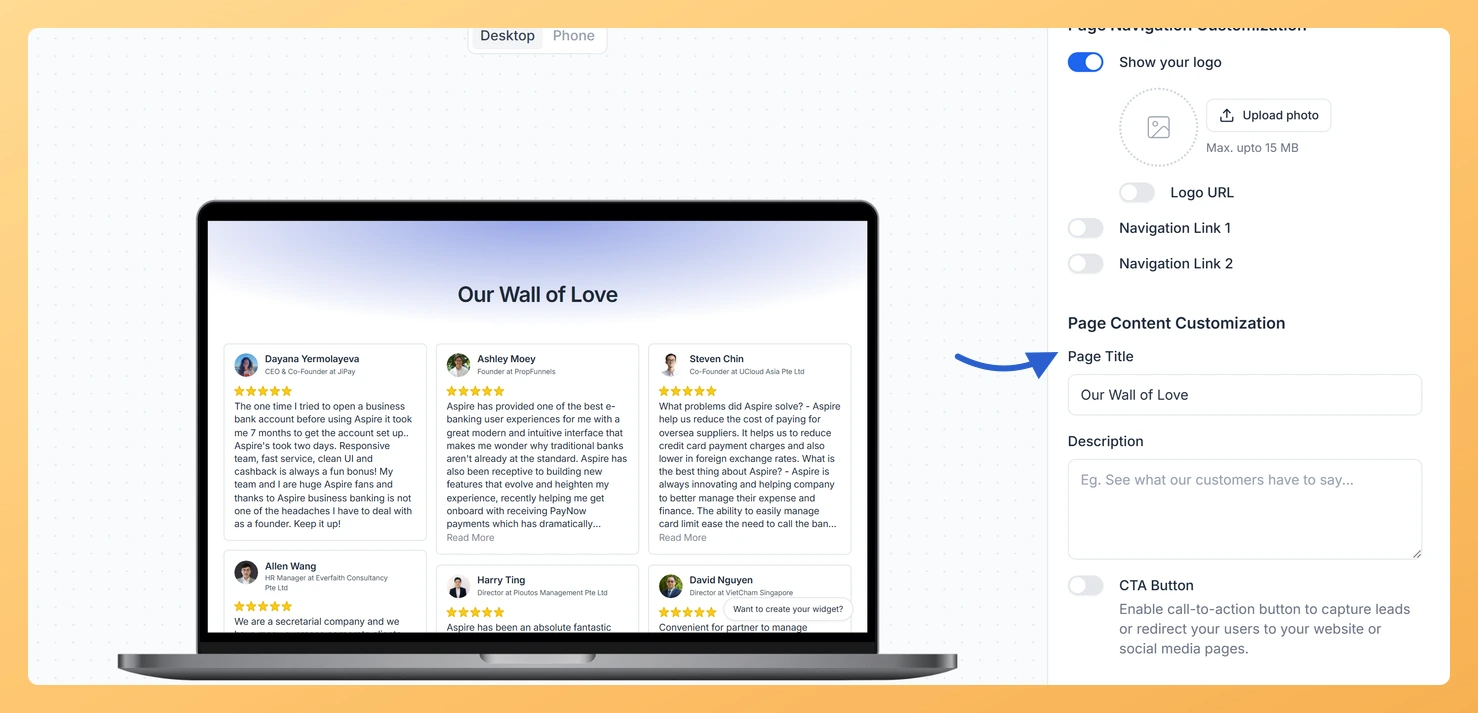
To change the heading your visitors see on the page, open your Wall of Love page in the editor and navigate to the Content Section settings. There you will find the page title and heading fields. Update them to your preferred wording and save. The change takes effect immediately on your live page.
How to Update the Internal Dashboard Name
The internal name is what Feedspace shows in your dashboard to help you identify the page among your other pages. You can edit this name directly from the dashboard by opening the page settings. Keeping this name clear and descriptive makes it easier to manage your pages as your collection grows.
A Note About Your Page URL
If your Wall of Love page uses the default Feedspace subdomain URL, the URL slug is set at the time you create the page and cannot be changed after the page is published. This means only the visible title and heading, not the web address, can be updated on a subdomain URL.
If having a fully customisable URL is important to you, connecting a custom domain to your Wall of Love page gives you complete control over the web address as well. With a custom domain in place, your page URL reflects your own brand rather than the default Feedspace subdomain.
What You Can Do Next
- Open your Wall of Love page in the editor, go to the Content Section settings, and update the page title or heading to your preferred wording.
- Edit the internal dashboard name from your Feedspace dashboard so your page is easy to find and identify alongside your other pages.
- Connect a custom domain to your Wall of Love page if you want full control over the page URL, not just the visible title.
- Review the guide on customising the Content Section of your Wall of Love page to explore all the other text and layout options available to you.
You might also find helpful
What Is a Wall of Love Page in Feedspace?
Overview A Wall of Love page is a dedicated, standalone web page in Feedspace that collects and displays your customer reviews in one beautiful, shareable location. Unlike embedding reviews inside a website page, a Wall of Love page exists on its own unique URL that you can share with anyone,...
How to Create a Wall of Love Page in Feedspace
Steps to Create a Page Log into Feedspace Sign in with your account credentials. Go to Pages From the left sidebar, click Pages. Create Page Click Create Page. This opens the creation screen with some reviews auto-selected in the space. Select Reviews Go to the Select Review page and choose...
How Do I Customize the Content Section of My Wall of Love Page?
Steps to Customize the Content Section Step 1: Open the Design Tab Step 2: Set the Page Title The Page Title field is required. This text appears as the main heading at the top of your Wall of Love page, usually the first thing visitors read. Keep it concise and...