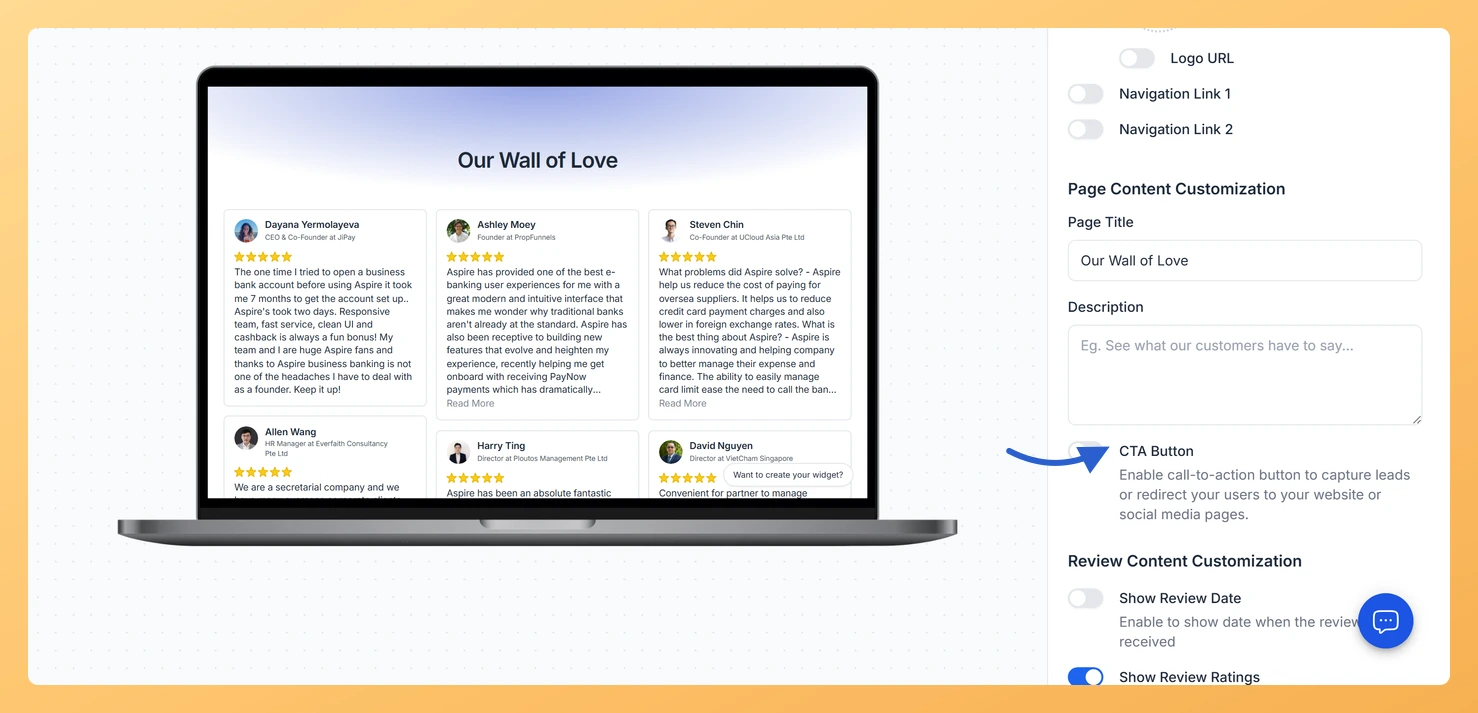
Many Feedspace users wonder whether their Wall of Love page can do more than just display testimonials. The good news is that it absolutely can.
Yes, Your Wall of Love Page Works as a Standalone Landing Page
Your Wall of Love page is a fully hosted, publicly accessible page with its own unique URL. That means you can share it directly in emails, social bios, and ad campaigns without embedding it on another website. Visitors land on a dedicated page that showcases your best social proof, and with a few customisations, it feels exactly like a purpose-built landing page.
Step 1: Add an inline CTA
An Inline CTA block lets you place a button anywhere on your Wall of Love page. Link it to your signup page, pricing page, or checkout flow so that visitors who are convinced by your testimonials have a clear next action. This single addition turns your testimonials page into a conversion-focused landing page.
Step 2: Customise the header, background and navigation
Feedspace gives you control over the visual appearance of your Wall of Love page. Update the header with your logo and brand name, choose a background colour or image that matches your brand palette, and adjust the navigation links to guide visitors where you want them to go. These changes make the page feel like a natural extension of your website rather than a third-party tool.
Step 3: Connect a custom domain
By default your Wall of Love page lives on a Feedspace subdomain. Connecting a custom domain lets you serve the page at an address like reviews.yourbrand.com or testimonials.yourbrand.com. A branded URL builds trust with visitors and reinforces your identity throughout the entire customer journey, from the first click to the final conversion.
Step 4: Share the URL
Once your page looks and feels like a proper landing page, start using its URL everywhere. Add it to your email signature, link to it from your Instagram bio or LinkedIn profile, include it in paid ad copy, and reference it in outbound sales emails. Every visitor who lands on the page encounters concentrated social proof, which shortens the path from interest to purchase.
What’s next
Open your Wall of Love page settings and add an Inline CTA button that links to your signup or purchase page.
Customise your page header, background colour, and navigation to match your brand identity.
Connect a custom domain so your page URL reflects your brand instead of the default Feedspace subdomain.
Copy your Wall of Love page URL and add it to your email signature, social bios, and marketing campaigns.
Common questions
Can I hide the Feedspace branding on the page?
The Branding tab in the page editor controls what shows. What you can turn off depends on your plan.
Will the page work on a phone?
Yes. Use the Phone view beside the preview in the editor to check how it reads before you share it.
You might also find helpful
What Is a Wall of Love Page in Feedspace?
Overview A Wall of Love page is a dedicated, standalone web page in Feedspace that collects and displays your customer reviews in one beautiful, shareable location. Unlike embedding reviews inside a website page, a Wall of Love page exists on its own unique URL that you can share with anyone,...
How Do I Add an Inline CTA to My Wall of Love Page?
Overview An inline CTA is a call-to-action card that appears within the review grid on your Wall of Love page. Instead of placing a single button at the top, inline CTAs appear between reviews so visitors see your offer while they are actively reading testimonials, at the moment their trust...
How to Add a Custom Domain in Feedspace
Overview Adding your own custom domain to Feedspace helps reinforce your brand and may improve traffic. Below is a simple, step-by-step walkthrough to get your custom domain up and running. Before you start A custom domain is available on plans that include it. If your current plan does not, Feedspace...