
Feedspace Home Dashboard

How to Import Reviews from Glassdoor into Feedspace

Last updated on October 31, 2025

Overview

Feedspace allows you to import company reviews from Glassdoor, one of the most trusted platforms for employee feedback and workplace ratings. With this integration, you can display real employee testimonials on your website or Wall of Love to build brand credibility and attract top talent.

Step 1 – Open Import Reviews in Feedspace

  1. Log in to your Feedspace account.
  2. From the sidebar, click Import Reviews.
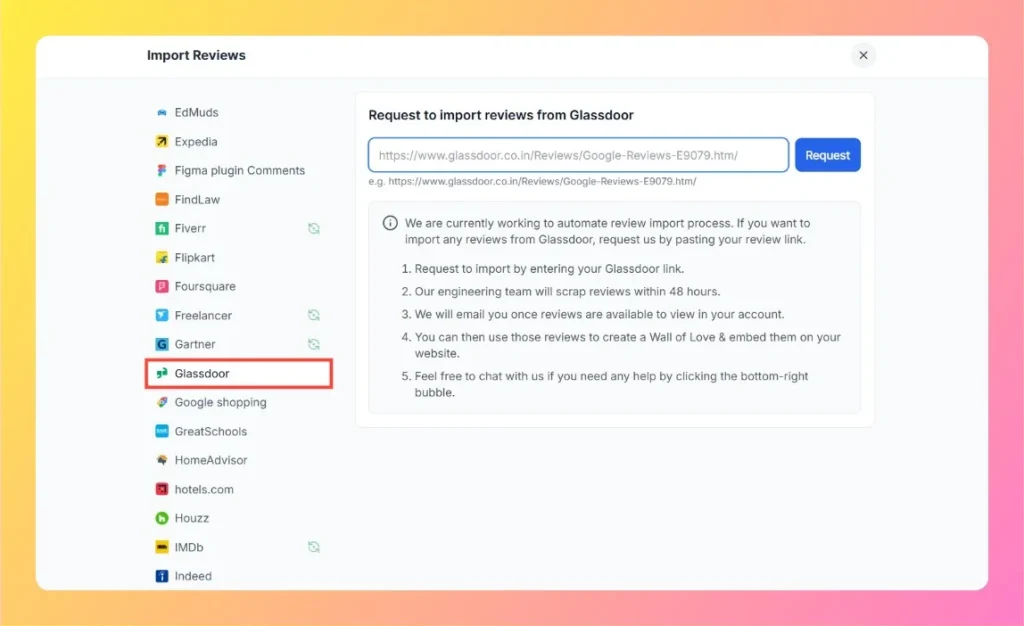
  3. In the Other Platforms section, select Glassdoor.

Step 2 – Enter Your Glassdoor Company Link

  1. Visit your company’s Glassdoor profile page.
    Example: https://www.glassdoor.co.in/Reviews/Google-Reviews-E9079.htm
  2. Copy the full URL of your company’s review page.
  3. Paste it into the input field in Feedspace.
  4. Click Request.
Enter Glassdoor Review Link

Step 3 – Review Import Process

  1. Feedspace’s engineering team will scrape the reviews from your Glassdoor profile within 48 hours.
  2. Once the data import is complete, you’ll receive an email notification when the reviews are ready in your account.

Step 4 – Manage and Display Your Reviews

After the import is complete, you can:

  • View and manage the reviews in your Feedspace dashboard.
  • Use them to create a Wall of Love that showcases your company culture.
  • Embed the reviews on your careers page or corporate website to boost employer branding.

Step 5 – Need Help?

If you encounter any issues during the process, click the chat bubble at the bottom-right corner of your Feedspace dashboard to contact support.

You might also find helpful

How to Import Posts from LinkedIn into Feedspace

Overview LinkedIn posts often feature professional reviews, shoutouts, and thought leadership. Importing LinkedIn posts into Feedspace lets you highlight these valuable moments on your website. Steps to Import Posts from LinkedIn Step 1 – Log into Feedspace Use your Feedspace credentials to log in. Step 2 – Select Workspace Pick...

How to Import Reviews from G2 into Feedspace

Overview Feedspace makes it easy to import your G2 reviews directly using the Feedspace Chrome Extension.This allows you to bring your authentic customer reviews from G2 into your Feedspace account to display them on your Wall of Love, widgets, or other pages seamlessly. Step 1 – Install Feedspace Chrome Extension...

Steps to Import Reviews from AppSumo

Overview AppSumo is a well-known platform for discovering software tools, and users often leave detailed reviews about their experiences with apps. Importing these reviews into Feedspace allows you to present authentic user feedback directly on your website. This can improve transparency and provide insights into how your products or services...