Feedspace can import the reviews people leave on your Android app’s Google Play Store listing. You paste the app’s Play Store link, fetch its reviews, and choose which ones to bring into your workspace.
A typical use: a fitness app team pulls its five-star Play Store reviews into Feedspace and shows them on the app’s landing page, so visitors see real user ratings right next to the download button.
Click Import in the left sidebar. You land on the Automated Import tab.
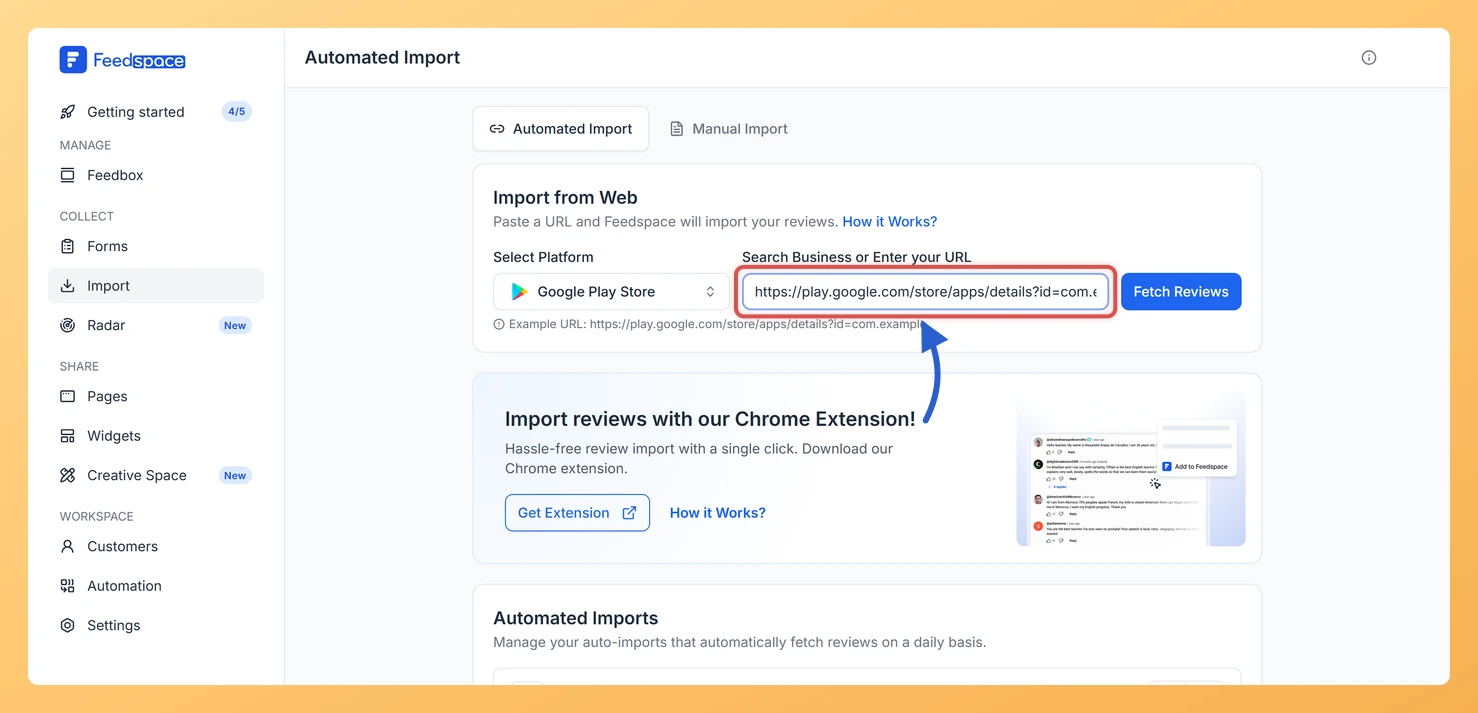
Step 3: Paste your Google Play Store URL
Paste your app’s Google Play Store URL into the input field. Feedspace detects the platform automatically and shows a Fetch Reviews button.
Step 4: Fetch the reviews
Click Fetch Reviews. Feedspace loads your app’s reviews in a list, each with a checkbox.
Step 5: Select and import your reviews
Tick the reviews you want to keep, or use Select All to choose them all. If you want to tag the reviews with labels or translate them into another language, click Customized Import in the footer bar first and set your options (Auto Translate is a premium feature). Then click Import Review in the footer bar to add the selected reviews to your workspace.
What if Feedspace says it cannot import from my link?
Feedspace shows a card asking if you are trying to import reviews from that platform, along with an example link in the correct format. Compare your link with the example, paste the corrected link, and try again.
You might also find helpful
How to Find Your Google Play Store URL?
Follow these simple steps to get your app’s Play Store link: Step 1: Open the Google Play Store Go to the Google Play Store on your desktop browser or open the Play Store app on your mobile phone. Step 2: Search for your app Type your app’s name into the...
How Do I Import Reviews from Google Business into Feedspace?
Overview Feedspace can import reviews straight from your Google Business Profile. You find your listing by typing your business name or pasting its Google Maps link, then choose which reviews to bring in. A typical use: a dental clinic with a strong Google rating pulls its best patient reviews into...
How to import reviews of App Store into Feedspace
Overview The App Store is a widely used platform where users share reviews for mobile apps. Importing these reviews into Feedspace allows you to showcase genuine feedback directly on your website, helping to build trust and increase user engagement. Whether you’re promoting your app or service, displaying App Store reviews...