Clients review the Redfin agents who helped them buy or sell a home. Feedspace fetches the reviews from your Redfin agent page so you can choose which to import.
Agents put these reviews on their own website, where a seller choosing an agent wants to hear from people who have worked with them.
Steps to import reviews from Redfin
Step 1: Open the Import page
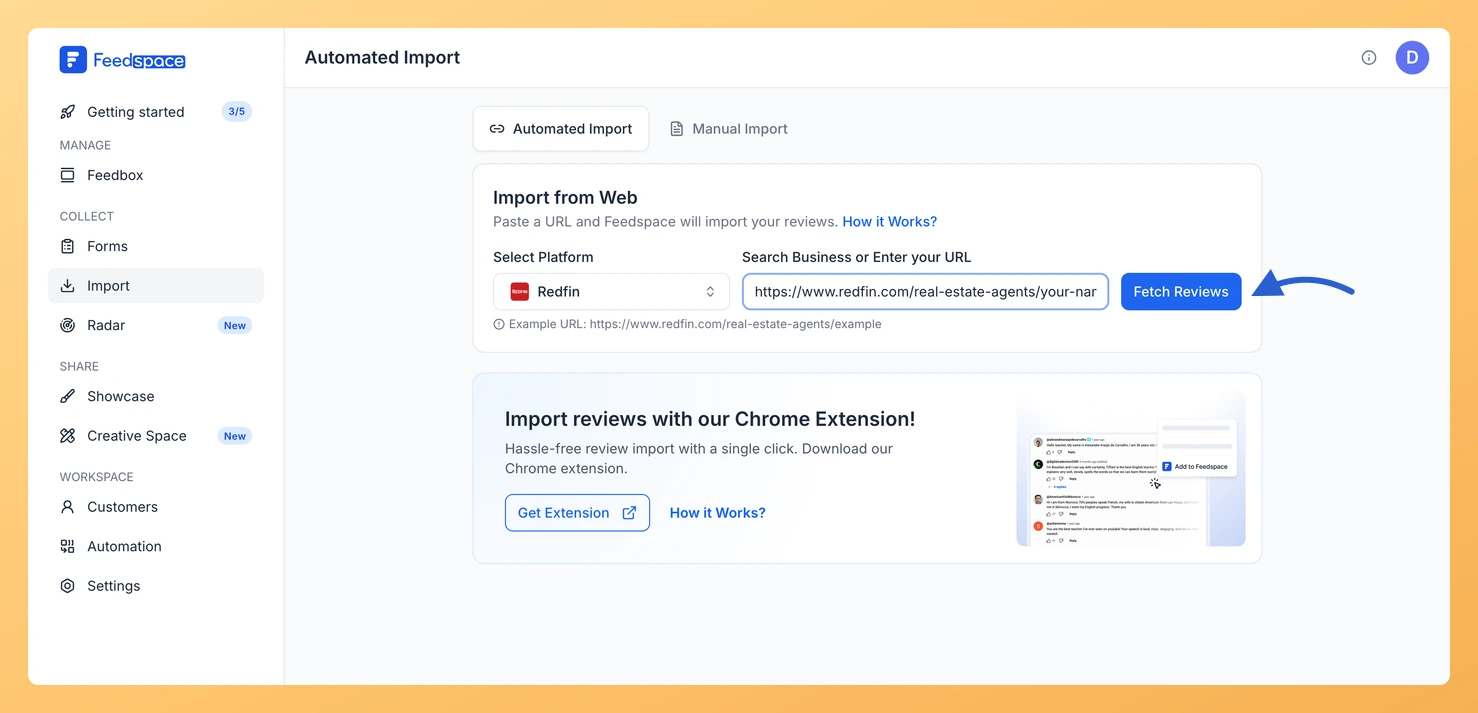
Open Feedspace, go to Import in the sidebar and stay on the Automated Import tab, where Import from Web sits at the top.
Step 2: Copy your Redfin agent page link
On Redfin, open your agent page and copy its address. It looks like https://www.redfin.com/real-estate-agents/your-name, and the same link with /reviews on the end works too.
Step 3: Paste the link and click Fetch Reviews
Paste your agent page link into Search Business or Enter your URL. Feedspace picks Redfin under Select Platform on its own; click Fetch Reviews.
Step 4: Choose the reviews and import them
Client reviews show up under Fetched Reviews from Redfin. Tick the ones to feature, or use Select All, and click Import Review. In Import Reviews with Customization, add labels if useful and click Import Reviews.
They can. When the link has no active auto import, a Setup Auto Import banner sits above the fetched reviews. Click it, pick any options in the dialog that opens and confirm with Setup Auto-Sync. Feedspace will then import new Redfin reviews every day. If auto import is not in your plan, or your plan’s auto imports are all in use, Feedspace shows the upgrade options instead.
You might also find helpful
How to Import Reviews from Zillow into Feedspace
Overview Clients review real estate agents on Zillow. Feedspace fetches the reviews from your Zillow profile so you can choose which to import. Agents put these reviews on their own website and listing pages, where a seller comparing agents can read them without going to Zillow. Steps to import reviews...
How to Import Reviews from Realtor.com into Feedspace
Overview Feedspace enables real estate professionals to import client testimonials and property feedback directly from Realtor.com. By integrating your Realtor.com reviews into Feedspace, you can showcase authentic client experiences on your website and build credibility with potential buyers and sellers. Step 1: Open import in Feedspace Log in to your...
How to Import Reviews from ImmoScout24 into Feedspace
Overview Feedspace enables businesses to showcase customer feedback by importing reviews from ImmoScout24. ImmoScout24 is Germany’s largest real estate platform connecting buyers, renters, and property owners with verified reviews. By integrating ImmoScout24 reviews into your Feedspace dashboard, you can display authentic customer experiences on your website, build credibility, and attract...