Merchants review apps on the Shopify App Store. Feedspace fetches the reviews from your app’s listing so you can import the ones that best show what your app does for stores.
App makers use these reviews on their own landing page, where merchants who found the app elsewhere can see what other stores say about it.
Steps to import reviews from Shopify App Store
Step 1: Open Import in your dashboard
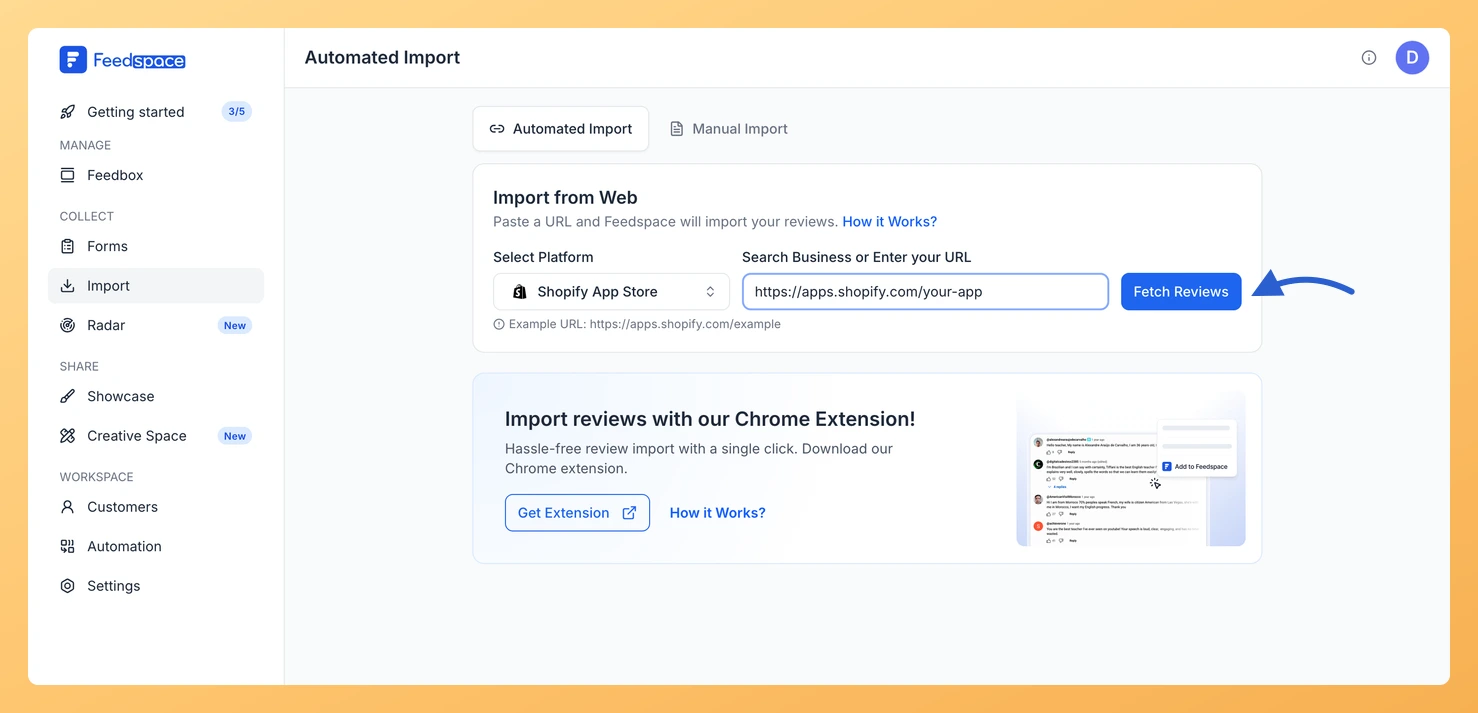
From the Feedspace sidebar, click Import. The Automated Import tab opens, and its Import from Web card takes your app link.
Step 2: Copy your app listing link
Open your app on the Shopify App Store and copy the address, which looks like https://apps.shopify.com/your-app.
Step 3: Paste the link and click Fetch Reviews
Paste the listing link into Search Business or Enter your URL. Feedspace selects Shopify App Store under Select Platform. Click Fetch Reviews.
Step 4: Choose the reviews and import them
Tick the reviews you want under Fetched Reviews from Shopify App Store, or click Select All. Click Import Review, then finish with Import Reviews in the customization dialog, where labels are optional.
What’s next
Show merchants what other stores say on your landing page with a widget or a Wall of Love page.
Can I import reviews for a Shopify theme the same way?
Yes, with the theme’s own link from themes.shopify.com. Feedspace selects Shopify Theme instead and the steps are the same.
Will new app reviews import automatically?
They can. When the link has no active auto import, a Setup Auto Import banner sits above the fetched reviews. Click it, pick any options in the dialog that opens and confirm with Setup Auto-Sync. Feedspace will then import new Shopify App Store reviews every day. If auto import is not in your plan, or your plan’s auto imports are all in use, Feedspace shows the upgrade options instead.
You might also find helpful
How to Import Reviews from Shopify Theme into Feedspace
Overview Shopify Theme reviews give prospective storeowners practical feedback on design quality, performance, and support. Importing Shopify Theme reviews into Feedspace helps you present authentic user perspectives where visitors can see them. Use the workflow below to complete the import efficiently. Steps to import reviews from Shopify Theme Step 1:...
How to Embed Wall Of Love in Shopify
Overview Feedspace Wall of Love embed code can be easily added to any Shopify store. This simple process helps you showcase customer trust directly on your Shopify pages. By following the steps below, you can embed the code in minutes. Step 1: Log in to Your Shopify Account Go to...
How to Embed Widget in Shopify
Overview Feedspace widgets can be placed on any Shopify store page. This method helps you highlight testimonials and customer trust directly on your Shopify site. Step 1: Access your Shopify account Go to Shopify and log in to your admin dashboard. Step 2: Open the theme customizer Step 3: Add...