
Feedspace Home Dashboard

How Do I Find a Specific Review in Feedspace?

Last updated on June 5, 2026

Overview

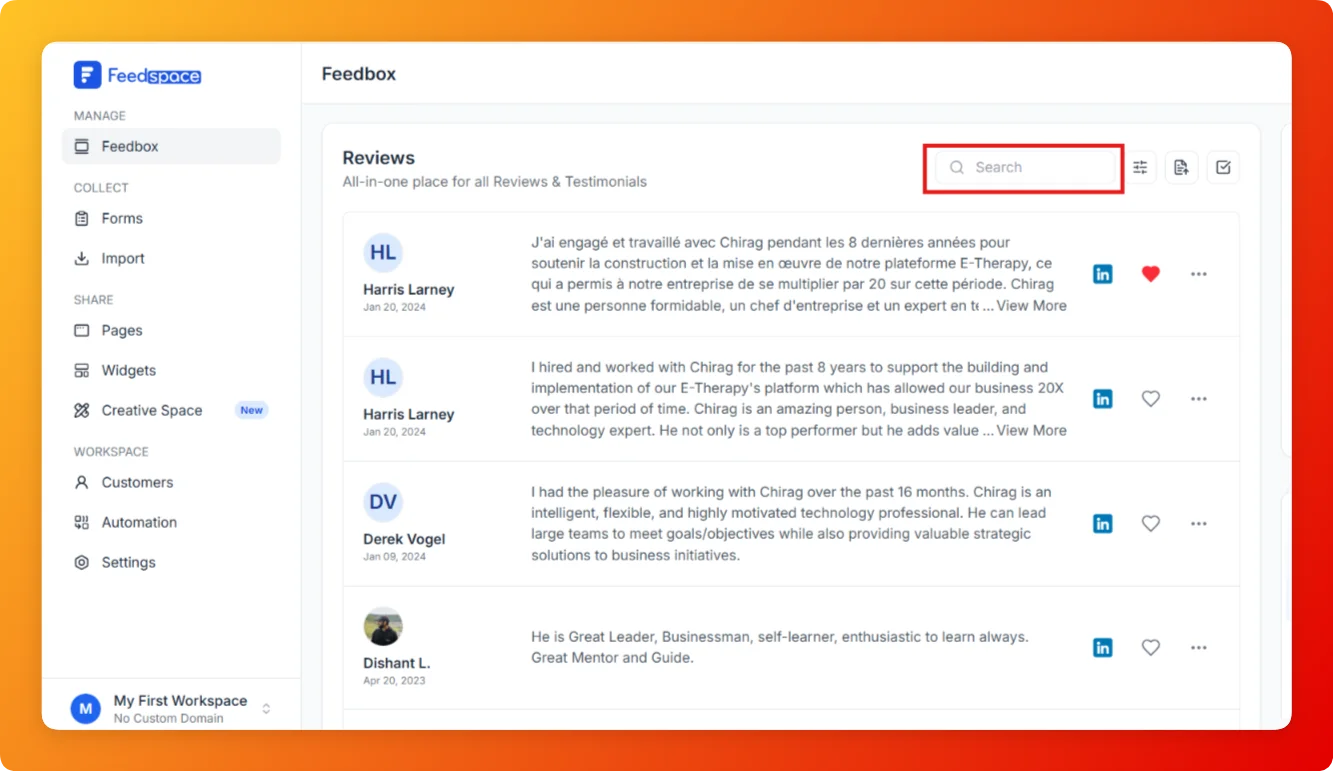
If you have many reviews and need to locate one quickly, the Search bar in Feedbox lets you find any review by typing the reviewer’s name or a keyword from the review text no scrolling required.

Steps

  1. Open Feedbox from the sidebar under Manage.
  2. Click the Search bar at the top right of the Reviews list.
  1. Type the reviewer’s name, a keyword from the review, or a company name.
  2. The list updates in real time to show only matching reviews.
  3. Clear the search field to return to the full list.

Tips

  • Search works across reviewer names and review text content.
  • Combine search with filters for more precise results for example, search a name and also filter by platform.
  • If no results appear, check for typos or try a shorter keyword.

You might also find helpful

How to Use Filters in Feedspace

Overview Feedspace provides advanced filtering options so you can quickly find and manage the reviews that matter most. Steps 1 Go to Feedbox Navigate to the Feedbox section in your Feedspace dashboard. Click on Filters: On the top-right corner, click the Filters button to open filtering options. Step 2 Apply...

Where Are All My Reviews? Getting Started with Feedbox in Feedspace

Overview Feedbox is your central hub inside Feedspace where every review you have ever collected whether from forms, imported from platforms, or added manually appears together in one list. If you are wondering where your reviews went or how to access them all, Feedbox is the answer. How to Open...