
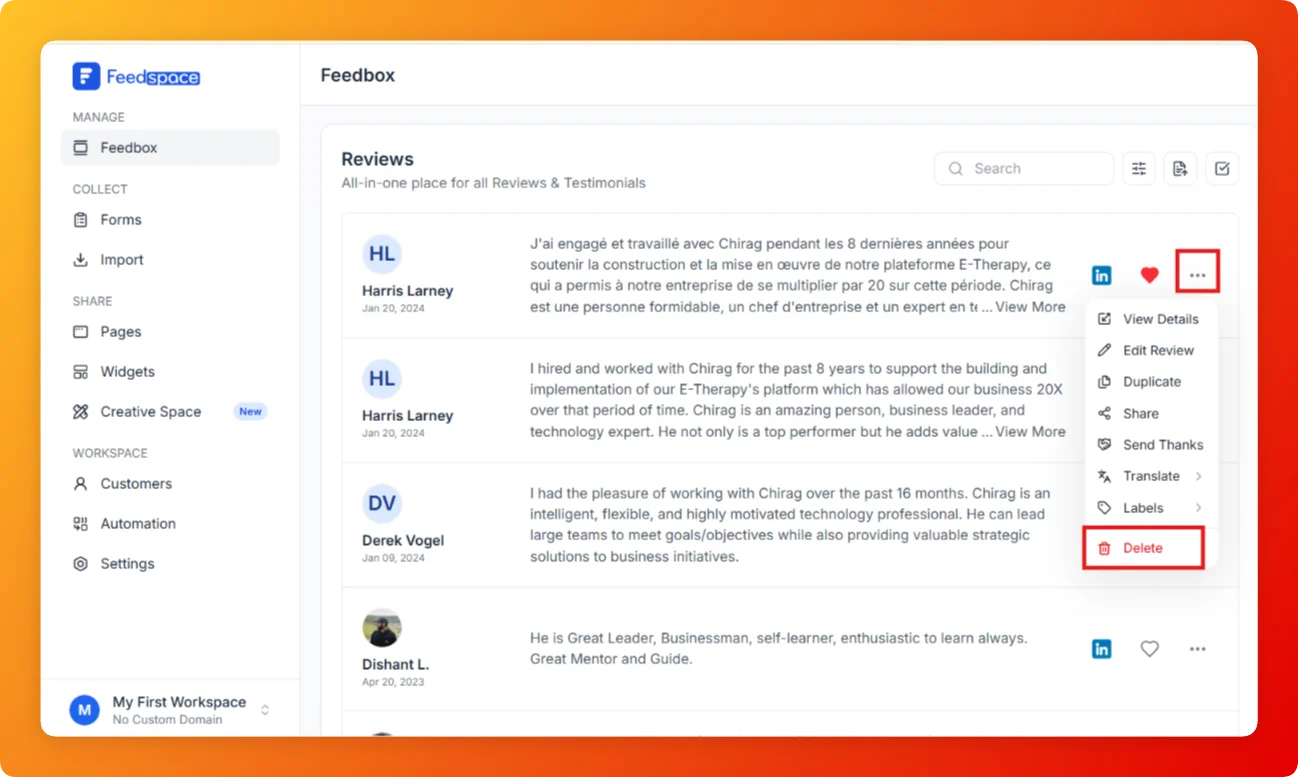
Feedspace Home Dashboard

How to Delete a Review in Feedspace

Last updated on June 5, 2026

Overview

If you need to remove a review that is no longer relevant, inaccurate, or was added by mistake, the Delete option in Feedbox permanently removes it from your account.

Steps

  1. Open Feedbox from the sidebar under Manage.
  2. Find the review you want to delete.
  3. Click the three-dot menu on the right side of the review card.
  4. Click Delete (shown in red at the bottom of the menu).
  1. Confirm the deletion when prompted.
  2. The review is permanently removed from your Feedbox.

Tips

  • Deletion is permanent and cannot be undone make sure you want to remove the review before confirming.
  • If the review is already added to a Widget or Wall of Love page, removing it from Feedbox will also remove it from those displays.
  • If you only want to hide a review temporarily instead of deleting it, consider using Labels to tag it for later rather than deleting.

You might also find helpful

How to Edit a Review in Feedspace

Overview Feedspace allows you to easily edit the details of imported or collected reviews. This is helpful if you want to update user info, correct details, or add missing fields like company name, designation, or email. Step 1 Go to Feedbox Navigate to your Feedbox from the left sidebar. Here,...

How to Duplicate Reviews

Overview Duplicating reviews in Feedspace allows you to quickly create a copy of an existing review.This feature is useful when you want to reuse or modify a testimonial for different widgets or pages without rewriting it manually. Step 1 Go to Feedbox Log in to your Feedspace account. From the...

How to Manage Review Labels in Feedspace

Overview Feedspace allows you to manage your review labels at the workspace level. This includes options to rename and delete existing labels, ensuring that any changes made will apply to all reviews within the workspace that are assigned those labels. Step 1 Log in to Feedspace Start by logging into...