
Feedspace Home Dashboard

How to View Full Details of a Review in Feedspace

Last updated on June 5, 2026

Overview

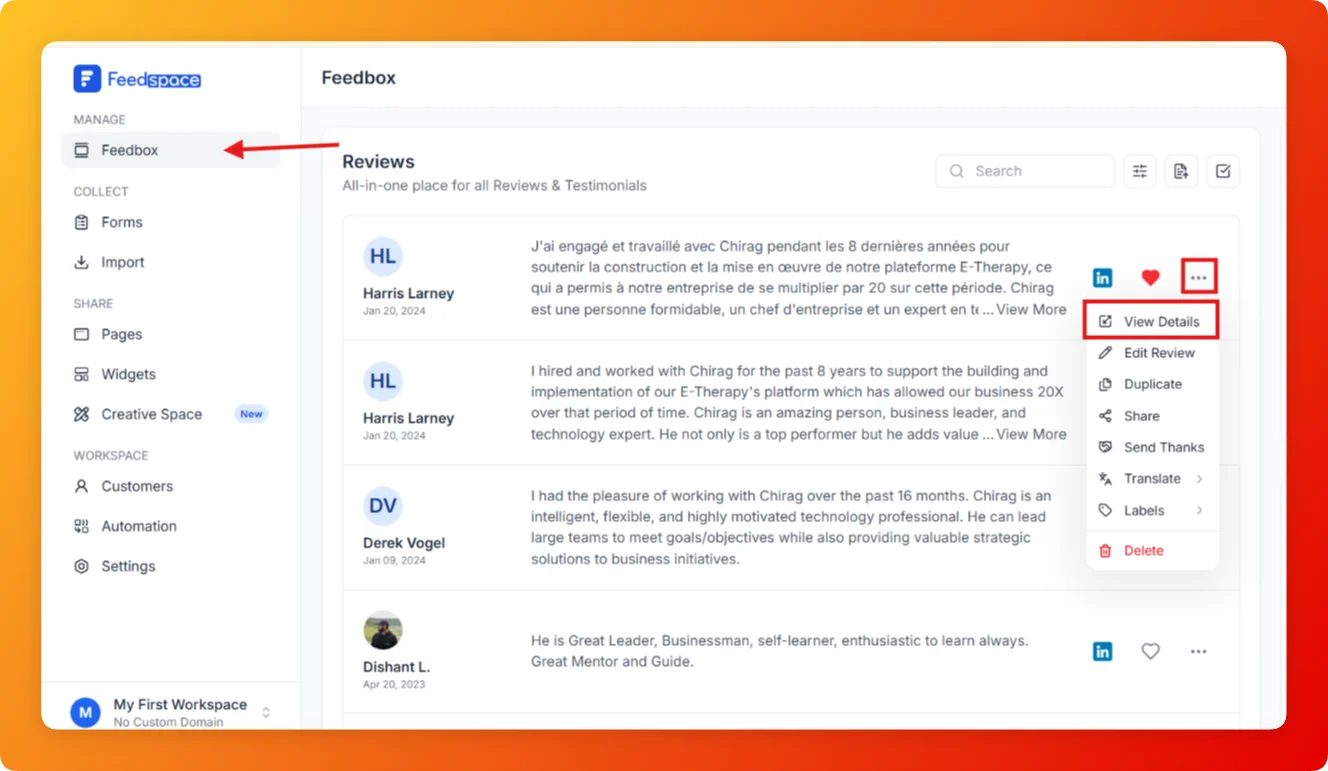
Each review card in Feedbox shows a short preview of the review text. If you want to see the full review along with all reviewer details, platform information, and metadata, the View Details option opens the complete review in one place.

Steps

  1. Open Feedbox from the sidebar under Manage.
  2. Find the review you want to inspect.
  3. Click the three-dot menu on the right side of the review card.
  4. Click View Details.
  1. The full review detail view opens showing the complete review text, reviewer name, date, platform source, star rating, and sentiment.

Tips

  • Use View Details before editing or sharing a review to confirm you have the right one.
  • The detail view also shows which form the review was collected from, if applicable.
  • You can take other actions (Edit, Share, Translate) directly from the detail view without going back to the list.

You might also find helpful

How to Edit a Review in Feedspace

Overview Feedspace allows you to easily edit the details of imported or collected reviews. This is helpful if you want to update user info, correct details, or add missing fields like company name, designation, or email. Step 1 Go to Feedbox Navigate to your Feedbox from the left sidebar. Here,...

How to Translate a Review in Feedspace

Overview Feedspace lets you translate any review into multiple languages directly from the Feedbox. This helps you display testimonials in your audience’s language and showcase reviews from international customers to a wider audience. Step 1 Go to Feedbox Navigate to your Feedbox from the left sidebar. Here, you’ll see the...