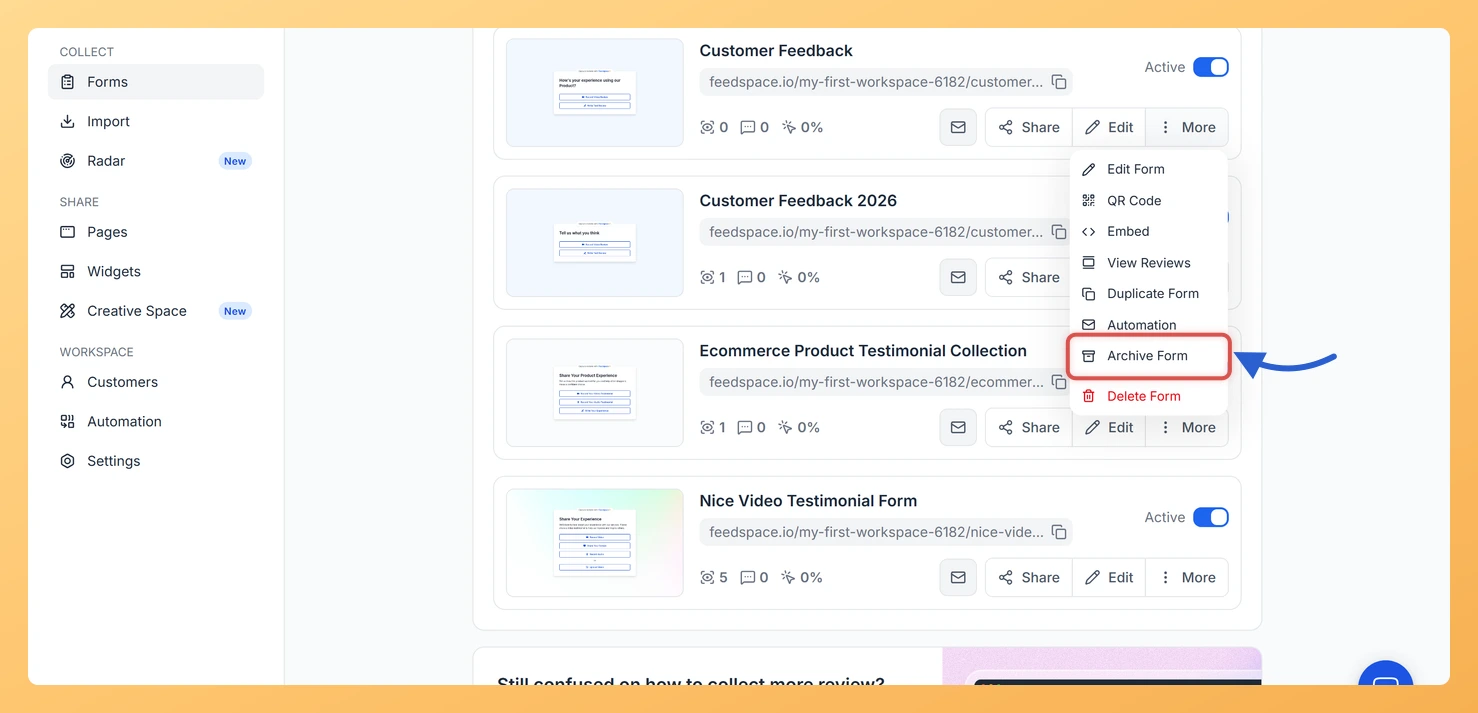
An old form that is no longer actively collecting reviews can clutter your Forms list and count against your plan limit. Archiving puts the form away without deleting anything. The form stops appearing in the main list, frees a plan slot, and can be brought back whenever you need it.
Archived forms keep all their reviews, and the public link keeps working, so old QR codes and email links do not hit a 404. The form simply stops taking new reviews until you bring it back.
Steps to archive a form
Log in to your Feedspace dashboard and click Forms in the left sidebar.
Find the form you want to archive and click More on the form card.
Click Archive Form, which sits just above Delete Form in the menu.
The Archive Form window opens and lists what happens while the form is archived: it stops collecting, it frees a plan slot, and its reviews and link stay as they are. Click Yes, Archive Form. Unlike deleting, there is nothing to type to confirm.
The form leaves the main list immediately. A View archived forms link then appears at the bottom of the Forms page. The link is only there once you have at least one archived form, so do not look for it before you archive something.
Steps to unarchive a form
Click View archived forms at the bottom of your Forms list. It is labelled Hide archived forms once the section is open.
The archived forms appear below your live forms.
Click More on the archived form card and click Unarchive.
The form returns to the main list and starts taking reviews again.
If you are already at your plan’s form limit, unarchiving is refused and the form stays archived. Workspace owners see an upgrade prompt; admins and editors are asked to contact the owner.
What’s next
Once you have archived a form you no longer need, consider deleting it permanently if you are sure it will not be needed again. Or duplicate an existing form to create a new one based on a template you already have.
Common questions
Does archiving delete my reviews?
No. All reviews you collected through the form stay in your Feedbox and remain visible on any Wall of Love or widget showing them. Only the form itself is put away.
What happens to the form’s public link after archiving?
The link keeps working, so old QR codes, email links and embed codes do not break. The form no longer takes new reviews while it is archived.
Can I archive a form if I am already at my plan limit?
Yes. Archiving frees a plan slot immediately, so you can archive a form to make room for a new one even if you are at your limit.
You might also find helpful
How Do I Delete a Review Form in Feedspace?
You can permanently delete any review form from the Forms page using the three-dot menu on the form card. Deleting a form removes the form itself but keeps all reviews you collected through it, so those reviews remain safe in your Feedbox. The form’s public link and embeds stop working,...
How Do I Pause and Resume My Feedspace Form Automation?
Pausing your form automation immediately stops all outgoing emails without deleting your sequence or removing customers from your list. It is the right choice when you need to update your emails, take a seasonal break, or investigate an issue, and you want to pick up exactly where you left off...
How Do I Duplicate a Review Form in Feedspace?
Duplicating a form in Feedspace creates an exact copy of an existing form including all its settings, tab configuration, and branding. This saves time when you want to create a similar form for a different product, campaign, or team without starting from scratch. What You Can Do What Gets Copied...