

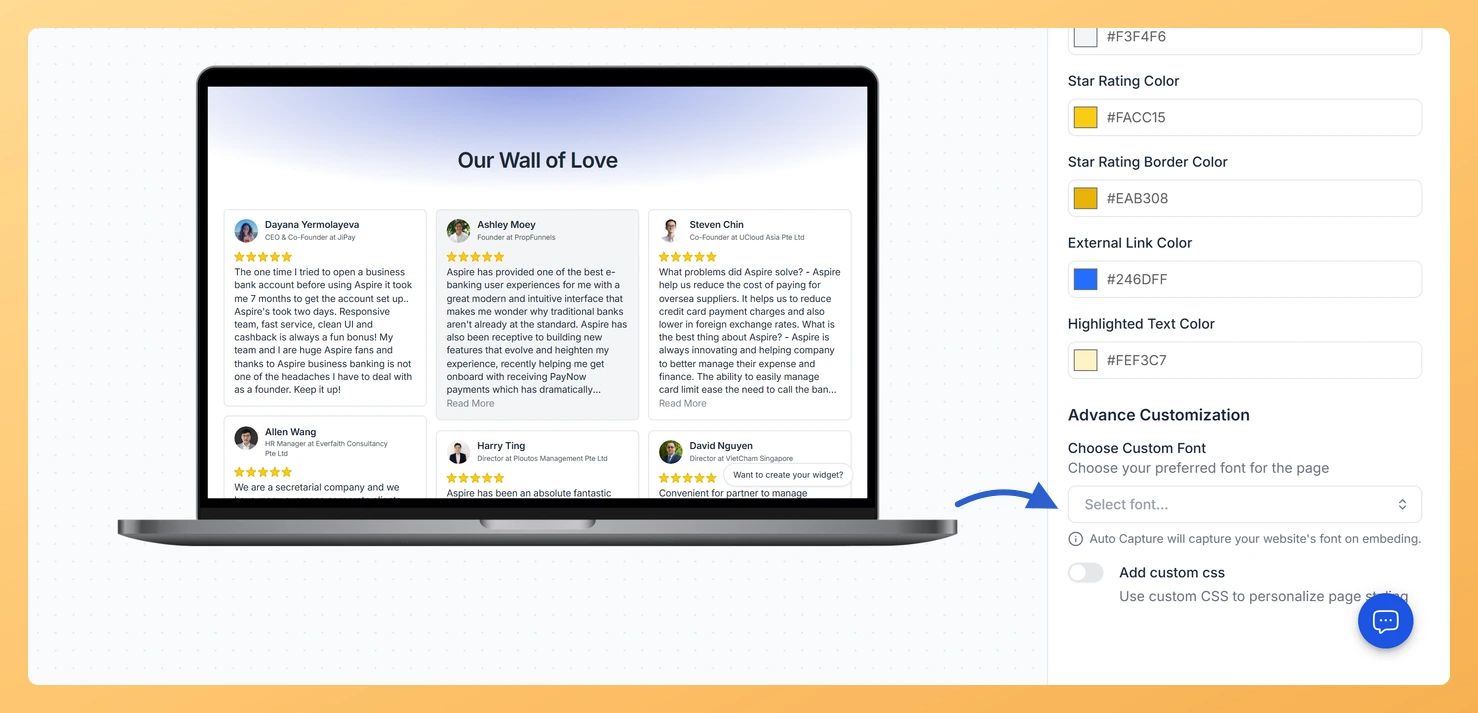
Feedspace Home Dashboard

How Do I Change the Font on My Wall of Love Page?

Last updated on June 11, 2026

Steps to Change the Font

Step 1: Open the Design Tab

  1. Log in to your Feedspace account.
  2. Go to Pages and click the edit icon on the page you want to update.
  3. Click the Design tab in the editor.
  4. Scroll to the bottom of the right panel to find the Font section, located below the color settings.

Step 2: Open the Font Picker

Click the font family dropdown or picker to browse available fonts. The list includes a range of typefaces suitable for different brand styles, from clean sans-serif fonts to more distinctive options.

Step 3: Select a Font

Click a font name to select it. The live preview on the left side of the editor updates immediately so you can see how the font looks across your page title, review text, reviewer names, and other content before saving.

Step 4: Save Your Changes

Once you are happy with how the font looks in the preview, click Save & Next to apply it to your published page.

Using Custom CSS for Advanced Font Control

If you need more control over font size, weight, line height, or letter spacing, use the Add Custom CSS option in the same Design tab. See How to Use Custom CSS in Wall of Love for details.

What You Can Do with Font Customization

  • Match the Wall of Love page typography to your website and marketing materials for a cohesive brand experience.
  • Choose a highly readable font to make long review text easier for visitors to scan.
  • Use a distinctive font to give your page a unique visual identity that stands out.
  • Combine the font picker with custom CSS for full typographic control over size, weight, and spacing.

You might also find helpful

How to Create a Wall of Love Page in Feedspace

Steps to Create a Page Log into Feedspace Sign in with your account credentials. Go to Pages From the left sidebar, click Pages. Create Page Click Create Page. This opens the creation screen with some reviews auto-selected in the space. Select Reviews Go to the Select Review page and choose...

How to Use Custom CSS Option in Wall of Love

Overview Feedspace gives you the flexibility to customize the look and feel of your Wall of Love using Custom CSS.This feature allows you to personalize font styles, colors, spacing, and other design elements to match your brand identity. Step 1: Go to Page Design Step 2: Enable “Add Custom CSS”...

How Do I Customize the Background of My Wall of Love Page?

Steps to Customize the Background Step 1: Open the Design Tab Step 2: Choose a Background Type Select how the background behind your reviews will look: Step 3: Customize Card and Text Colors Scroll down to find individual color pickers for each part of the page. Click any swatch to...