
Overview
The Avatar Group widget in Feedspace displays a cluster of reviewer profile photos, giving visitors an immediate visual sense of your customer community. Unlike text-heavy widgets, the Avatar Group’s impact depends almost entirely on the faces shown, so choosing the right reviews is critical to making it look polished and trustworthy.
The Select Reviews tab inside the Avatar Group widget editor lets you hand-pick exactly which reviews contribute avatars to the cluster. You can select reviews one at a time using individual checkboxes, or add all visible reviews at once with the Select All button. Prioritising reviewers who have uploaded a profile photo ensures the widget displays real faces rather than placeholder initials, creating a far stronger visual impression of your customer community.
How to Select Reviews for Your Avatar Group Widget
Step 1: Open the Avatar Group Widget Editor
Log in to your Feedspace account and navigate to the Widgets section from the main sidebar. Locate the Avatar Group widget you want to update and click on it to open the widget editor.
Step 2: Go to the Select Reviews Tab
Inside the widget editor, click the Select Reviews tab. This tab shows all the reviews available in your Feedspace account that are eligible to appear in the Avatar Group widget.
Step 3: Select Reviews Using Individual Checkboxes
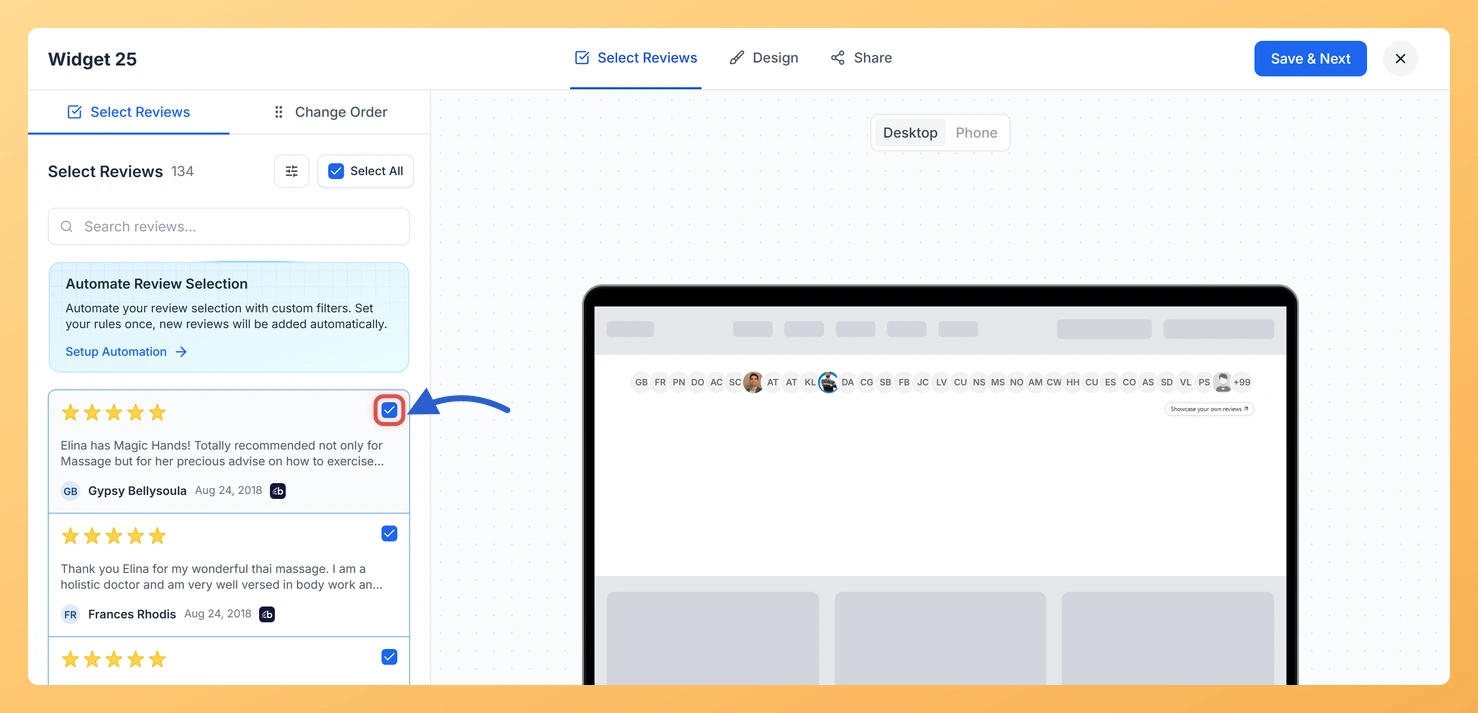
Browse the list of reviews displayed in the Select Reviews tab. Each review card shows the reviewer’s name, profile photo (if available), and their review text. To add a specific review to your Avatar Group widget, click the checkbox on that review card. A checkmark confirms the review has been selected. Repeat this for each review you want to include.
For the best visual result, prioritise reviews from customers who have a profile photo. Real reviewer photos make the avatar cluster look more authentic and create a stronger sense of community trust for visitors viewing the widget.
Step 4: Use Select All to Add All Visible Reviews at Once
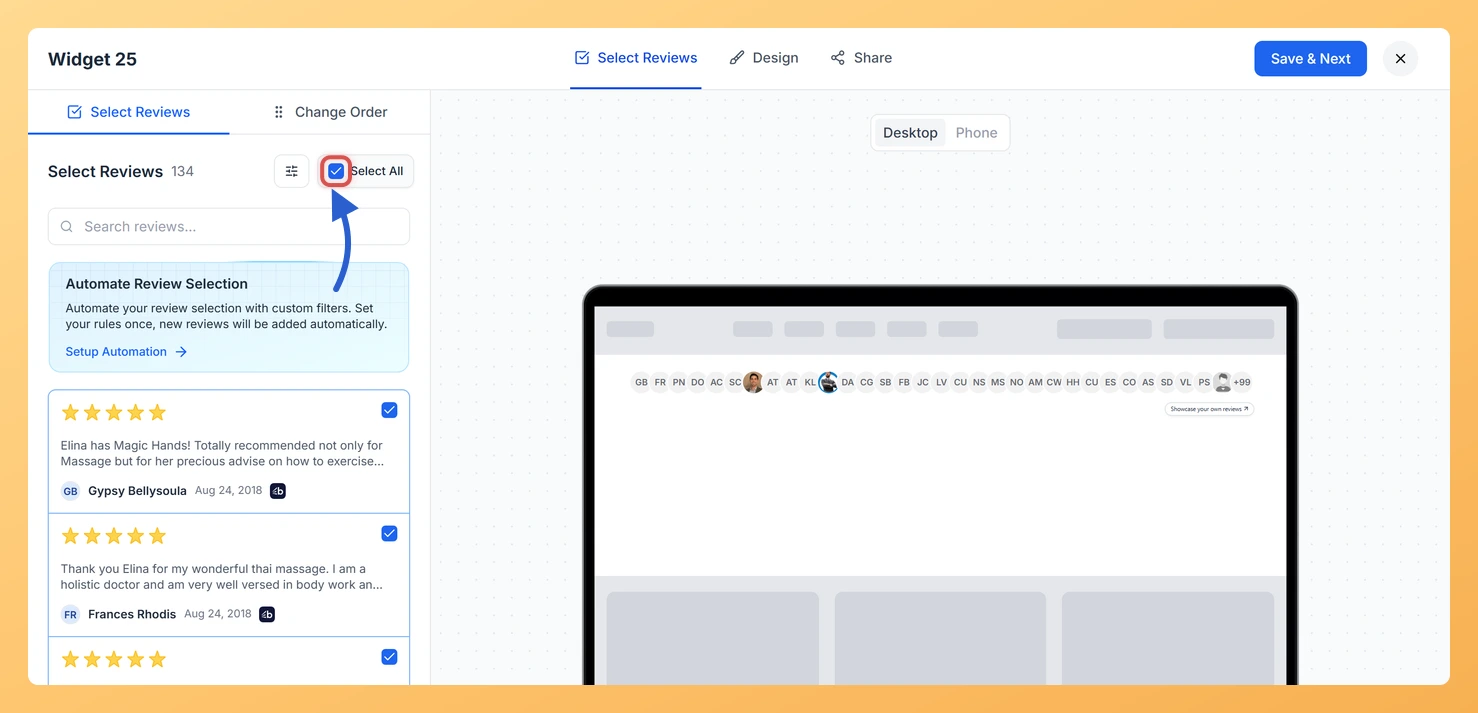
If you want to include all the reviews currently shown in the list, click the Select All button at the top of the Select Reviews tab. This instantly checks every review card on screen, saving you from clicking each one individually. You can then deselect any specific reviews you do not want to include by unchecking their individual checkboxes.
Step 5: Save Your Widget
Once you are satisfied with your selection, click the Save button to apply your changes. The Avatar Group widget will now display avatars only from the reviews you selected. Your live embed or published widget will update to reflect the new selection.
What You Can Do Next
- Use the search and filter options in the Select Reviews tab to narrow the list to reviewers with profile photos before making your selection, so your Avatar Group cluster looks its best.
- Adjust the Avatar Group widget’s display settings, such as avatar size and the number of avatars shown, to complement the reviews you have selected.
- Embed the Avatar Group widget on your homepage or landing page to show visitors a visual snapshot of your customer community right where it has the most impact.
- Return to the Select Reviews tab periodically to add newly collected reviews from customers who have profile photos, keeping the avatar cluster fresh and growing.
You might also find helpful
How to Create an Avatar Group Widget in Feedspace
Overview The Avatar Group widget in Feedspace displays the profile pictures (avatars) of your reviewers in a sleek and minimal circular layout. Itβs ideal for showing social proof in a subtle, space-saving format on your homepage, footer, or testimonial sections. How to Access Step 1 – Log in to Feedspace...
What is a Widget in Feedspace?
Overview In Feedspace, a widget is a customizable display tool that allows you to showcase your collected reviews, testimonials, or feedback directly on your website. With widgets, you can turn customer voices into social proof, helping you build trust and credibility with visitors. Instead of just collecting reviews, widgets let...
How Do I Search and Filter Reviews for My Avatar Group Widget in Feedspace?
Overview The Avatar Group widget in Feedspace displays a compact cluster of reviewer profile photos, creating an instant visual impression of your customer community. Because the widget’s entire impact depends on showing real faces, the quality of the reviews you select matters more here than in any other widget type....