Video testimonials are the best way to prove your product works. A real customer on camera builds trust faster than any sales page. The numbers back this up. Wyzowl found that 79% of people say a testimonial video convinced them to buy. BrightLocal reports that 88% of consumers trust video testimonials as much as a tip from a friend.
Still, most brands do not know how to collect video testimonials from customers without a big budget or a film crew. You do not need either.
This guide shows you the full process from start to finish. You will learn who to ask, when to ask, what to say, which questions to use, and how to make recording simple. By the end, you can start collecting videos this week.
To collect video testimonials from customers, ask your happiest customers right after a win. Send a short request with a recording link. Use a tool like Feedspace so they record on their phone in minutes, with no app to download. Add a few clear questions, then review, approve, and show the videos on your website.
What Is a Video Testimonial?
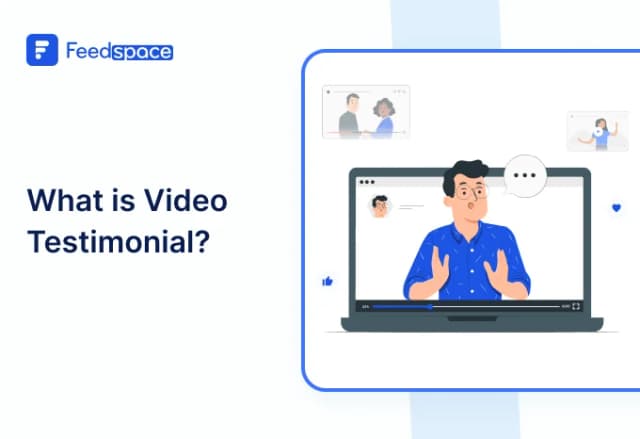
A video testimonial is a short clip where a real customer talks about your product. They share their problem, how you helped, and the result they got.
These videos work because people believe faces, not just text. Viewers see the emotion and hear the honest tone. That makes customer video testimonials one of the strongest forms of social proof you can use.
Why Video Testimonials Work
Written reviews still help. But video wins on trust, memory, and sales.
- People remember video. Studies show viewers keep about 95% of a message from video, but only 10% from text.
- It builds instant trust. A face and a voice are hard to fake, so buyers believe them.
- It lifts conversions. Reviews of A/B tests show video testimonials can raise conversion rates by around 34%, and up to 80% on some sales pages.
- It holds attention. Most people watch a short video before they read a paragraph.
Video testimonials turn happy customers into your best salespeople.
Where to Use Video Testimonials
Collect once, then use them in many places:
- Your homepage and product pages.
- Landing pages, near the buy button.
- Paid ads on social media.
- Sales emails and newsletters.
- Sales calls, demos, and proposals.
- A dedicated Wall of Love page.
Types of Video Testimonials
Not every testimonial looks the same. Pick the type that fits your goal.
- Customer testimonial: A buyer shares their result. This is the most common and most useful type.
- Case study video: A deeper story with numbers, like time saved or sales gained. Great for B2B and SaaS.
- Employee testimonial: Your team shares what it is like to work with you. Good for hiring and culture.
- Expert testimonial: A trusted voice in your field vouches for you. This adds authority.
- Social or UGC clip: A short, casual video a customer posts on their own. It feels raw and real.
Most brands should start with simple customer video testimonials, then add the rest over time.
How to Collect Video Testimonials From Customers: 7 Steps
Here is the full process. Follow these steps in order, and your response rate will climb.
Step 1: Pick Your Best Customers
Start with people who already love you. Look for repeat buyers, five-star reviewers, and customers who hit a clear result.
Check your reviews, support chats, and survey replies. Anyone who said “thank you” or shared a win is a strong pick. These customers are the easiest yes.
Step 2: Ask at the Right Moment
Timing changes everything. Ask when the good feeling is fresh.
Great moments to ask include:
- Right after a customer hits a big result.
- Just after they leave a positive review.
- When they renew or upgrade their plan.
- After your support team solves a problem well.
Do not wait weeks. Ask while the win is still on their mind.
Step 3: Make a Clear, Simple Request
Your ask should be short and easy to say yes to. Tell them what you want, why it helps, and how little time it takes.
Keep three things in your message:
- A warm, personal opening.
- A clear request for a short video.
- A promise that it takes only a few minutes.
You will find ready-to-paste email templates below.
Step 4: Make Recording Easy
This is where most brands lose people. If you ask a customer to book a call or set up a camera, they drop off.
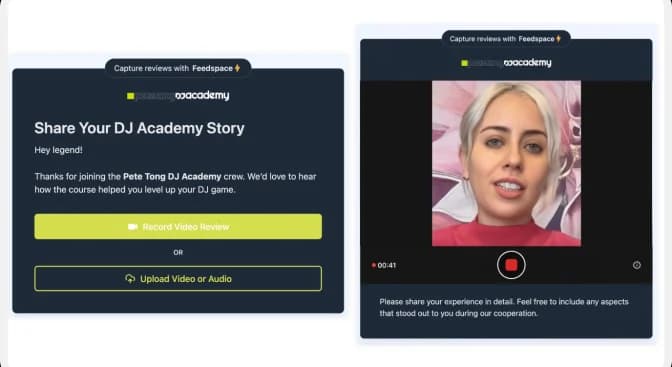
Remove all friction. Send one link. Let them record on their phone or laptop with no app to download. A tool like Feedspace does this for you. Customers click, follow simple prompts, and record in minutes.
Easy recording is the difference between a few videos and a full library.
Step 5: Give Them Good Questions
A blank screen scares people. Clear prompts fix that. When you guide the answer, you get a better video and less rambling.
Give three to five short questions before they record. Feedspace lets you add these prompts right into the recording link.
Step 6: Review and Approve
Once the video comes in, watch it. Check the sound, the light, and the message. Keep the clips that feel honest and clear.
You can trim long pauses or pick the best parts. Good tools store every video in one place, so nothing gets lost.
Step 7: Show Them Off
A testimonial hidden in a folder does nothing. Put your videos where buyers will see them.
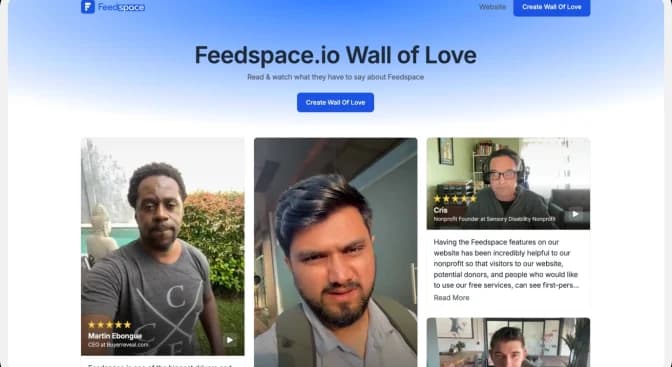
Build a Wall of Love, which is a single page that shows all your best customer videos and reviews together. Add clips to your homepage, product pages, and checkout. With Feedspace, you can embed a Wall of Love in a few clicks.
Best Questions to Ask for a Video Testimonial
Good questions lead to good stories. Use these prompts to get clear, honest answers.
- What problem were you trying to solve before you found us?
- What made you choose our product over others?
- What result have you seen since you started?
- What surprised you the most about working with us?
- Who would you recommend this to, and why?
Pick three or four. Too many questions make the video long and dull.
Testimonial Request Templates
You do not need to write these from scratch. A three-email sequence works best. The first asks, the second sends the link, and the third reminds. Copy them, add the customer name, and send.
Email 1: The First Ask
Email 2: The Link and Steps
Email 3: The Friendly Reminder
Short SMS or WhatsApp Ask
In-App or Post-Purchase Ask
Offer an Incentive (When It Helps)
Some customers record just because they love you. Many will do more with a small reward.
Good incentives include:
- A discount on their next order.
- A free month or a plan upgrade.
- A gift card or a small thank-you gift.
- A shout-out to their brand when you share the video.
Keep the reward honest. You want a real story, not a paid script. Make it clear the review must be their true opinion.
Get Permission Before You Share
Always ask for consent before you post a customer video. This protects your brand and respects your customer.
- Add a simple checkbox or line that says they agree to let you share the video.
- Tell them where you plan to use it, like your website and social media.
- Keep a record of that consent.
Feedspace captures consent as part of the collection flow, so you stay covered. When people know how you will use their video, they feel safe and say yes more often.
How to Record a Video Testimonial (Tips for Customers)
Share these simple tips with your customers. Better clips make your brand look better.
- Find good light. Face a window or a lamp. Never sit with a bright light behind you.
- Use a quiet room. Turn off fans, music, and notifications.
- Hold the phone steady. Prop it up or use a stand.
- Look at the camera. It feels like talking to a friend.
- Keep it short. Sixty to ninety seconds is the sweet spot.
- Be yourself. A real, honest tone beats a perfect script.
One helpful note: a video filmed at home or in an office often feels more real than a studio shoot. Do not chase perfect. Chase honest.
Video Testimonial Examples to Learn From
Strong testimonials share a simple shape. They follow a before, during, and after story.
- The result story: The customer names a clear win, like more sales or saved time.
- The switch story: They explain why they left another tool for yours.
- The doubt story: They share a fear they had, then how you proved them wrong.
When you ask the right questions, your customers will tell these stories on their own.
Read More: Best Video Testimonial Examples
Best Video Testimonial Software
The right tool makes the whole process simple. Look for software that lets customers record with one link and no app. It should also let you add prompts, store clips, capture consent, and display videos in one place.
Feedspace is a video testimonial collection tool that stands out because it does the full job in one place. You can:
- Send a recording link for video, audio, or text testimonials.
- Add custom questions to guide each answer.
- Capture customer consent during the recording flow.
- Import reviews from Google, social media, and other sites.
- Build a Wall of Love and embed it on your site in minutes.
You can start collecting customer feedback for free and grow from there.
Common Mistakes to Avoid
Skip these, and you will collect far more videos.
- Asking too late. The good feeling fades. Ask while the win is fresh.
- Making it hard. Calls and camera setups kill your response rate.
- No clear ask. A vague request gets ignored. Say exactly what you want.
- Skipping questions. A blank prompt leads to a weak, rambling video.
- Forgetting consent. Always get permission before you share.
- Hiding the videos. A testimonial only works when buyers can see it.
Start Collecting Video Testimonials Today
Now you know how to collect video testimonials from customers from start to finish. Pick your happiest customers, ask at the right time, and make recording simple. Guide them with good questions, get their consent, then show the videos where buyers will see them.
You do not need a big budget or a film crew. You need the right process and the right tool. Start with Feedspace for free and turn your happy customers into your best proof.
FAQs
1. How do I collect video testimonials from customers?
Ask your happiest customers right after a win. Send a short request with a recording link. Use a tool like Feedspace so they record on their phone in minutes, then approve and display the videos.
2. What is the best time to ask for a video testimonial?
Ask when the good feeling is fresh. Great moments are right after a customer hits a result, leaves a positive review, or renews their plan.
3. How long should a video testimonial be?
Keep it between sixty and ninety seconds. Short videos hold attention and are easy to share on your site, ads, and social posts.
4. What questions should I ask in a video testimonial?
Ask about the problem they had, why they chose you, and the result they got. Three or four clear questions work best.
5. How do I get customers to record video testimonials?
Make it easy. Send one link they can open on any phone or laptop, with no app to download. Add clear prompts and offer a small thank you if it helps.
6. Do I need permission to use a customer video testimonial?
Yes. Always get consent before you share. Tell the customer where you will use the video and keep a record that they agreed.
7. What is the best software to collect video testimonials?
Look for a tool that lets customers record with one link and no app. Feedspace also lets you add questions, capture consent, store clips, and show them on a Wall of Love.
8. Are video testimonials better than written ones?
Video builds trust faster because viewers see the person and hear their tone. Written reviews still help, but video moves buyers to act.