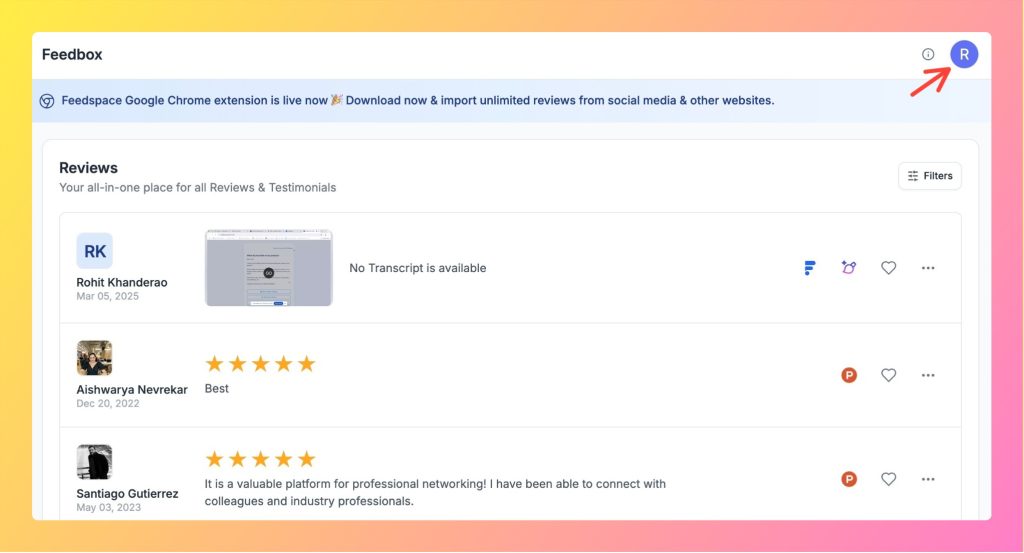
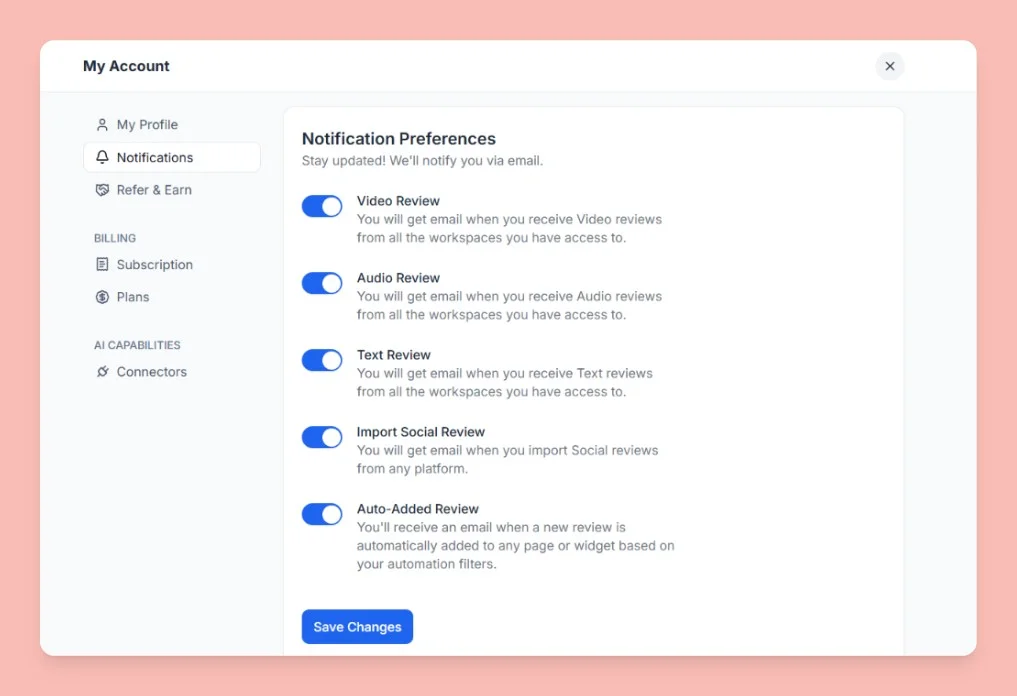
Click your profile avatar at the top-right of the header to open the menu, then click Notifications. This opens the My Account modal on the Notifications tab.
Notification preferences
All notifications are sent by email. Toggle each one on or off based on your preference:
Video Review: Receive an email whenever someone submits a video testimonial through your review form.
Audio Review: Receive an email whenever someone submits an audio testimonial.
Text Review: Receive an email whenever someone submits a text testimonial.
Import Social Review: Receive an email whenever a social review is imported into your workspace.
Auto-Added Review: Receive an email when a review is automatically added to your workspace through an automation or integration.
These toggles control review and import alerts only. Essential account and transactional emails, such as billing receipts, security alerts, and team invitations, are sent separately and are not affected by these settings.
Save your changes
After toggling your preferred notifications, click Save Changes at the bottom of the Notifications tab. Your settings are saved to your account and apply across all workspaces.
Common questions
I am not receiving any review notification emails
Check that the relevant toggle is turned on and that you clicked Save Changes. Also check your email spam folder, as notification emails may be filtered there.
Do notification settings apply to all my workspaces?
Yes. Notification preferences are set at the account level and apply to activity across all workspaces you are a member of.
I turned every notification off but still received some emails
The toggles control only review and import notifications. Account and transactional emails, such as billing receipts, security alerts, and team invitations, are sent separately and continue to arrive even when every review notification is off.
Can I send new review notifications to a different email address?
Review notifications are sent to the email address on your Feedspace account. The Notifications tab controls which review types you receive, not the recipient address. To receive them at another address, update your account email on the My Profile tab, or route review events to a separate inbox or channel using an automation tool. See how to update your profile in Feedspace.
You might also find helpful
How to Update Your Profile in Feedspace
Overview Updating your profile on Feedspace ensures your information is accurate and personalized. Follow the steps below to manage your profile. Step 1: Go to My Account Once logged into your dashboard, click on your profile icon (top right corner) and select My Account from the menu. Step 2: Open...
What is Workspace in Feedspace?
Overview In Feedspace, a Workspace is a dedicated environment where all your review-related data and tools are organized. Think of it as a container that holds everything you need for managing testimonials and reviews in one place. A workspace typically includes: This structure helps you keep things organized and segregated,...
How Do I Create a New Workspace in Feedspace?
Overview Organize your content effectively by creating separate workspaces, whether by project, client, or campaign. Here’s how to set one up: Step 1: Log into Feedspace Visit Feedspace and sign in using your account credentials. Step 2: Open the workspace switcher In the sidebar footer, click the workspace switcher. It...