SEO rich snippets are extra pieces of information that Google can display alongside your page in search results. Instead of showing just a title and a description, Google can show star ratings and a review count directly in the listing. This makes your result stand out and gives people a reason to choose your page over others before they even click.
Feedspace generates the structured data for you, so you do not need to write any schema markup by hand. The feature produces a rich snippet widget with a ready-to-paste embed code. You add that code to a page on your own site, and the snippet is then served from there. It is not applied automatically across every page, you place it where you want the star rating to appear.
What Feedspace adds to your search results
When you enable SEO rich snippets in Feedspace, your workspace generates rating code that search engines can read. It reports your overall average rating in a standard format Google recognises and uses to show:
Star rating: A visual row of stars reflecting your average review score.
Review count: The total number of reviews you have collected.
Feedspace pulls these values directly from the reviews stored in your Feedbox and keeps the schema up to date as new reviews come in.
Why rich snippets matter
Search results with star ratings consistently attract more clicks than plain listings. When someone searches for a product, service, or brand name and sees your page with four or five stars next to it, that social proof builds trust before they even visit your site.
This improvement in click-through rate (CTR) can compound over time. More clicks signal to Google that your page is relevant, which can contribute to better rankings, which in turn brings even more visitors.
Where the rich snippet appears
The star rating can appear in Google search results for the page where you have added the Feedspace snippet code. This is typically:
Your Wall of Love page on a custom domain (for example, reviews.yourbrand.com).
Any page on your website where you embed the Feedspace rich snippet code.
Google decides when and whether to show the rich snippet. Adding the structured data to your page gives Google the information it needs, but display is not guaranteed on every search query.
What you need before enabling rich snippets
Reviews in your Feedbox: Feedspace reads your published reviews to calculate the average rating and review count. You need at least one published review for the schema to have meaningful data.
A custom domain (recommended): Rich snippets are most effective when your Wall of Love page lives on your own domain rather than a Feedspace subdomain. A custom domain adds credibility and ties the star rating directly to your brand in search results.
How to enable SEO rich snippets
You enable and configure rich snippets from the SEO tab inside your workspace settings:
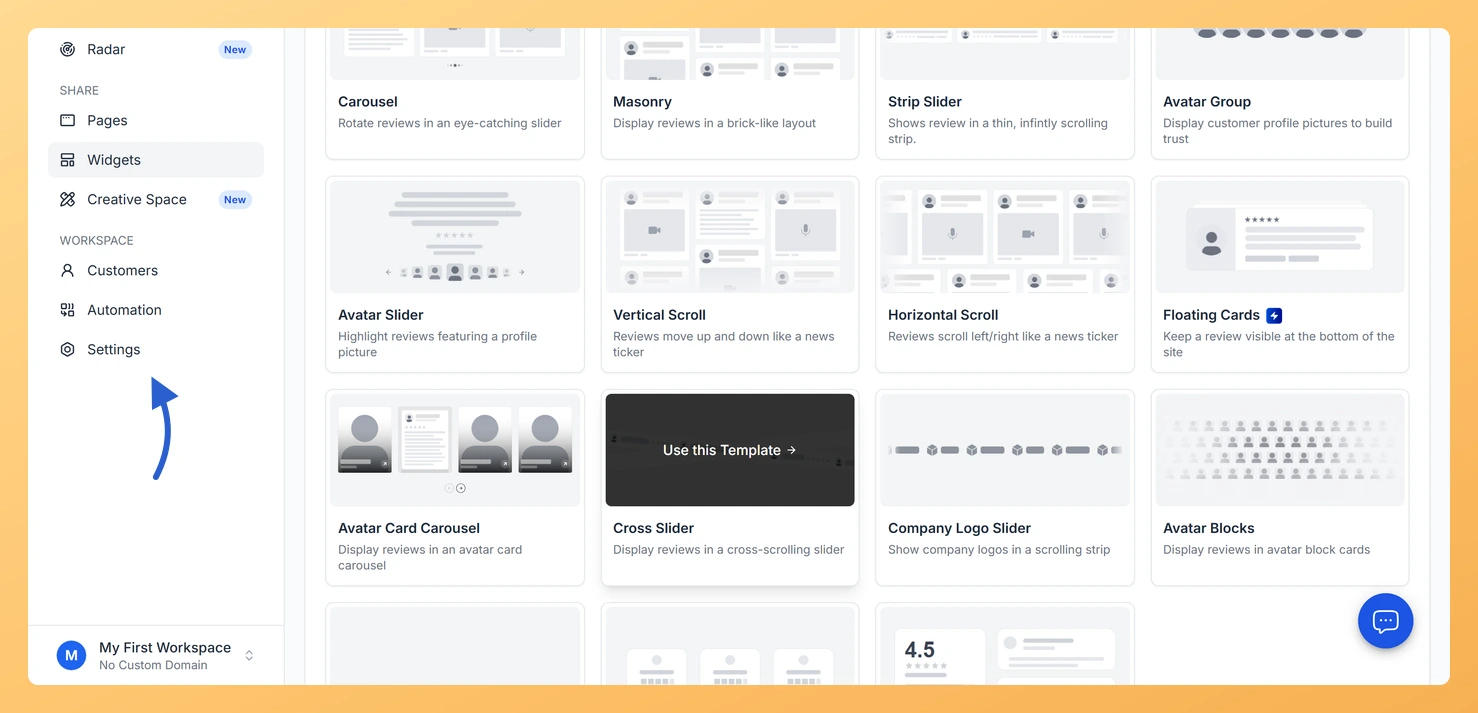
Step 1: Open Settings
In the left sidebar, click Settings under the Workspace section.
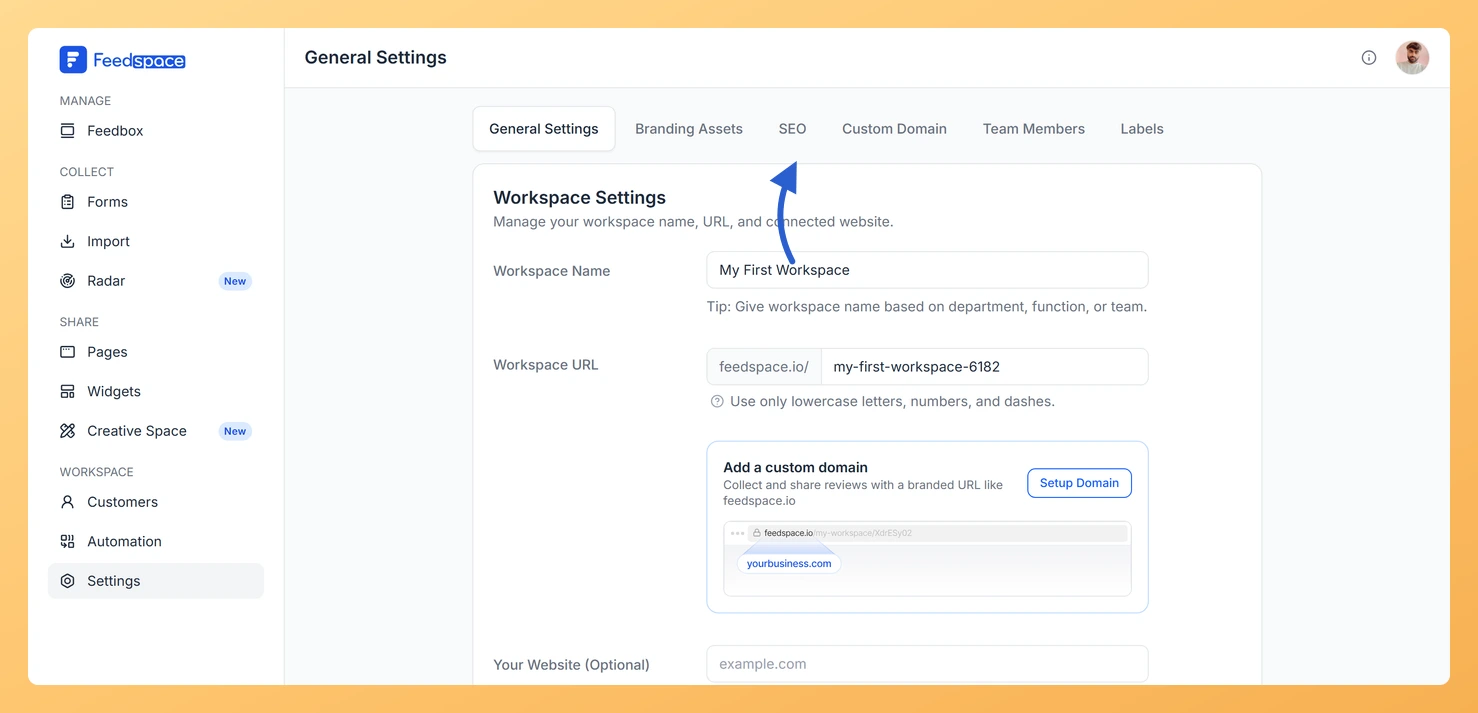
Step 2: Open the SEO tab
Click the SEO tab in the row of tabs across the top of the Settings page. The SEO Rich Snippet screen opens.
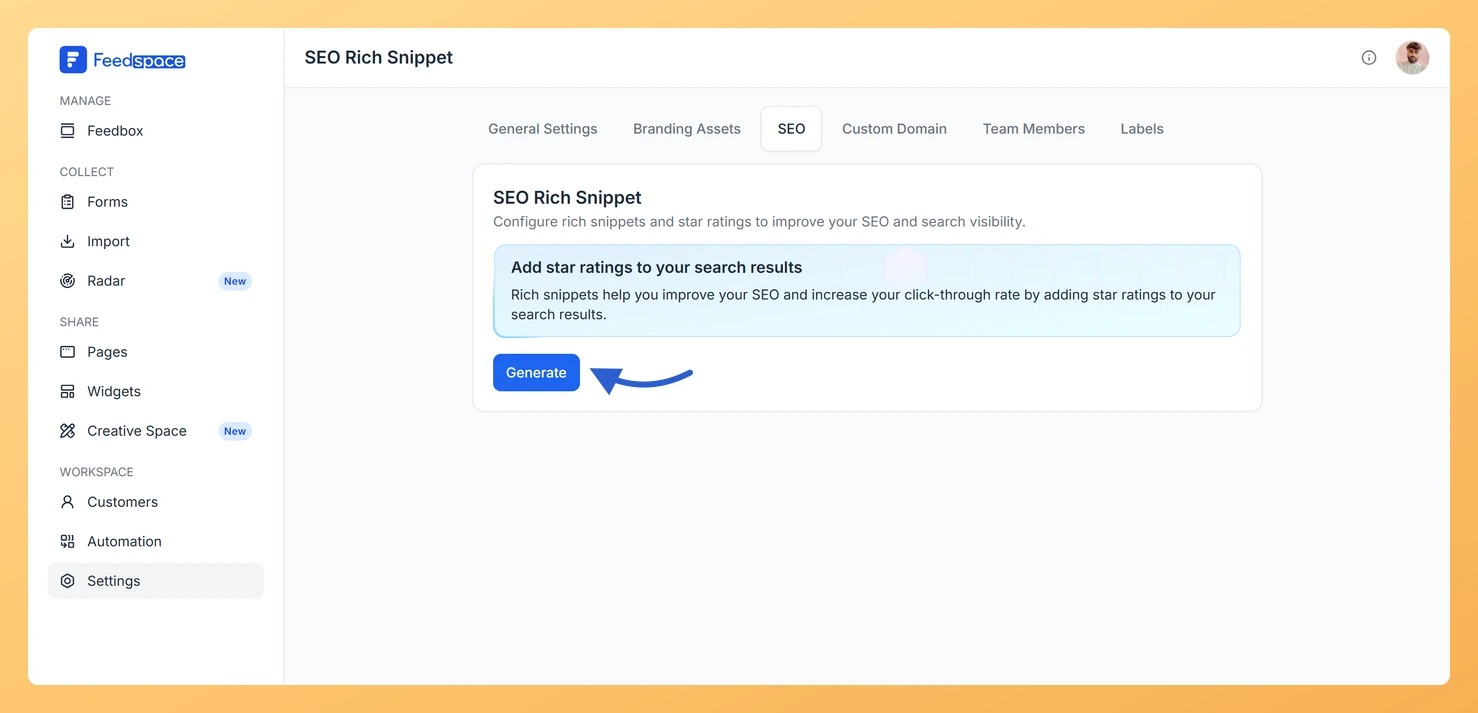
Step 3: Generate your rich snippet
Click Generate to create your rich snippet configuration.
Step 4: Add the code to your website
Copy the code snippet shown and add it to your website following the instructions for your platform (HTML/WordPress, Framer, Next.js, or Angular).
For step-by-step platform instructions, see the related article on setting up SEO rich snippets for your workspace.
Common questions
How long does it take for stars to appear in Google?
After you add the snippet to your website, Google needs to crawl and reindex your page before stars appear in search results. This typically takes a few days to several weeks. There is nothing further to do in Feedspace once the code is live on your site.
Does this affect my Google Business Profile rating?
No. The AggregateRating schema from Feedspace applies to your website page, not your Google Business Profile. Your Google Business Profile rating is separate and comes from reviews left directly on Google.
Do I need a developer to set this up?
Not necessarily. Feedspace provides ready-to-paste code snippets for the most common platforms. If your site runs on a standard platform like WordPress or Framer, you can add the snippet yourself without writing any custom code.
What you can do next
Follow the setup guide to add the rich snippet code to your website.
Set up a custom domain so your Wall of Love page is indexed under your own brand.
Test your structured data using Google’s Rich Results Test after adding the snippet to confirm it is being read correctly.
You might also find helpful
How Do I Set Up SEO Rich Snippets for My Feedspace Workspace?
Overview SEO rich snippets in Feedspace let you display star ratings directly in Google search results for your website. This improves your click-through rate by showing social proof in search listings without the visitor needing to visit your site first. You add a small code snippet to your website that...
What is Workspace in Feedspace?
Overview In Feedspace, a Workspace is a dedicated environment where all your review-related data and tools are organized. Think of it as a container that holds everything you need for managing testimonials and reviews in one place. A workspace typically includes: This structure helps you keep things organized and segregated,...
How to Add a Custom Domain in Feedspace
Overview Adding your own custom domain to Feedspace helps reinforce your brand and may improve traffic. Below is a simple, step-by-step walkthrough to get your custom domain up and running. Before you start A custom domain is available on plans that include it. If your current plan does not, Feedspace...