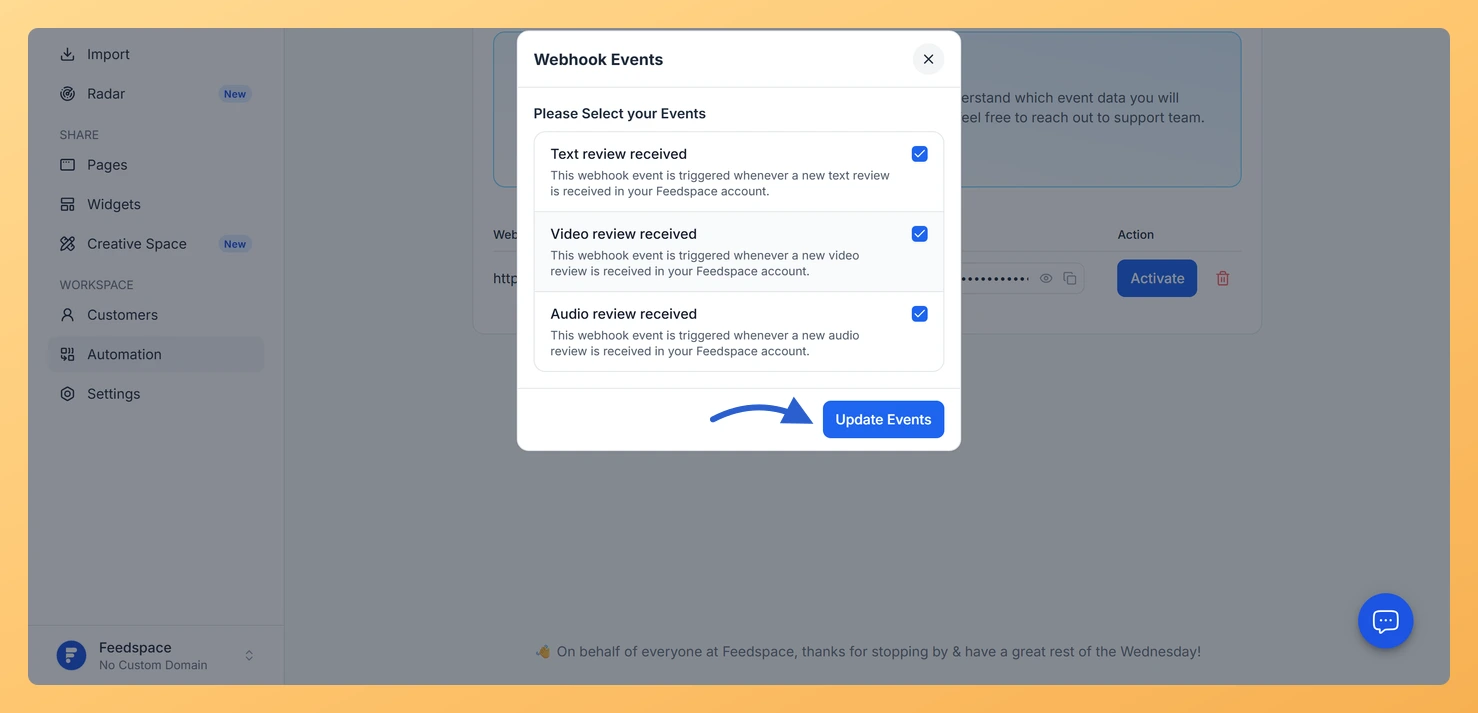
Feedspace webhooks fire when specific review events occur in your workspace. When you create a webhook, all available events are subscribed by default, so any review activity that matches a subscribed event will trigger a notification to your webhook destination (the URL on your server that receives the data).
This is useful for developers who want to react to incoming reviews in real time, for example, routing new reviews to a CRM, triggering a Slack message, or updating a database when auto-synced reviews arrive.
How to check and configure webhook events
Sign in to your Feedspace account and click Automation in the left sidebar under the Workspace section.
Click the Webhook tab at the top of the Automation page.
In the webhook list, find the webhook you want to check. In the Event access column, the Events button shows a badge, either All (all events subscribed) or a number indicating how many events are active.
Click the Events button to open the Webhook Events window. Each event shows its name, a description, and a checkbox.
Review the subscribed events. Check or uncheck events to control exactly which review activities trigger your webhook endpoint.
Click Update Events to save your selection. At least one event must remain selected.
What’s next
With your events configured, test your webhook by checking the data your server receives when a review is added. Use the webhook secret (visible in the Secret column on the Webhook tab) to confirm that incoming requests are genuinely from Feedspace.
Common questions
Are all events subscribed when I first create a webhook?
Yes. When you create a new webhook in Feedspace, all available events are subscribed by default. You can then open Webhook Events from that row to deselect any you do not need.
How do I view the webhook secret to verify incoming requests?
In the Webhook tab, each row has a Secret column. Click the eye icon to reveal the secret value, or click the copy icon to copy it to your clipboard. Use this secret in your server to confirm that incoming webhook requests are genuinely from Feedspace.
What happens if my endpoint returns an error?
If your server address is unreachable or returns an error response, the webhook delivery will fail for that event. Check your server logs for errors and use the Feedspace webhook documentation for details on retries and what the data looks like.
You might also find helpful
What is Webhook in Feedspace?
Overview Webhooks in Feedspace let your external applications receive instant notifications whenever an event occurs in your workspace. Instead of repeatedly polling the API for updates, Feedspace pushes event data to a URL you provide the moment something happens, making your integrations faster and more efficient. For example, a development...
How Do I Create a Webhook in Feedspace?
Overview A webhook in Feedspace sends real-time data to a URL you control whenever a review event occurs. You create the webhook by entering your server’s endpoint URL, and then select which review events should trigger it. This lets you receive notifications or trigger workflows in your own system the...
How Do I Manage Webhook Events in Feedspace?
Overview When you create a webhook in Feedspace, all available events are subscribed by default. You can update the event selection at any time to limit which review events trigger your webhook, without deleting or recreating it. How to select events for a webhook Available webhook events What’s next Common...