
Feedspace Home Dashboard

How Do I Use the Feedspace API?

Last updated on June 22, 2026

Overview

The Feedspace API lets you connect your software with Feedspace programmatically. You can create, update, and retrieve reviews directly from your own application or pipeline without using the Feedspace dashboard.

A common use is pulling your testimonials into your own backend, CRM, or app so they show up where your customers already are, or pushing review data from your product into Feedspace as it comes in. You authenticate each request with an API Key you generate in your dashboard. API access depends on your plan, so generate your keys to confirm it is available on your account.

Getting started

  1. Visit the official API documentation at docs.feedspace.io to browse available endpoints and request formats.
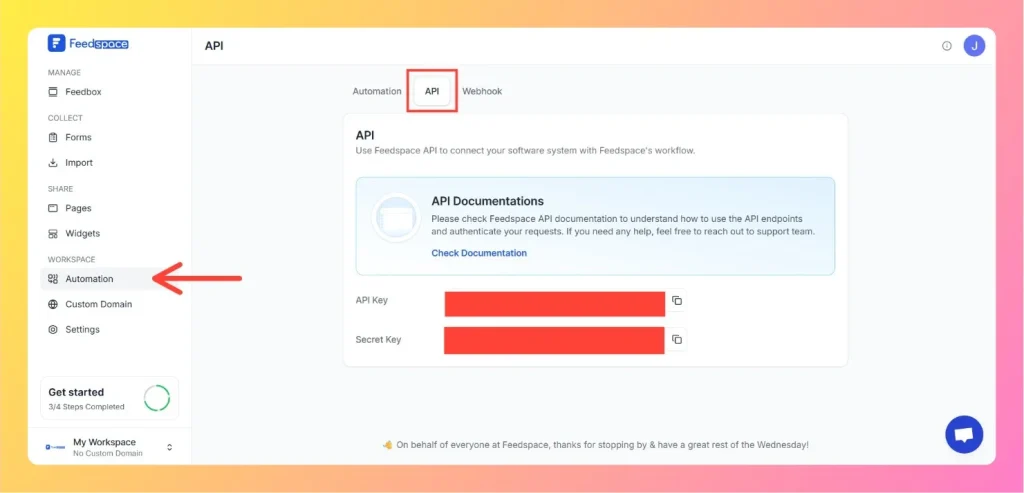
  2. Log in to your Feedspace account, click Automation in the left sidebar, then click the API tab.
  3. Click Generate API Keys to create your API Key and Secret Key. Copy the API Key and store it securely. Do not share it publicly.
  4. Include your API Key as a Bearer token in every request header: Authorization: Bearer YOUR_API_KEY
Click on Automation in Left Sidebar

What’s next

With your keys generated and the documentation open, build your first request against the endpoints you need. For a step-by-step walkthrough of creating and copying your keys, see how to generate API keys in Feedspace. If you want Feedspace to push events to your server instead of polling the API, set up a webhook.

Common questions

Where do I find my API Key and Secret Key?

Both live on the API tab in Automation. Click Generate API Keys the first time to create them. After that the fields stay masked, and you copy either one with the copy button beside it.

Is the API the same as the Automation Secret Key?

No. The API Key and Secret Key on the API tab are for direct REST API calls. The Automation Secret Key on the Automation tab is a separate credential used by no-code tools like Zapier and Pabbly Connect. Use the API keys for your own code.

Which endpoints and request formats are available?

The full list of endpoints, parameters, and response shapes is maintained at docs.feedspace.io. The same link is available from the API Documentation banner on the API tab.

You might also find helpful

What is API in Feedspace?

Overview The Feedspace API lets you connect your own software systems directly with Feedspace. It lets you programmatically send, receive, and manage reviews and testimonials, making it easier to integrate Feedspace into your existing tools and processes. For example, an e-commerce platform can use the API to trigger a review...

What is Webhook in Feedspace?

Overview Webhooks in Feedspace let your external applications receive instant notifications whenever an event occurs in your workspace. Instead of repeatedly polling the API for updates, Feedspace pushes event data to a URL you provide the moment something happens, making your integrations faster and more efficient. For example, a development...

What is Automation in Feedspace?

Overview Automation in Feedspace lets you connect your workspace with other tools and services. Using the Feedspace Automation Secret Key, API, and webhooks, you can send real-time notifications to apps like Slack, Telegram, WhatsApp, and Discord, back up testimonials to Google Drive or Dropbox, and push event data to any...