
Feedspace Home Dashboard

How Do I Use Webhooks in Feedspace?

Last updated on June 22, 2026

Overview

Feedspace provides webhooks to notify your application about important events in real-time. With webhooks, you can automatically trigger workflows in your system whenever reviews are collected on Feedspace.

Reference: Feedspace Webhook Documentation

Step 1: Access the webhook tab

  1. Log in to your Feedspace account and click Automation in the left sidebar.
  2. Click the Webhook tab.
  3. Click Create Webhook.

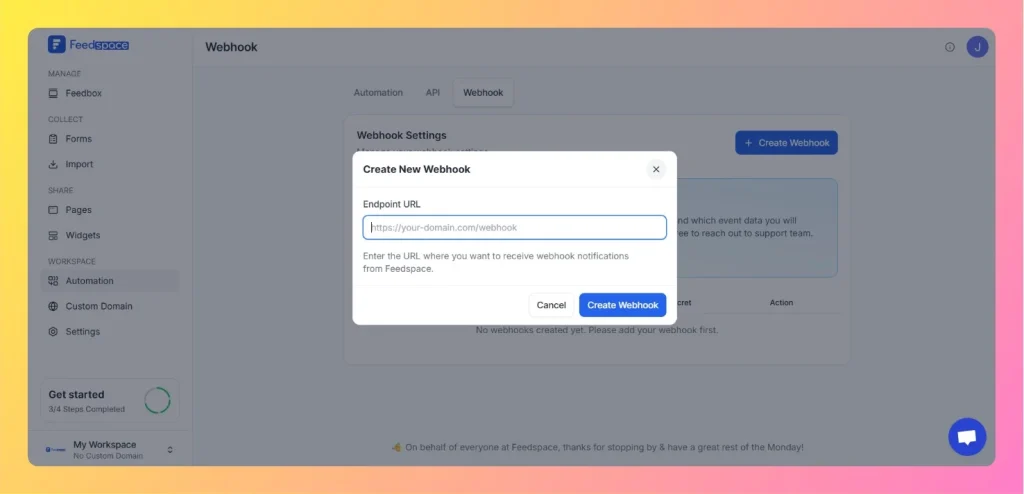
Step 2: Add your endpoint URL

  1. Enter the URL where you want Feedspace to send data in the Endpoint URL field. For example: https://your-domain.com/webhook
  2. Click Create Webhook.
Create New Webhook

Step 3: Select events to receive

Click the Events button on the webhook row to choose which events trigger webhook calls:

  • Text Review Received: triggers when a text review is submitted.
  • Video Review Received: triggers when a video review is submitted.
  • Audio Review Received: triggers when an audio review is submitted.

Click Update Events to save your selection.

Step 4: Handle webhook data

When an event occurs, Feedspace sends a JSON payload to your endpoint with details about the review.

You might also find helpful

What is Webhook in Feedspace?

Overview Webhooks in Feedspace let your external applications receive instant notifications whenever an event occurs in your workspace. Instead of repeatedly polling the API for updates, Feedspace pushes event data to a URL you provide the moment something happens, making your integrations faster and more efficient. For example, a development...

What is Automation in Feedspace?

Overview Automation in Feedspace lets you connect your workspace with other tools and services. Using the Feedspace Automation Secret Key, API, and webhooks, you can send real-time notifications to apps like Slack, Telegram, WhatsApp, and Discord, back up testimonials to Google Drive or Dropbox, and push event data to any...

What is API in Feedspace?

Overview The Feedspace API lets you connect your own software systems directly with Feedspace. It lets you programmatically send, receive, and manage reviews and testimonials, making it easier to integrate Feedspace into your existing tools and processes. For example, an e-commerce platform can use the API to trigger a review...