In-person events, trade shows, workshops, product launches, conferences, are ideal moments to collect reviews. Attendees are engaged, the energy is high, and face-to-face interactions create the kind of goodwill that makes people want to give back. Feedspace’s QR code feature lets you collect reviews on the spot without any paperwork or manual follow-up.
Overview
Collect video, audio, and text reviews from attendees on the spot using a QR code
Let customers submit reviews from their own phone with no app or account needed
Print the QR code on banners, cards, receipts, or display it on a screen
Capture authentic in-the-moment reactions while enthusiasm is at its peak
What you need
A Feedspace review form with video and text review options enabled
The QR code for the form (opened from the form’s More options menu, on the Share tab)
A printed QR code on a banner, card, or screen, or a phone/tablet to show it digitally
Steps to collect reviews at an event
Step 1: Prepare the form
Create a form specifically for the event. Set the title to something event-specific: “How was your experience at [Event Name]?” Enable video and text options. Keep user detail fields minimal, Name and Email only, so the experience is fast.
Step 2: Open the QR code
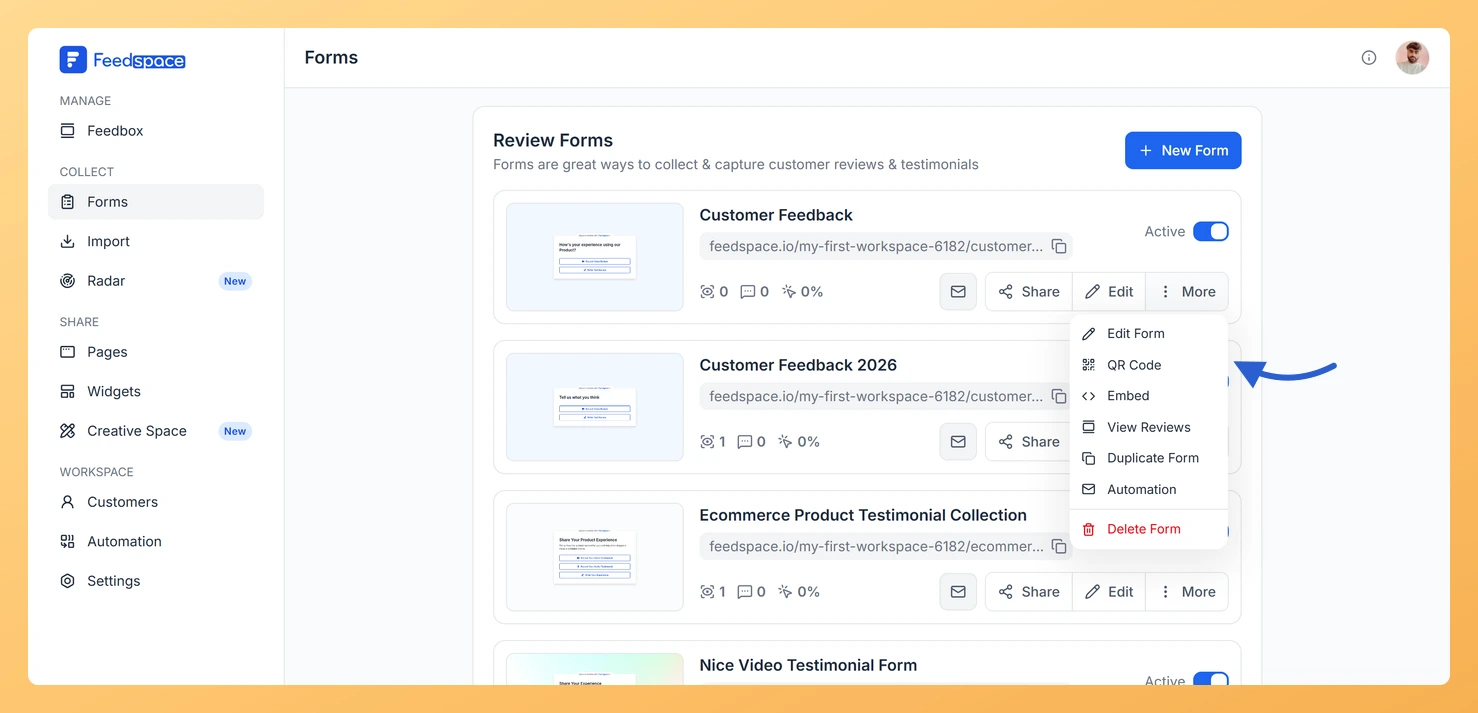
On the Forms page, open the form’s More menu and click QR Code.
Step 3: Download the code
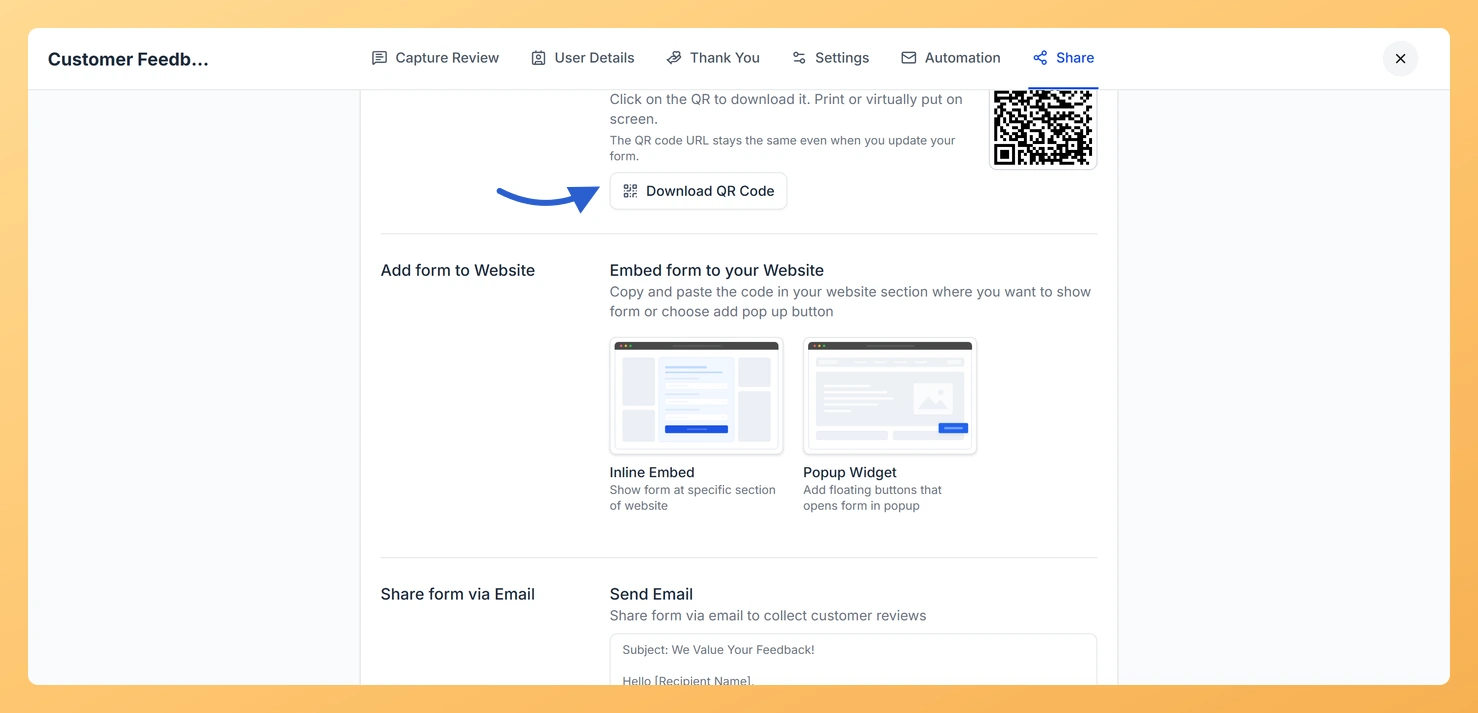
The editor opens on the Share tab. Click Download QR Code and print it at whatever size you need: business cards, A4 flyers, pull-up banners and table cards all work. The code keeps pointing at the same form even after you edit it.
Step 4: Put the code where people already are
At a booth or table, stand a printed card next to your product display.
At a workshop, put it on the final slide of your presentation.
At a checkout or registration desk, attach it to a receipt or a handout.
On a demo device, show the code on screen between demos.
Step 5: Ask for the video there and then
When speaking with an attendee who has had a great experience, ask directly: “Would you mind scanning this and recording a quick thirty-second video? It would mean a lot.” In-person asks have a much higher acceptance rate than email requests. The video is recorded directly on their phone, no app needed.
Step 6: Pick up the reviews afterwards
Submissions land in your Feedbox as they come in. Afterwards, tidy up the reviewer details, mark the strongest ones with the heart, and send them to a Wall of Love page or a widget with Add to Page / Widget while the event is still fresh.
What’s next
The same QR code works for anything printed, so it is worth keeping beyond the event. See how to share your form link via QR code for the other places it fits.
Common questions
Do attendees need a Feedspace account to submit?
No. The review form is a public link. Attendees scan the QR code, fill in the form, and submit, no account or app download needed on their end.
What if there is no internet at the event?
The form requires an internet connection to submit. For events with poor Wi-Fi, collect email addresses manually and send the form link after the event. Feedspace’s Automation tab can then send follow-ups automatically.
You might also find helpful
How to Share Form Link via QR Code
Overview Feedspace makes it easy to share audio, video, and text forms across your network. Providing a QR code for your review or feedback form makes it easy for users to access it directly – ideal for print, offline events, and quick mobile access. In Feedspace, you can generate and...
How Do I Use Feedspace Review Forms as an Agency?
Agencies live and die by referrals and case studies. Feedspace gives agencies a structured way to collect client testimonials at the end of every engagement, video, audio, or text, and turn them into the kind of social proof that shortens sales cycles for new clients. What You Can Do Recommended...
How Does Feedspace Help Me Collect Reviews on Autopilot?
The old way vs. the Feedspace way Collecting reviews manually means remembering to follow up with each customer individually, writing personal emails, and hoping they take the time to respond. Most businesses collect very few reviews this way because the process is time-consuming and inconsistent. Feedspace replaces this entirely with...