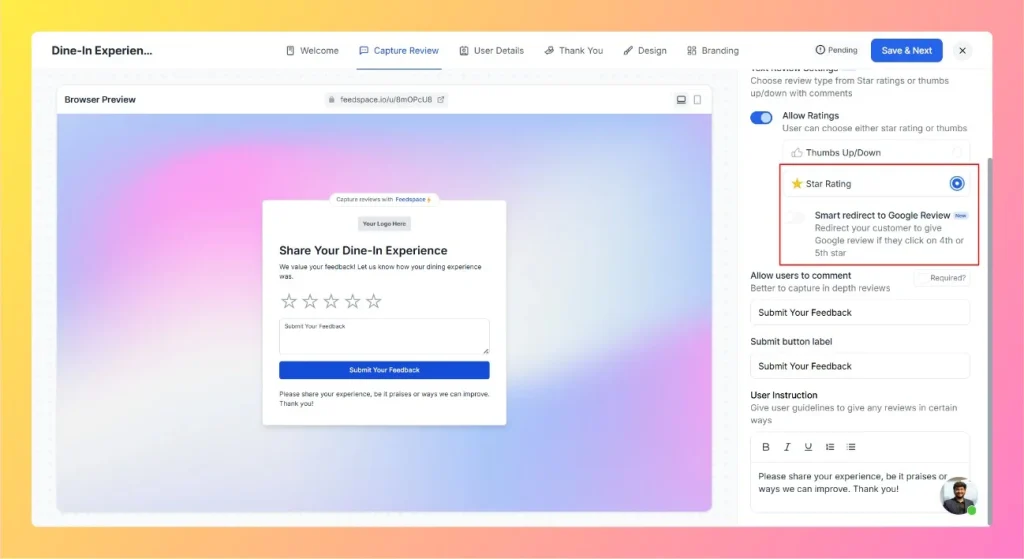
Feedspace allows you to smartly redirect satisfied customers to Google Reviews. With this feature, if a customer selects a 4-star or 5-star rating, they will be redirected to your Google Review page automatically. This helps capture positive feedback publicly while still collecting private feedback for lower ratings.
Steps to enable smart Google redirection
Open your form
Click the pencil (edit) icon on the form card to open the editor, which lands on the Capture Review tab, then go to the Text Review Settings section of your review form.
Enable Ratings
Choose Star Rating as your review type.
Turn On Smart Redirect
Toggle the option Smart redirect to Google Review.
Search Your Business: A textbox will appear where you can search your business name. Select your verified Google Business profile from the list.
How It Works
If a customer selects 4 or 5 stars, a Google Review popup will open, prompting them to leave a review directly on Google.
If they select 1-3 stars, their feedback stays in Feedspace for your internal review.
Why use smart Google redirection?
Boosts your positive Google ratings.
Encourages happy customers to share publicly.
Keeps lower ratings private for internal improvements.
If your business is not found in the search
Smart Google Redirection sends your happy reviewers to your Google review page, so the search needs to match your listing on Google. If your business does not appear when you search, try these steps:
Search using the exact business name as it appears on Google Maps, including spelling, spacing, and location words.
Paste your Google Business profile link or Google Maps URL into the search box instead of typing the name.
Make sure your Google Business listing is published and public so it can be matched.
If it still does not appear, email support@feedspace.io with your business name and location.
What’s next
Once Smart Google Redirection is on, share your form link with customers to start collecting reviews. You can also import reviews from Google Business to bring your existing Google reviews into Feedspace.
Common questions
Where does Smart Google Redirection send reviewers?
It sends reviewers who give 4 or 5 stars to your Google review page, so the positive feedback lands on your Google listing specifically.
Why can’t I find my business in the search box?
Search by the exact name shown on Google, or paste your Google Business profile or Maps URL, and confirm the listing is public. If it still does not show, email support@feedspace.io.
Can I redirect to platforms other than Google?
Smart redirect currently supports Google only. Reviewers who give 4 or 5 stars are sent to your Google review page. There is no option to redirect to other platforms at this time.
I tested the redirect but it did not open Google. Why?
The redirect only fires when a reviewer selects 4 or 5 stars. If you test with 1, 2, or 3 stars, the form collects the feedback in Feedspace as normal and no redirect happens. To confirm the redirect is working, submit a test review with a 4 or 5 star rating.
You might also find helpful
How to Create a Wall of Love Page in Feedspace
Steps to Create a Page Log into Feedspace Sign in with your account credentials. Go to Pages From the left sidebar, click Pages. Create Page Click Create Page. This opens the creation screen with some reviews auto-selected in the space. Select Reviews Go to the Select Review page and choose...
How to Share Your Wall of Love (Page)
Step-by-Step Instructions Log into Feedspace Sign in with your account credentials. Go to Pages From the left sidebar, click Pages. Sharing Options You can share the Wall of Love page in two ways: Copy Link or Share Review Page. Copy Link When you click Copy Link, a popup will confirm...
How Do I Import Reviews from Google Business into Feedspace?
Overview Feedspace can import reviews straight from your Google Business Profile. You find your listing by typing your business name or pasting its Google Maps link, then choose which reviews to bring in. A typical use: a dental clinic with a strong Google rating pulls its best patient reviews into...