
Overview
The Company Logo Slider widget displays a sliding row of company logos drawn from your reviewers, helping visitors immediately recognise the brands that trust your product. Because this widget is logo-driven, Feedspace automatically filters the review list to show only reviews where the reviewer has a company logo attached. Reviews without a company logo are excluded from the list entirely.
The Select Reviews tab in the widget editor lets you choose exactly which of those logo-bearing reviews appear in your slider. You can tick reviews one by one using individual checkboxes, or use the Select All button to include every eligible review in a single click. Controlling your selection means you can highlight the most recognisable brand names and keep your slider focused on the logos that build the most trust with your audience.
If your list looks shorter than expected, it is because only reviews with a company logo attached are shown. To make additional reviews eligible, ensure company logos are uploaded for those reviewers in their profile.
How to Select Reviews for Your Company Logo Slider Widget
Step 1: Open Your Company Logo Slider Widget
Log in to your Feedspace account and navigate to the Widgets section. Locate your Company Logo Slider widget in the list and click on it to open the widget editor.
Step 2: Go to the Select Reviews Tab
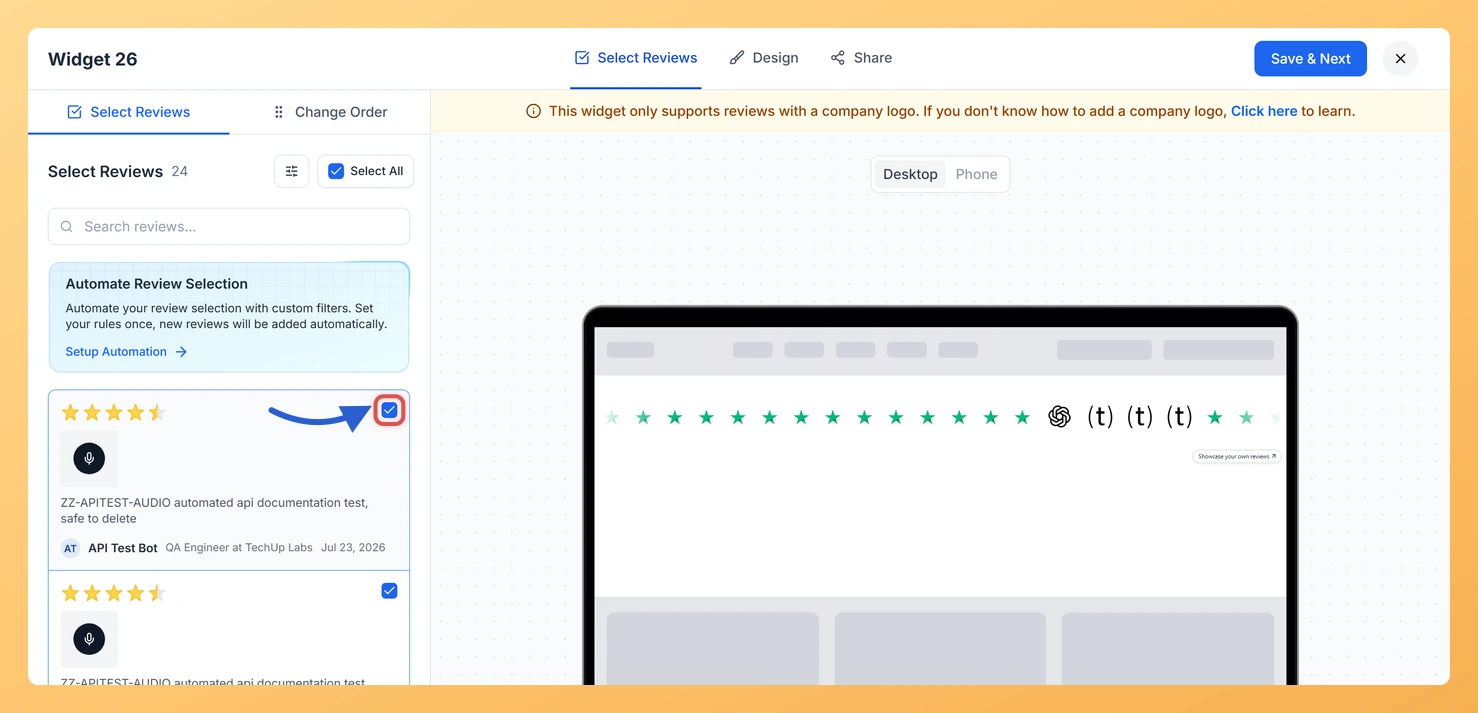
Inside the widget editor, click the Select Reviews tab. This tab shows all reviews that are eligible for the Company Logo Slider, meaning only reviews where the reviewer has a company logo attached. Reviews without a logo are not displayed here and cannot be added to this widget type.
Step 3: Understand the Logo-Only Filter
The review list in this tab is automatically filtered to include only reviews where the reviewer has a company logo on their profile. This is a fixed behaviour of the Company Logo Slider: it only renders logos, so reviews without one are excluded. If you expect to see a specific review but it does not appear, check that a company logo has been uploaded for that reviewer. Once a logo is added to their profile, the review will appear in this list.
Step 4: Select Reviews Using Individual Checkboxes
To add specific reviews to your slider, tick the checkbox beside each review you want to include. You can select as many or as few reviews as you like. Untick a checkbox to remove a previously selected review from the slider. Only the reviews you have checked will appear as logos in the published widget.
Step 5: Use Select All to Include Every Eligible Review
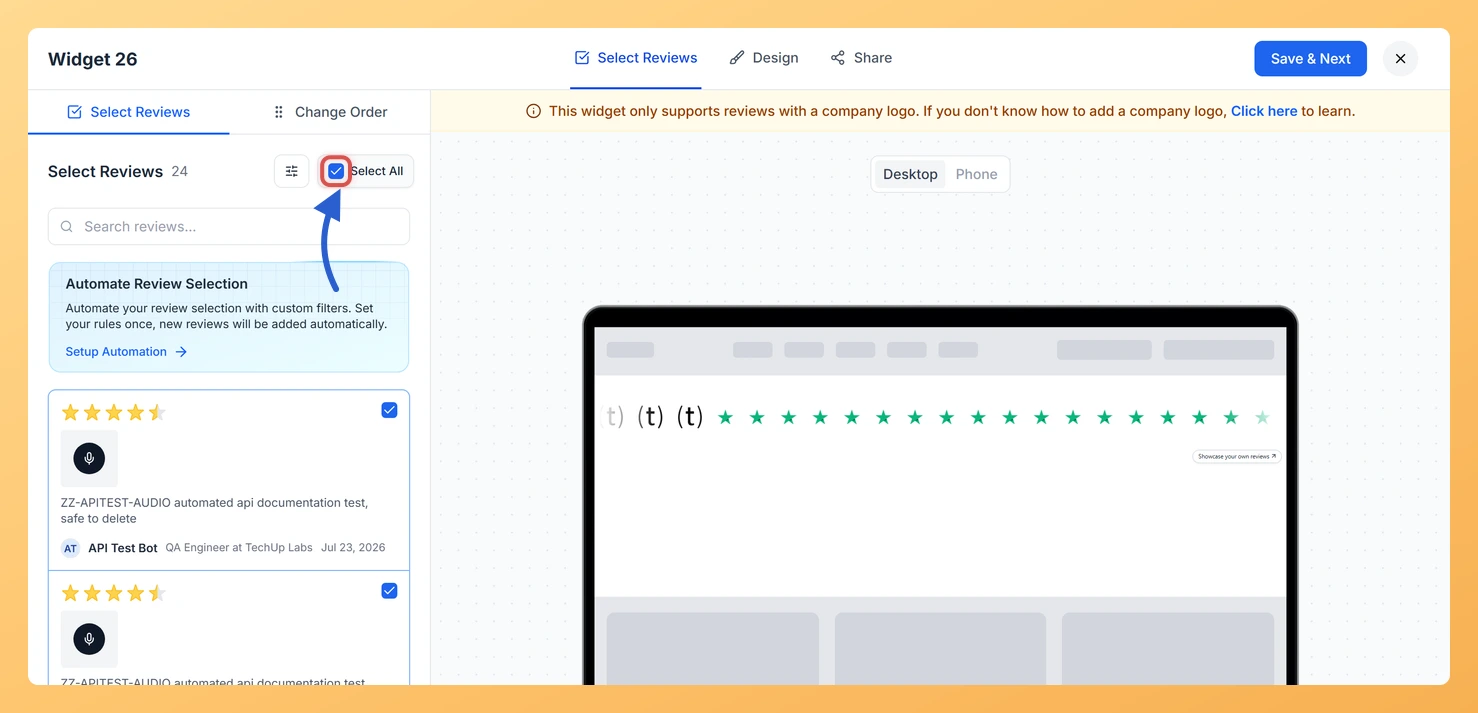
To include all logo-bearing reviews at once, click the Select All button at the top of the review list. All checkboxes will be ticked in one action, and every eligible review will be added to your Company Logo Slider. If you later want to narrow the selection, untick individual checkboxes after using Select All.
Step 6: Save Your Widget
Once you are satisfied with your review selection, click Save to apply the changes. Your Company Logo Slider will now display only the logos from the reviews you selected.
What You Can Do Next
- Use the search and filter options in the Select Reviews tab to quickly find specific company logos when your review list is long.
- Upload company logos to reviewer profiles so more reviews become eligible and visible in your Company Logo Slider widget.
- Customise the slider appearance, such as scroll speed and logo size, in the Design tab of the widget editor.
- Copy the embed code from the widget editor and add your Company Logo Slider to any page on your website to start building trust with visitors.
You might also find helpful
How to Create a Company Logo Slider Widget in Feedspace
Overview Feedspace’s Company Logo Slider widget displays your clients’ or partners’ logos in a smooth, continuously scrolling strip. It’s the ideal “as seen on” or “trusted by” social proof bar for your homepage or landing page: no review text needed, just recognizable brand logos. Step 1: Log in to Feedspace...
What is a Widget in Feedspace?
Overview In Feedspace, a widget is a customizable display tool that allows you to showcase your collected reviews, testimonials, or feedback directly on your website. With widgets, you can turn customer voices into social proof, helping you build trust and credibility with visitors. Instead of just collecting reviews, widgets let...
How Do I Search and Filter Reviews for My Company Logo Slider Widget in Feedspace?
Overview The Company Logo Slider widget displays a sliding row of company logos from your reviewers, building trust through recognisable brand names on your site. Because this widget only shows reviews where the reviewer has a company logo attached to their profile, not every review in your account will appear...