Auto Sync in Feedspace automatically fetches new reviews from supported platforms such as Google and Trustpilot. Once activated, Feedspace checks the connected platform every day and pulls in new reviews, keeping your reviews up to date without any manual effort.
This is useful when you collect reviews on a platform like Google Business and want them to flow into Feedspace on their own, so the testimonials on your widgets and Wall of Love pages always reflect your latest feedback.
Step 1: Go to import reviews
Log in to your Feedspace account.
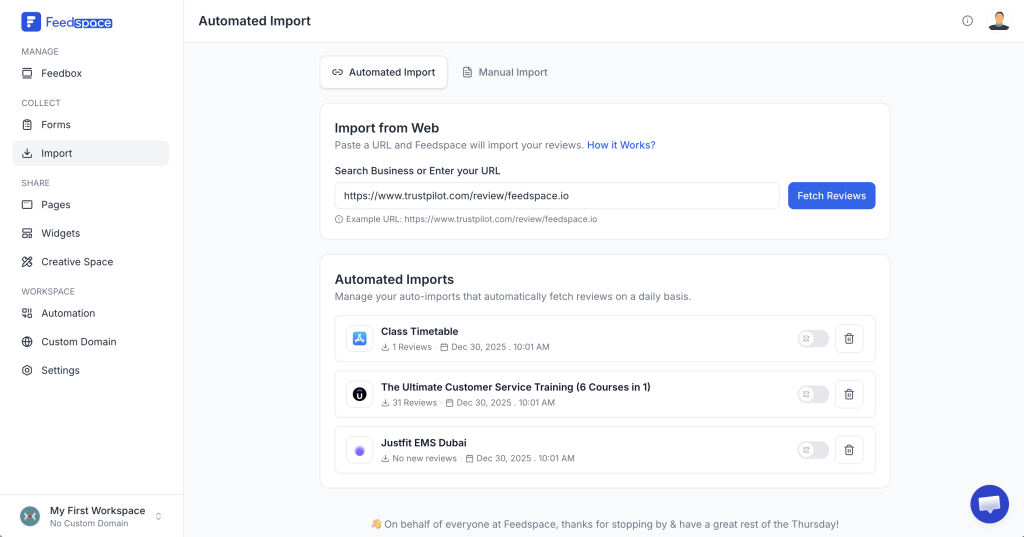
From the left sidebar, click Import. You’ll land on the Automated Import tab by default.
Step 2: Search for your business or enter a URL
In the URL input, enter your business name or paste a direct review URL. Feedspace detects what you type as you go.
For example:
Google: type your business name (e.g. “Feedspace”), click Search Business, then select your business from the results.
Trustpilot: paste your Trustpilot review page URL (e.g. https://www.trustpilot.com/review/feedspace.io).
Click Fetch Reviews to pull reviews from the platform.
Step 3: Set up auto sync first
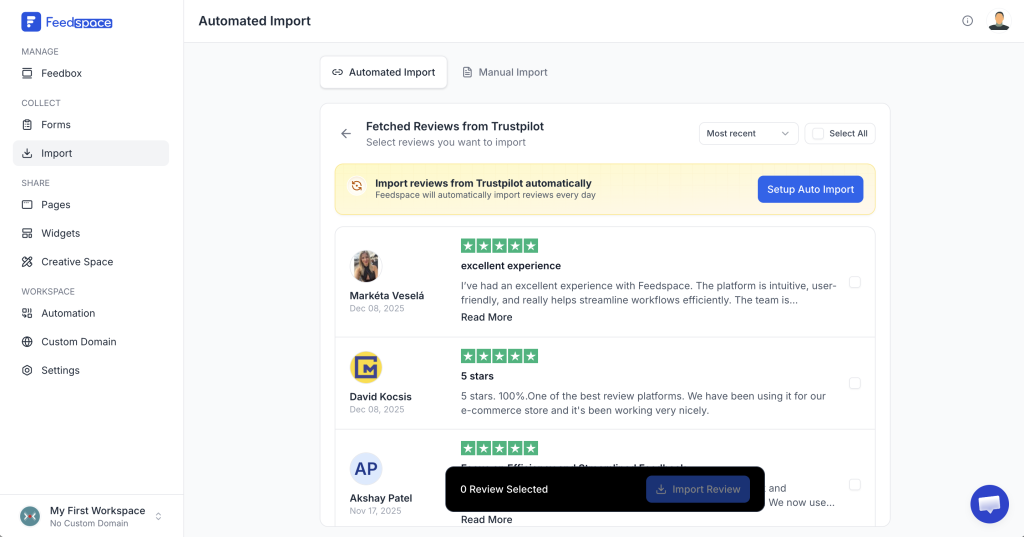
Once reviews are fetched, you’ll see a highlighted banner at the top of the results.
Click Set Auto Sync in that banner before importing any individual reviews. This makes sure new reviews from this platform are pulled in automatically going forward.
Step 4: Configure your auto sync settings
A setup dialog appears with two optional settings:
Auto-Tag Imported Reviews: automatically tag imported reviews with selected labels. Use the Manage Label dropdown to choose or create labels.
Auto Translate: select your preferred language to automatically translate imported reviews.
Once configured, click the confirm button in the dialog to save your auto sync.
Step 5: Import existing reviews (optional)
After setting up auto sync, you can also import the reviews that were already on the platform:
Select individual reviews using the checkboxes, or click Select All.
Click Import Review in the bottom bar to import the selected reviews.
Step 6: Manage your auto syncs
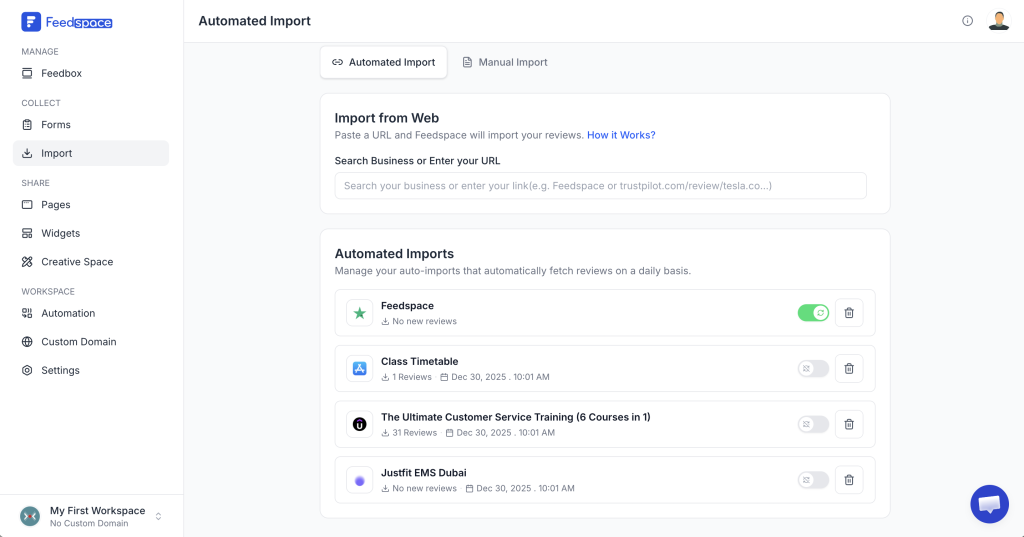
Your active auto syncs are listed below the URL input on the Automated Import tab. Each item shows the platform, the number of reviews imported, and the last sync time. For each one you can:
Use the toggle switch to start or pause auto sync for that platform. A confirmation dialog appears before the change applies.
Click the trash icon to delete the auto sync entirely, then confirm in the dialog.
How auto sync works
Once activated, Feedspace checks the connected platform every day.
Any new reviews published on that platform are automatically added to your Feedspace account.
You can still import reviews manually anytime using the URL input at the top.
Auto Sync checks the connected platform on a daily schedule, not instantly, so a brand new review may take until the next check to appear in your Feedbox. If a review still does not pull after that, confirm the source review page is still public and the URL you connected is valid. If it continues to skip new reviews on a plan that includes Auto Sync, email support@feedspace.io and they can look into the connected source.
Is Auto Sync available on the free plan?
Auto Sync requires a paid plan. When you click Set Auto Sync on a free plan, an upgrade prompt appears. Once you are on a paid plan, the setup flow opens normally. If Auto Sync is not available even after upgrading, email support@feedspace.io with your account details and the team will check your plan entitlement.
You might also find helpful
How to Bulk Import Reviews in Feedspace
Overview If you have a stack of reviews saved in a spreadsheet, Feedspace lets you add them all in one go with Bulk Import. You fill in a downloadable template with your review data, then upload that one file instead of typing each review into a form. This is the...
How Do I Import Reviews from Google Business into Feedspace?
Overview Feedspace can import reviews straight from your Google Business Profile. You find your listing by typing your business name or pasting its Google Maps link, then choose which reviews to bring in. A typical use: a dental clinic with a strong Google rating pulls its best patient reviews into...
How to Self Import a Video Review in Feedspace
Overview The Self Import Video Review feature in Feedspace allows you to manually add video reviews or testimonials. This is especially useful when: Customers share feedback over recorded video. You collect testimonials outside integrated platforms. You want to showcase authentic customer stories with video proof. By importing video reviews, you...